|
|
| Description |
|---|
| MultiCopy allows the duplication (copy and paste) of multiple FreeCAD objects that can be labelled sequentially and in a custom manner. Macro version: 1.0.1 Last modified: 2021-03-18 FreeCAD version: 0.17 and above Download: ToolBar Icon Author: Melwyncarlo |
| Author |
| Melwyncarlo |
| Download |
| ToolBar Icon |
| Links |
| MultiCopy.zip Personal Github - MultiCopy FC Github - MultiCopy FC Forum - MultiCopy Macros recipes How to install macros How to customize toolbars |
| Macro Version |
| 1.0.1 |
| Date last modified |
| 2021-03-18 |
| FreeCAD Version(s) |
| 0.17 and above |
| Default shortcut |
| None |
| See also |
| None |

Description
'MultiCopy' is a user-created macro to be used within the FreeCAD application. MultiCopy allows the duplication (copy and paste) of multiple FreeCAD objects that can be labelled sequentially and in a custom manner.
 This is the MultiCopy Macro icon.
The MultiCopy Macro can be downloaded using the in-built Addon Manager within the FreeCAD software.
Key Features
- Two input methods: by mouse, or by keyboard (Paste Code Commands)
- Standard Copy and Simple Copy methods supported
- Duplication across two different documents
- Delete selected objects after duplication
- Duplicate with or without dependencies
- Add custom label separators
- Add padded numbering to labels
- Numbering types: Ordinary numerals, upper/lower-case roman numerals and upper/lower-case alphabetic characters
- Unique 'Paste Code Commands' that allow multiple duplication procedurally as well as in nested loops
- Both CUI and GUI methods available
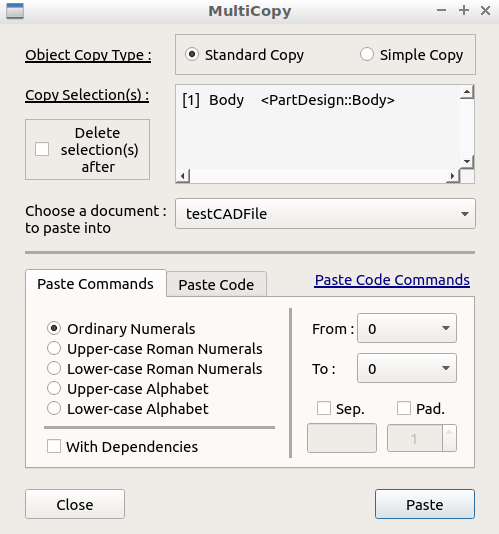
MultiCopy Macro Main Dialog Box
Installation
Linux
MultiCopy can be installed manually, similar to Windows installation, or by using the command terminal and its relevant commands as mentioned in the INSTALL file.
By default, the Linux command terminal can be launched by pressing the following keyboard keys simultaneously :
Control + Alt + T
Windows
MultiCopy can be installed with the help of the following two steps :-
- Download the MultiCopy.zip file.
- Extract the ZIP file's contents into the FreeCAD User Macro directory location.
By default, the FreeCAD User Macro directory should be located at :
C:/Users/User_Name/AppData/Roaming/FreeCAD/Macro
Usage - GUI Method
MultiCopy can be loaded by performing the following steps :-
- Launch the FreeCAD application.
- Go to Macro → Macros ....
- Click on the User macros tab in the pop-up dialog box.
- Select MultiCopy.FCMacro.
- Click on Execute.
Before loading the MultiCopy macro, first select one or more objects from the active FreeCAD doccument, then load the macro. Next, follow the instructions in the dialog box, fill in the required inputs, and click on the 'Paste' button. In case of error or warning, you will automatically be notified of the same. In case you come across an unexpected error, communicate the error by mentioning the FreeCAD version, tracing the steps taken, and mentioning whether (and how much) or not any ouput was generated.
Usage - CUI (Python Console) Method
Before running the MultiCopy operation, first select one or more objects from the active FreeCAD doccument.
To launch the GUI dialog:
import MultiCopy

MultiCopy.Launch()
To perform the terminal-based operation:
The MultiCopy command is as follows :
Run (paste_code, copy_type=True, delete_selection=False, paste_document_label=None)
The MultiCopy command's parameters are as follows :
1. Name              : paste_code
   Type              : String
   Is Optional       : False
   Description       : The paste code commands string.
                       For indentations, use \'\\t\'.
                       For line breaks, use \'\\n\'.

2. Name              : copy_type
   Type              : Boolean or String or Integer
   Is Optional       : True
   Description       : The copy operation mode.
   Acceptable Values : 'Standard', 'Simple',
                       True, False,
                       1, 2
   Default Value     : True

3. Name              : delete_selection
   Type              : Boolean
   Is Optional       : True
   Description       : If true, the selected objects are
                       deleted after the MultiCopy operation.
   Default Value     : False

4. Name              : paste_document_label
   Type              : String or FreeCAD.Document
   Is Optional       : True
   Description       : The label of the document to paste to,
                       or the document object itself.
   Default Value     : FreeCAD.ActiveDocument
Example 1 :
To paste the selected objects to the currently active document as a standard copy, and to not delete the selections after the operation.
import MultiCopy

some_paste_code_commands = 'from 1 to 2 :\n\t[1] = SomeName_{n#}'
MultiCopy.Run(some_paste_code_commands)
Example 2 :
To paste the selected objects to a different document as a simple copy, and to delete the selections after the operation.
import MultiCopy

some_paste_code_commands = 'from 1 to 2 :\n\t[1] = SomeName_{n#}'
MultiCopy.Run(some_paste_code_commands, True, True, 'SomeDocumentLabel')
Paste Code Commands
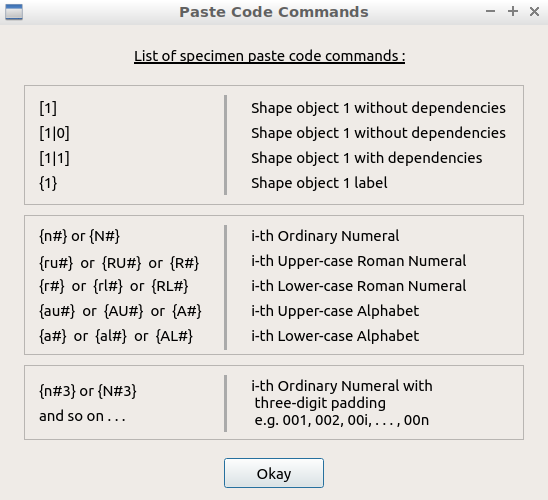
MultiCopy Macro 'Paste Code Commands' List
The two recurring commands in their generic form are as follows:
from ... to ... :[...] = ...
While inputting the Paste Code Commands in the relevant input text box, there are three signals in the form of coloured strips located at the bottom of the text box:
- Black denotes that the text box is focussed on, and that the user is currently entering the Paste Code Commands into it.
- Red denotes that the text box is focussed out of, and that the user-entered commands are SYNTACTICALLY INCORRECT.
- Green denotes that the text box is focussed out of, and that the user-entered commands are SYNTACTICALLY CORRECT.
Example 1
from 1 to 3 :
     [1] = {1}-Something_{n#}
The 1 and 3 values represent the duplication range where both the values are INCLUSIVE. The first (from) value must always be LESS THAN OR EQUAL TO the second (to) value. The values (together) can take the form of one of the five numbering types (check 'Key Features').
[1] represents the first object from an assumed list of user-selected objects.
{1} represents the label name of the first object.
{n#} represents a numbering label of the type 'Ordinary Numerals'. (more on that, later)
NOTE that correct tab indentations are very crucial to the commands; they cannot be replaced with spaces.
Brackets are only used for commands of the second generic type. The square brackets [ and ] always lie on the left-hand side of the command; whereas, the curly brackets { and } always lie on the right-hand side of the command.
Let the first object's original label name be Body. Then, the above commands would output a set of duplicated objects (of the first object) each labelled as follows:
Body-Something_1
Body-Something_2
Body-Something_3
Object representation
Let i be an arbitrary i-th object from an assumed list of user-selected objects.
[i] represents the i-th object without dependencies (by default)
[i|0] represents the i-th object without dependencies (another form)
[i|1] represents the i-th object WITH dependencies included
Numbering labels
{n#} or {N#} are of the type 'Ordinary Numerals'
{R#} or {ru#} or {RU#} are of the type 'Upper-case Roman Numerals'
{r#} or {rl#} or {RL#} are of the type 'Lower-case Roman Numerals'
{A#} or {au#} or {AU#} are of the type 'Upper-case Alphabet'
{a#} or {al#} or {AL#} are of the type 'Lower-case Alphabet'
A numbering label can have two additional options:
{n#X}Padding (of 'X' digits){n#X|i1}Nested loop level assignment (to a loop tagged as 'i1')
In case of a nested loop level assignment WITHOUT padding, do:
{n#0|i1}OR{n#|i1}
Example 2
from 1 to 2 : i1 :
     from a to b : i2 :
          [1|1] = Pasted-{1}-{n#3|i1}-{AU#0|i2}
Here, the objects are pasted along with the dependencies. The 'Ordinary Numeral' label has a padding of '3', and the 'Upper-case Alphabet' label has a padding of '0'.
NOTICE how the 'from-to' loop uses the lower-case alphabet; but the label will be outputted as upper-case.
The above commands would output a set of duplicated objects (of the first object) each labelled as follows:
Pasted-Body-001-A
Pasted-Body-001-B
Pasted-Body-002-A
Pasted-Body-002-B
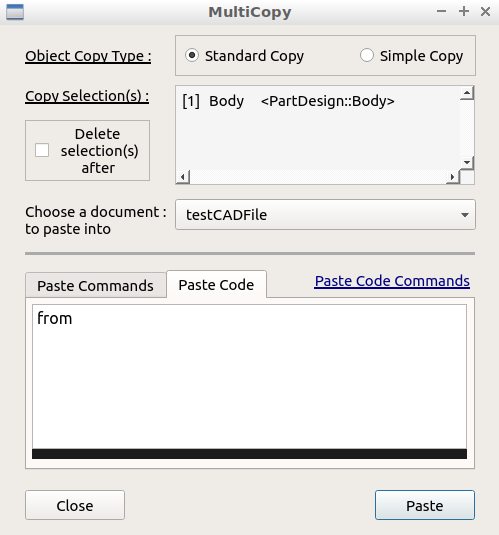
MultiCopy Macro 'Paste Code Commands'
INPUT Signal

MultiCopy Macro 'Paste Code Commands'
INCORRECT Signal
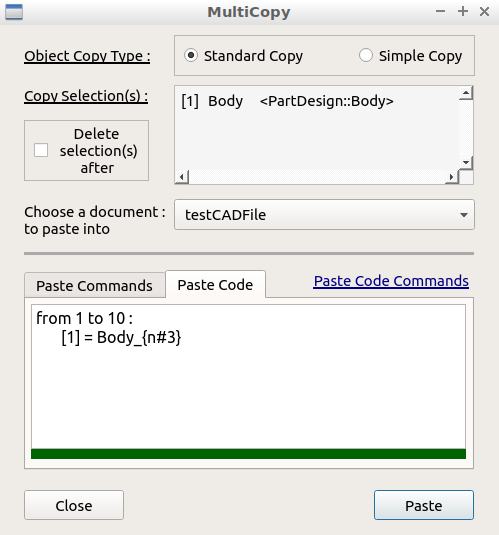
MultiCopy Macro 'Paste Code Commands'
CORRECT Signal
Notes
| (1) | There are a few inevitable from-to naming clashes between roman numerals and alphabetic characters. E.g.: c, v, i, x, etc. |
| (2) | By design, roman numerals take precedence over alphabetic characters. |
| (3) | Dependencies only apply to 'Standard Copy'; its application on 'Simple Copy' will automatically be ignored. |
Script
__Title__         = "MultiCopy"
__Author__        = "Melwyncarlo"
__Version__       = "1.0.1"
__Date__          = "2021-03-18"
__Comment__       = "MultiCopy allows the duplication (copy and paste) of "\
                    "multiple FreeCAD objects that can be labelled sequentially "\
                    "and in a custom manner."
__Web__           = "https://github.com/melwyncarlo/MultiCopy"
__Wiki__          = "https://wiki.freecad.org/index.php?title=Macro_MultiCopy"
__Icon__          = "MultiCopy_UI_Files/MultiCopy.svg"
__Help__          = "Select one or more FreeCAD objects, then click on the "\
                    "MultiCopy button/macro, and follow the instructions in the dialog box."
__Status__        = "stable"
__Requires__      = "Freecad >= v0.17"
__Communication__ = "https://github.com/melwyncarlo/MultiCopy/issues"
__Files__         = "MultiCopy_UI_Files/MultiCopy_Main_Dialog.ui, "\
                    "MultiCopy_UI_Files/MultiCopy_Commands_Dialog.ui, "\
                    "MultiCopy_UI_Files/mc_d_imgs.gif, "\
                    "MultiCopy_UI_Files/MultiCopy.svg"

#  OS: Ubuntu 18.04.5 LTS
#  Word size of OS: 64-bit
#  Word size of FreeCAD: 64-bit
#  Version: 0.18.4.
#  Build type: Release
#  Python version: 3.6.8
#  Qt version: 5.9.5
#  Coin version: 4.0.0a
#  OCC version: 7.3.0
#  Locale: English/UnitedKingdom (en_GB)

#  OS: Ubuntu 18.04.5 LTS (LXDE/Lubuntu)
#  Word size of OS	: 64-bit
#  Word size of FreeCAD: 64-bit
#  Version: 0.19
#  Build type: Release
#  Branch: unknown
#  Hash: 32200b604d421c4dad527fe587a7d047cf953b4f
#  Python version: 3.6.9
#  Qt version: 5.9.5
#  Coin versio: 4.0.0a
#  OCC version: 7.3.0
#  Locale: English/UnitedKingdom (en_GB)
Temporary code for external macro link. Do not use this code. This code is used exclusively by Addon Manager. Link for optional manual installation: Macro
# This code is copied instead of the original macro code
# to guide the user to the online download page.
# Use it if the code of the macro is larger than 64 KB and cannot be included in the wiki
# or if the RAW code URL is somewhere else in the wiki.

from PySide import QtGui, QtCore

diag = QtGui.QMessageBox(QtGui.QMessageBox.Information,
    "Information",
    "This macro must be downloaded from this link\n"
    "\n"
    "https://raw.githubusercontent.com/melwyncarlo/MultiCopy/main/MultiCopy.FCMacro" + "\n"
    "\n"
    "Quit this window to access the download page")

diag.setWindowFlags(QtCore.Qt.WindowStaysOnTopHint)
diag.setWindowModality(QtCore.Qt.ApplicationModal)
diag.exec_()

import webbrowser
webbrowser.open("https://raw.githubusercontent.com/melwyncarlo/MultiCopy/main/MultiCopy.FCMacro")
Links
[1] MultiCopy Github Repository
[2] FreeCAD Macros Github Repository - MultiCopy
[3] FreeCAD Forum Discussion Page - MultiCopy
This page is retrieved from https://wiki.freecad.org/Macro_MultiCopy