|
|
| Description |
|---|
| Cette macro change la forme de la souris en une croix de précision. Version macro : 0.05 Date dernière modification : 2020-08-06 Version FreeCAD : 0.18 et au-dessus Téléchargement : Icône de la barre d'outils Auteur: Mario52 |
| Auteur |
| Mario52 |
| Téléchargement |
| Icône de la barre d'outils |
| Liens |
| Page des macros Comment installer une macro Comment créer une barre d'outils |
| Version Macro |
| 0.05 |
| Dernière modification |
| 2020-08-06 |
| Version(s) FreeCAD |
| 0.18 et au-dessus |
| Raccourci clavier |
| C, A , G, X, Q |
| Voir aussi |
| None |

Description
Cette macro change la forme de la souris en une croix de précision.
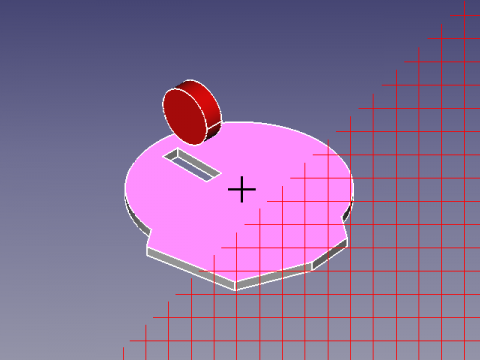
Petit exemple d'utilisation de la class ViewObserver() et de l'utilisation du clavier avec SoKeyboardEvent
Utilisation
- Pressez la touche C pour activer la croix.
- Pressez la touche A pour activer la flèche.
- Pressez la touche G pour activer la grille.
- Pressez la touche X pour visualiser tous les curseurs.
- Pressez la touche Q pour quitter la macro.
Script
Icône de la barre d'outils 
Macro_Mouse_Cross.FCMacro
# -*- coding: utf-8 -*-
# mouse cursor to Cross or Arrow + Grig
# ver 0.2 08/08/2014  PyQt4 and PySide
# ver 0.4 07/06/2019 compatible Python 3.
# ver 0.5 06/08/2020 PySide2 and add image in macro
#
__title__   = "Macro_Mouse_Cross"
__author__  = "Mario52"
__wiki__    = "https://wiki.freecad.org/Macro_Mouse_Cross"
__url__     = "https://freecad.org/"
__version__ = "0.05"
__date__    = "06/08/2020"

import PySide2
from PySide2 import QtWidgets, QtCore, QtGui
from PySide2.QtGui import QColor, QPixmap, QImage, QPainter, QCursor
from PySide2.QtCore import Qt,QUrl
from PySide2.QtWidgets import QApplication
from pivy import coin

FCCursor24x24_Icon = [
"24 24 9 1",
" 	c None",
".	c #3A0202",
"+	c #0E1245",
"@	c #640A0A",
"#	c #B10A0B",
"$	c #2A3E71",
"%	c #DF1F20",
"&	c #49699A",
"*	c #638EC0",
"..............          ",
".%%%%%%%%%%%%.          ",
".%%%%%%%%%%%%.          ",
".%%%%%%%%%%%%.          ",
".%%%%%%%%%%%%.          ",
".%%%%.........          ",
".%%%%.       ++++       ",
".%%%%.       +**+       ",
".%%%%.   +++ +**+ +++   ",
".%%%%.....**+****+**+   ",
".%%%%%%%%.**********+   ",
".%%%%%%%%.+********+    ",
".%%%%%%%%.***++++***+   ",
".%%%%%....**++  ++**+++ ",
".%%%%..+****+    +****+ ",
".%%%%. +****+    +****+ ",
".%%%%. +++**++  ++**+++ ",
".%%%%.   +***++++***+   ",
".%%%%.    +********+    ",
".%%%%.   +**********+   ",
".%%%%.   +**+****+**+   ",
".%%%%.   +++ +**+ +++   ",
".%%%%.       +**+       ",
"......       ++++       "
]

global xx ;xx = -1

#################### create document if not exist #######################
doc = FreeCAD.ActiveDocument                                         ####
if doc == None:                                                      ####
    doc = FreeCAD.newDocument()                                      ####
#########################################################################
class ViewObserver:
   def logPosition(self, info):
       global xx
       self.pos = info["Key"]
       if (self.pos.upper() == "Q"):
           QtWidgets.QApplication.setOverrideCursor(QtGui.QCursor(QtCore.Qt.ArrowCursor))
           v.removeEventCallback("SoKeyboardEvent",c)
           FreeCAD.Console.PrintMessage("End Macro_Mouse_Cross"+"\n")
       if (self.pos.upper() == "C"):
           # change the cursor cross ( + )
           QtWidgets.QApplication.setOverrideCursor(QtGui.QCursor(QtCore.Qt.CrossCursor))
       elif (self.pos.upper() == "A"):
           # change the cursor in Arrow
           QtWidgets.QApplication.setOverrideCursor(QtGui.QCursor(QtCore.Qt.ArrowCursor))
       elif (self.pos.upper() == "X") and (info["State"] == "DOWN"):
           # change the cursor and visualise all model
           xx += 1
           if xx == 0:
               QtWidgets.QApplication.setOverrideCursor(QtGui.QCursor(QtCore.Qt.ArrowCursor))
               FreeCAD.Console.PrintMessage(str(xx)+" : ArrowCursor"+"\n")
           if xx == 1:
               QtWidgets.QApplication.setOverrideCursor(QtGui.QCursor(QtCore.Qt.UpArrowCursor))
               FreeCAD.Console.PrintMessage(str(xx)+" : UpArrowCursor"+"\n")
           if xx == 2:
               QtWidgets.QApplication.setOverrideCursor(QtGui.QCursor(QtCore.Qt.CrossCursor))
               FreeCAD.Console.PrintMessage(str(xx)+" : CrossCursor"+"\n")
           if xx == 3:
               QtWidgets.QApplication.setOverrideCursor(QtGui.QCursor(QtCore.Qt.WaitCursor))
               FreeCAD.Console.PrintMessage(str(xx)+" : WaitCursor"+"\n")
           if xx == 4:
               QtWidgets.QApplication.setOverrideCursor(QtGui.QCursor(QtCore.Qt.IBeamCursor))
               FreeCAD.Console.PrintMessage(str(xx)+" : IBeamCursor"+"\n")
           if xx == 5:
               QtWidgets.QApplication.setOverrideCursor(QtGui.QCursor(QtCore.Qt.SizeVerCursor))
               FreeCAD.Console.PrintMessage(str(xx)+" : SizeVerCursor"+"\n")
           if xx == 6:
               QtWidgets.QApplication.setOverrideCursor(QtGui.QCursor(QtCore.Qt.SizeHorCursor))
               FreeCAD.Console.PrintMessage(str(xx)+" : SizeHorCursor"+"\n")
           if xx == 7:
               QtWidgets.QApplication.setOverrideCursor(QtGui.QCursor(QtCore.Qt.SizeBDiagCursor))
               FreeCAD.Console.PrintMessage(str(xx)+" : SizeBDiagCursor"+"\n")
           if xx == 8:
               QtWidgets.QApplication.setOverrideCursor(QtGui.QCursor(QtCore.Qt.SizeFDiagCursor))
               FreeCAD.Console.PrintMessage(str(xx)+" : SizeFDiagCursor"+"\n")
           if xx == 9:
               QtWidgets.QApplication.setOverrideCursor(QtGui.QCursor(QtCore.Qt.SizeAllCursor))
               FreeCAD.Console.PrintMessage(str(xx)+" : SizeAllCursor"+"\n")
           if xx == 10:
               QtWidgets.QApplication.setOverrideCursor(QtGui.QCursor(QtCore.Qt.BlankCursor))
               FreeCAD.Console.PrintMessage(str(xx)+" : BlankCursor"+"\n")
           if xx == 11:
               QtWidgets.QApplication.setOverrideCursor(QtGui.QCursor(QtCore.Qt.SplitVCursor))
               FreeCAD.Console.PrintMessage(str(xx)+" : SplitVCursor"+"\n")
           if xx == 12:
               QtWidgets.QApplication.setOverrideCursor(QtGui.QCursor(QtCore.Qt.SplitHCursor))
               FreeCAD.Console.PrintMessage(str(xx)+" : SplitHCursor"+"\n")
           if xx == 13:
               QtWidgets.QApplication.setOverrideCursor(QtGui.QCursor(QtCore.Qt.PointingHandCursor))
               FreeCAD.Console.PrintMessage(str(xx)+" : PointingHandCursor"+"\n")
           if xx == 14:
               QtWidgets.QApplication.setOverrideCursor(QtGui.QCursor(QtCore.Qt.ForbiddenCursor))
               FreeCAD.Console.PrintMessage(str(xx)+" : ForbiddenCursor"+"\n")
           if xx == 15:
               QtWidgets.QApplication.setOverrideCursor(QtGui.QCursor(QtCore.Qt.OpenHandCursor))
               FreeCAD.Console.PrintMessage(str(xx)+" : OpenHandCursor"+"\n")
           if xx == 16:
               QtWidgets.QApplication.setOverrideCursor(QtGui.QCursor(QtCore.Qt.ClosedHandCursor))
               FreeCAD.Console.PrintMessage(str(xx)+" : ClosedHandCursor"+"\n")
           if xx == 17:
               QtWidgets.QApplication.setOverrideCursor(QtGui.QCursor(QtCore.Qt.WhatsThisCursor))
               FreeCAD.Console.PrintMessage(str(xx)+" : WhatsThisCursor"+"\n")
           if xx == 18:
               QtWidgets.QApplication.setOverrideCursor(QtGui.QCursor(QtCore.Qt.BusyCursor))
               FreeCAD.Console.PrintMessage(str(xx)+" : BusyCursor"+"\n")
           if xx == 19:
               QtWidgets.QApplication.setOverrideCursor(QtGui.QCursor(QPixmap(FCCursor24x24_Icon))) # image include in macro
               #QtWidgets.QApplication.setOverrideCursor(QtGui.QCursor(QPixmap("C:/completePath/image.png"))) # image to disk
               FreeCAD.Console.PrintMessage(str(xx)+" : FCCursor24x24_Icon"+"\n")
               xx = -1
       elif (self.pos.upper() == "G"):
           # "wmayer" https://forum.freecad.org/viewtopic.php?f=3&t=1065&hilit=cross#p8818
           # Create Grida
           grid=coin.SoType.fromName("SoDrawingGrid").createInstance()
           Gui.ActiveDocument.ActiveView.getSceneGraph().addChild(grid)

xx = -1

try:
    v=Gui.activeDocument().activeView()
    o = ViewObserver()
    c = v.addEventCallback("SoKeyboardEvent",o.logPosition)
    App.Console.PrintMessage("Type Key C to Cross"+"\n")
    App.Console.PrintMessage("Type Key A to Arrow"+"\n")
    App.Console.PrintMessage("Type Key X to Visualise all cursor"+"\n")
    App.Console.PrintMessage("Type Key G to Grid (not editable)"+"\n")
    App.Console.PrintMessage("Type Key Q to Quit"+"\n")
except Exception:
    FreeCAD.Console.PrintError("\n"+"Not document open"+"\n")
Curseurs pouvant être utilisés
ArrowCursor, UpArrowCursor, CrossCursor, WaitCursor, IBeamCursor, SizeVerCursor, SizeHorCursor SizeBDiagCursor, SizeFDiagCursor, SizeAllCursor, BlankCursor, SplitVCursor, SplitHCursor PointingHandCursor, ForbiddenCursor, OpenHandCursor, ClosedHandCursor, WhatsThisCursor, BusyCursor, BitmapCursor
Limitations
- Le curseur peut changer d'apparence en fonction de l'atelier utilisé, auquel cas la macro doit être exécutée à nouveau.
- Le curseur peut être remplacé (par exemple lors de l'expansion d'une fenêtre).
- La grille est permanente.
Cette page est extraite de https://wiki.freecad.org/Macro_Mouse_Cross