|
|
| Descripción |
|---|
| This macro turns the arrow of the mouse in a precision cross. Versión macro : 0.05 Fecha última modificación : 2020-08-06 Versión FreeCAD : 0.18 and more Descargar : ToolBar icon Autor : Mario52 |
| Autor |
| Mario52 |
| Descargar |
| ToolBar icon |
| Enlace |
| Macros recipes How to install macros How to customize toolbars |
| Versión Macro |
| 0.05 |
| Fecha última modificación |
| 2020-08-06 |
| Versión(es) FreeCAD |
| 0.18 and more |
| Acceso directo predeterminado |
| C, A, G, X, Q |
| Ver también |
| None |


Description
Descripción
Esta pequeña macro gira la flecha del mouse en una cruz de precisión.
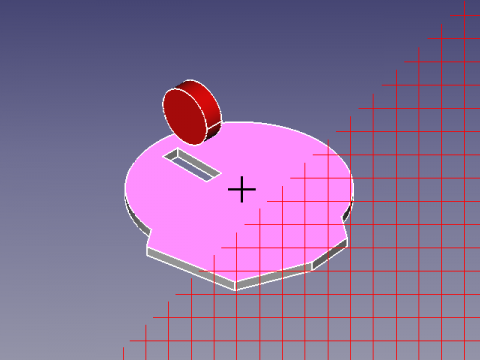
Pequeño ejemplo de uso de la clase ViewObserver() y el uso del teclado con SoKeyboardEvent
Usage
Cómo usar
- Presione el botón C para activar la cruz.
- Presione el botón A para activar la flecha.
- Presione el botón G para activar la cuadrícula.
- Presione el botón X para visualizar todos los cursores.
- Presione el botón Q para salir de la macro.
Script
ToolBar icon 
Macro_Mouse_Cross.FCMacro
# -*- coding: utf-8 -*-
# mouse cursor to Cross or Arrow + Grig
# ver 0.2 08/08/2014  PyQt4 and PySide
# ver 0.4 07/06/2019 compatible Python 3.
# ver 0.5 06/08/2020 PySide2 and add image in macro
#
__title__   = "Macro_Mouse_Cross"
__author__  = "Mario52"
__wiki__    = "https://wiki.freecad.org/Macro_Mouse_Cross"
__url__     = "https://freecad.org/"
__version__ = "0.05"
__date__    = "06/08/2020"

import PySide2
from PySide2 import QtWidgets, QtCore, QtGui
from PySide2.QtGui import QColor, QPixmap, QImage, QPainter, QCursor
from PySide2.QtCore import Qt,QUrl
from PySide2.QtWidgets import QApplication
from pivy import coin

FCCursor24x24_Icon = [
"24 24 9 1",
" 	c None",
".	c #3A0202",
"+	c #0E1245",
"@	c #640A0A",
"#	c #B10A0B",
"$	c #2A3E71",
"%	c #DF1F20",
"&	c #49699A",
"*	c #638EC0",
"..............          ",
".%%%%%%%%%%%%.          ",
".%%%%%%%%%%%%.          ",
".%%%%%%%%%%%%.          ",
".%%%%%%%%%%%%.          ",
".%%%%.........          ",
".%%%%.       ++++       ",
".%%%%.       +**+       ",
".%%%%.   +++ +**+ +++   ",
".%%%%.....**+****+**+   ",
".%%%%%%%%.**********+   ",
".%%%%%%%%.+********+    ",
".%%%%%%%%.***++++***+   ",
".%%%%%....**++  ++**+++ ",
".%%%%..+****+    +****+ ",
".%%%%. +****+    +****+ ",
".%%%%. +++**++  ++**+++ ",
".%%%%.   +***++++***+   ",
".%%%%.    +********+    ",
".%%%%.   +**********+   ",
".%%%%.   +**+****+**+   ",
".%%%%.   +++ +**+ +++   ",
".%%%%.       +**+       ",
"......       ++++       "
]

global xx ;xx = -1

#################### create document if not exist #######################
doc = FreeCAD.ActiveDocument                                         ####
if doc == None:                                                      ####
    doc = FreeCAD.newDocument()                                      ####
#########################################################################
class ViewObserver:
   def logPosition(self, info):
       global xx
       self.pos = info["Key"]
       if (self.pos.upper() == "Q"):
           QtWidgets.QApplication.setOverrideCursor(QtGui.QCursor(QtCore.Qt.ArrowCursor))
           v.removeEventCallback("SoKeyboardEvent",c)
           FreeCAD.Console.PrintMessage("End Macro_Mouse_Cross"+"\n")
       if (self.pos.upper() == "C"):
           # change the cursor cross ( + )
           QtWidgets.QApplication.setOverrideCursor(QtGui.QCursor(QtCore.Qt.CrossCursor))
       elif (self.pos.upper() == "A"):
           # change the cursor in Arrow
           QtWidgets.QApplication.setOverrideCursor(QtGui.QCursor(QtCore.Qt.ArrowCursor))
       elif (self.pos.upper() == "X") and (info["State"] == "DOWN"):
           # change the cursor and visualise all model
           xx += 1
           if xx == 0:
               QtWidgets.QApplication.setOverrideCursor(QtGui.QCursor(QtCore.Qt.ArrowCursor))
               FreeCAD.Console.PrintMessage(str(xx)+" : ArrowCursor"+"\n")
           if xx == 1:
               QtWidgets.QApplication.setOverrideCursor(QtGui.QCursor(QtCore.Qt.UpArrowCursor))
               FreeCAD.Console.PrintMessage(str(xx)+" : UpArrowCursor"+"\n")
           if xx == 2:
               QtWidgets.QApplication.setOverrideCursor(QtGui.QCursor(QtCore.Qt.CrossCursor))
               FreeCAD.Console.PrintMessage(str(xx)+" : CrossCursor"+"\n")
           if xx == 3:
               QtWidgets.QApplication.setOverrideCursor(QtGui.QCursor(QtCore.Qt.WaitCursor))
               FreeCAD.Console.PrintMessage(str(xx)+" : WaitCursor"+"\n")
           if xx == 4:
               QtWidgets.QApplication.setOverrideCursor(QtGui.QCursor(QtCore.Qt.IBeamCursor))
               FreeCAD.Console.PrintMessage(str(xx)+" : IBeamCursor"+"\n")
           if xx == 5:
               QtWidgets.QApplication.setOverrideCursor(QtGui.QCursor(QtCore.Qt.SizeVerCursor))
               FreeCAD.Console.PrintMessage(str(xx)+" : SizeVerCursor"+"\n")
           if xx == 6:
               QtWidgets.QApplication.setOverrideCursor(QtGui.QCursor(QtCore.Qt.SizeHorCursor))
               FreeCAD.Console.PrintMessage(str(xx)+" : SizeHorCursor"+"\n")
           if xx == 7:
               QtWidgets.QApplication.setOverrideCursor(QtGui.QCursor(QtCore.Qt.SizeBDiagCursor))
               FreeCAD.Console.PrintMessage(str(xx)+" : SizeBDiagCursor"+"\n")
           if xx == 8:
               QtWidgets.QApplication.setOverrideCursor(QtGui.QCursor(QtCore.Qt.SizeFDiagCursor))
               FreeCAD.Console.PrintMessage(str(xx)+" : SizeFDiagCursor"+"\n")
           if xx == 9:
               QtWidgets.QApplication.setOverrideCursor(QtGui.QCursor(QtCore.Qt.SizeAllCursor))
               FreeCAD.Console.PrintMessage(str(xx)+" : SizeAllCursor"+"\n")
           if xx == 10:
               QtWidgets.QApplication.setOverrideCursor(QtGui.QCursor(QtCore.Qt.BlankCursor))
               FreeCAD.Console.PrintMessage(str(xx)+" : BlankCursor"+"\n")
           if xx == 11:
               QtWidgets.QApplication.setOverrideCursor(QtGui.QCursor(QtCore.Qt.SplitVCursor))
               FreeCAD.Console.PrintMessage(str(xx)+" : SplitVCursor"+"\n")
           if xx == 12:
               QtWidgets.QApplication.setOverrideCursor(QtGui.QCursor(QtCore.Qt.SplitHCursor))
               FreeCAD.Console.PrintMessage(str(xx)+" : SplitHCursor"+"\n")
           if xx == 13:
               QtWidgets.QApplication.setOverrideCursor(QtGui.QCursor(QtCore.Qt.PointingHandCursor))
               FreeCAD.Console.PrintMessage(str(xx)+" : PointingHandCursor"+"\n")
           if xx == 14:
               QtWidgets.QApplication.setOverrideCursor(QtGui.QCursor(QtCore.Qt.ForbiddenCursor))
               FreeCAD.Console.PrintMessage(str(xx)+" : ForbiddenCursor"+"\n")
           if xx == 15:
               QtWidgets.QApplication.setOverrideCursor(QtGui.QCursor(QtCore.Qt.OpenHandCursor))
               FreeCAD.Console.PrintMessage(str(xx)+" : OpenHandCursor"+"\n")
           if xx == 16:
               QtWidgets.QApplication.setOverrideCursor(QtGui.QCursor(QtCore.Qt.ClosedHandCursor))
               FreeCAD.Console.PrintMessage(str(xx)+" : ClosedHandCursor"+"\n")
           if xx == 17:
               QtWidgets.QApplication.setOverrideCursor(QtGui.QCursor(QtCore.Qt.WhatsThisCursor))
               FreeCAD.Console.PrintMessage(str(xx)+" : WhatsThisCursor"+"\n")
           if xx == 18:
               QtWidgets.QApplication.setOverrideCursor(QtGui.QCursor(QtCore.Qt.BusyCursor))
               FreeCAD.Console.PrintMessage(str(xx)+" : BusyCursor"+"\n")
           if xx == 19:
               QtWidgets.QApplication.setOverrideCursor(QtGui.QCursor(QPixmap(FCCursor24x24_Icon))) # image include in macro
               #QtWidgets.QApplication.setOverrideCursor(QtGui.QCursor(QPixmap("C:/completePath/image.png"))) # image to disk
               FreeCAD.Console.PrintMessage(str(xx)+" : FCCursor24x24_Icon"+"\n")
               xx = -1
       elif (self.pos.upper() == "G"):
           # "wmayer" https://forum.freecad.org/viewtopic.php?f=3&t=1065&hilit=cross#p8818
           # Create Grida
           grid=coin.SoType.fromName("SoDrawingGrid").createInstance()
           Gui.ActiveDocument.ActiveView.getSceneGraph().addChild(grid)

xx = -1

try:
    v=Gui.activeDocument().activeView()
    o = ViewObserver()
    c = v.addEventCallback("SoKeyboardEvent",o.logPosition)
    App.Console.PrintMessage("Type Key C to Cross"+"\n")
    App.Console.PrintMessage("Type Key A to Arrow"+"\n")
    App.Console.PrintMessage("Type Key X to Visualise all cursor"+"\n")
    App.Console.PrintMessage("Type Key G to Grid (not editable)"+"\n")
    App.Console.PrintMessage("Type Key Q to Quit"+"\n")
except Exception:
    FreeCAD.Console.PrintError("\n"+"Not document open"+"\n")
Cursores que pueden ser utilizados.
ArrowCursor, UpArrowCursor, CrossCursor, WaitCursor, IBeamCursor, SizeVerCursor, SizeHorCursor SizeBDiagCursor, SizeFDiagCursor, SizeAllCursor, BlankCursor, SplitVCursor, SplitHCursor PointingHandCursor, ForbiddenCursor, OpenHandCursor, ClosedHandCursor, WhatsThisCursor, BusyCursor, BitmapCursor
Limitations
Limitación
El cursor puede cambiar de aspecto dependiendo del Workbench utilizado, debe repetir la operación.
El cursor puede ser subtitulador de los otros controles deslizantes (por ejemplo, expansión de una ventana, esquina ...).
La cuadrícula es permanente.
Esta página ha sido recuperada de https://wiki.freecad.org/Macro_Mouse_Cross