|
|
| Description |
|---|
| This macro creates an Hilbert curve wire in 2 or 3 dimensions with many iterations. Macro version: 1.2.0 Last modified: 2021-02-13 FreeCAD version: 0.16 to 0.19 Download: ToolBar Icon Author: Simone Bignetti |
| Author |
| Simone Bignetti |
| Download |
| ToolBar Icon |
| Links |
| Macros recipes How to install macros How to customize toolbars |
| Macro Version |
| 1.2.0 |
| Date last modified |
| 2021-02-13 |
| FreeCAD Version(s) |
| 0.16 to 0.19 |
| Default shortcut |
| None |
| See also |
| None |

Description
This macro creates a Hilbert curve wire in 2 or 3 dimensions with many iterations.
Usage
- Start the macro in a FreeCAD document.
- In the dialog that opens choose the parameters for the Hilbert curve:
- Select if the curve should be 2 dimensional:
 2D, or 3 dimensional:
  3D.
3D. - Specify the number of iterations 1
 . Attention! Increasing the number of iterations will also increase the computation time.
 - Specify the length of the wire segment: 10.00 .
- Select if the curve should be 2 dimensional:
- Click OK to create the wire or CANCEL to exit the macro.
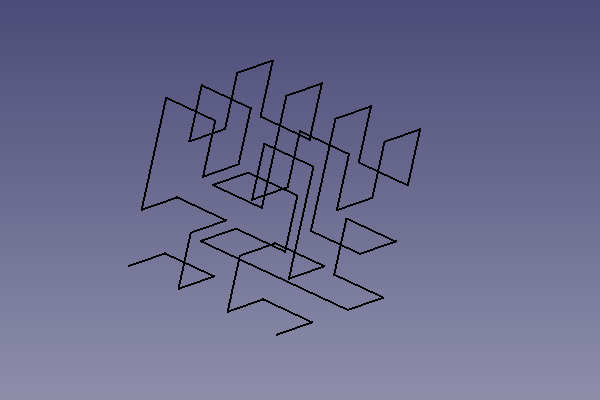
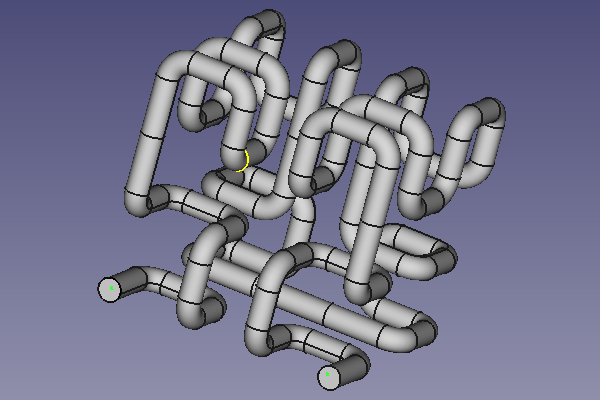
You can use a Hilbert curve as the path for a Part Sweep, but it's better to apply a radius to the wire first, or the sweep will be badly formed.
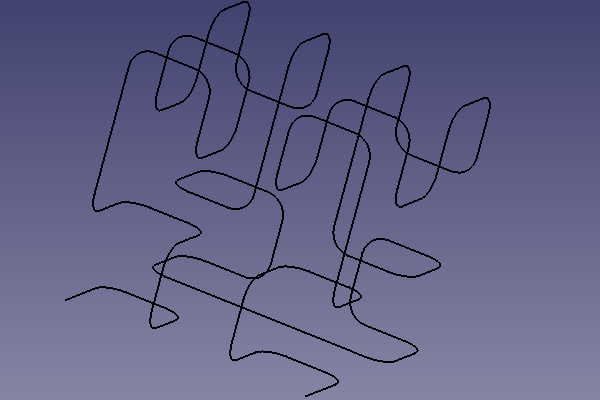
Finding the right radius may requires some testing. It depends on the length of the curve segments and the shape of the profile you want to sweep.
Script
ToolBar Icon 
Macro_HilbertCurve.FCMacro
# -*- coding: utf-8 -*-

# Copyright (c) 2020 Simone Bignetti, Gottolengo Italy (simone.b)
#
# This file is part of the FreeCAD CAx development system.
#
# This library is free software; you can redistribute it and/or
# modify it under the terms of the GNU Lesser General Public
# License as published by the Free Software Foundation; either
# version 2.1 of the License, or (at your option) any later version.
#
# This library is distributed in the hope that it will be useful,
# but WITHOUT ANY WARRANTY; without even the implied warranty of
# MERCHANTABILITY or FITNESS FOR A PARTICULAR PURPOSE. See the GNU
# Lesser General Public License for more details.
#
# You should have received a copy of the GNU Lesser General Public
# License along with this library; if not, write to the Free Software
# Foundation, Inc., 51 Franklin Street, Fifth Floor, Boston, MA  02110-1301
# USA
#
# You can contact me by mail at simone.bignetti@linux.it

__Name__ = 'HilbertCurve'
__Comment__ = 'This macro creates an Hilbert curve wire in 2 or 3 dimensions with many iterations.'
__Author__  = 'Simone Bignetti'
__Version__ = '1.2.0'
__Date__    = '2020-12-29'
__License__ = 'GNU LESSER GENERAL PUBLIC LICENSE Version 2.1, February 1999'
__Web__ = 'https://wiki.freecad.org/Macro_HilbertCurve'
__Wiki__ = 'https://wiki.freecad.org/Macro_HilbertCurve'
__Icon__ = 'https://wiki.freecad.org/images/6/69/Hilbert_curve_icon.png'
__Help__ = 'Choose the dimensions of the wire, the number of the iterations and the length of the wire segment.'
__Status__ = 'Stable'
__Requires__ = ''
__Communication__ = 'https://forum.freecad.org/viewtopic.php?f=22&t=53781'
__Files__ = 'HilbertCurve.svg'


# For the wire
import FreeCAD as app
import Draft

# For the gui
from PySide import QtGui, QtCore

class HilbertCurve:
    """The class of the Hilbert curve.

    By this class it's possible to create a wire
    of a fractal Hilbert curve with
    a fixed number of dimensions and iterations.
    """

    def __init__(self, dimensions, iterations):
        """Initialize the Hilbert curve.
        Args:
            iterations (int): iterations to use in constructing the curve
            dimensions (int): number of dimensions
        """

self.dimensions = dimensions
        self.iterations = iterations

# minimum and maximum distance along curve
        self.min_distance = 0
        self.max_distance = 2 ** (self.iterations * self.dimensions) - 1

# minimum and maximum coordinate value in any dimension
        self.min_coordinate = 0
        self.max_coordinate = 2 ** self.iterations - 1

# number of points
        self.number_of_points = 2 ** (self.iterations * self.dimensions)

def point_from_distance(self, distance):
        """Return a point in n-dimensional space given a distance along a the curve.
        Args:
            distance (int): integer distance along the curve
        Returns:
            point (iterable of ints): an n-dimensional vector of length dimensions where
            each component value is between 0 and 2**iterations-1.
        """

bit_string = format(distance, 'b').zfill(self.iterations * self.dimensions)  # zero filled binary distance
        point = [int(bit_string[i::self.dimensions], 2) for i in range(self.dimensions)]  # transpose of distance

# Gray decode: point = point xor (point / 2)
        gray = point[self.dimensions-1] >> 1
        for i in range(self.dimensions-1, 0, -1):
            point[i] ^= point[i-1]
        point[0] ^= gray

# Undo excess work
        q = 2
        while q != (2 << (self.iterations-1)):
            p = q - 1
            for i in range(self.dimensions-1, -1, -1):
                if point[i] & q:
                    # invert
                    point[0] ^= p
                else:
                    # exchange
                    gray = (point[0] ^ point[i]) & p
                    point[0] ^= gray
                    point[i] ^= gray
            q <<= 1

return point

def get_min_distance(self):
        """Return the minimum distance along the curve."""
        return self.min_distance

def get_max_distance(self):
        """Return the maximum distance along the curve."""
        return self.max_distance

def get_min_coordinate(self):
        """Return the minimum coordinate value in any dimension."""
        return self.min_coordinate

def get_max_coordinate(self):
        """Return the maximum coordinate value in any dimension."""
        return self.max_coordinate

def get_number_of_points(self):
        """Return the number of points in the curve."""
        return self.number_of_points

def get_points(self):
        """Return the list of points in the curve."""
        points = []
        for point_number in range(self.number_of_points):
            points.append(self.point_from_distance(point_number))
        return points

def __str__(self):
        return f"HilbertCurve(dimensions={self.dimensions}, iterations={self.iterations})"

def __repr__(self):
        return self.__str__()


class Hilbert_Dialog(QtGui.QDialog):
    """The dialog for the Hilbert curve

    This class opens in FreeCAD a dialog to input
    the number of dimensions and the number of iterations
    to create the Hilbert curve.
    OK creates the curve.
    CANCEL quit the macro.
    """

def __init__(self):
        super(Hilbert_Dialog, self).__init__()
        self.setupUi()

def setupUi(self):
        self.dimensions = 2
        self.iterations = 3

self.setGeometry(250, 250, 400, 300)  # Window definition
        self.setWindowTitle("Hilbert curve Macro")

titleLabel = QtGui.QLabel("Create an Hilbert curve in two or three dimensions")  # Title and subtitle
        titleFont = QtGui.QFont()
        titleFont.setBold(True)
        titleFont.setWeight(75)
        titleLabel.setFont(titleFont)
        subtitleLabel = QtGui.QLabel("This macro creates a wire in the draft workbench\nwith the shape of an Hilbert curve in two or three dimensions.\nFor example, you can use this wire as a sweep path.\nIt's recommended to apply a radius at the wire,\nin order to obtain a correct sweep generation.")
        titleBox = QtGui.QVBoxLayout()
        titleBox.addWidget(titleLabel)
        titleBox.addWidget(subtitleLabel)
        titleBox.insertStretch(-1)

dimensionsLabel = QtGui.QLabel("Number of dimensions: ")  # Number of dimensions
        self.twoDradioButton = QtGui.QRadioButton()
        self.twoDradioButton.setText("2D")
        self.twoDradioButton.setChecked(True)
        self.threeDradioButton = QtGui.QRadioButton()
        self.threeDradioButton.setText("3D")
        dimensionsBox=QtGui.QHBoxLayout()
        dimensionsBox.addWidget(dimensionsLabel)
        dimensionsBox.addWidget(self.twoDradioButton)
        dimensionsBox.addWidget(self.threeDradioButton)

iterationsLabel = QtGui.QLabel("Iterations:")  # Iterations  and length spins in a grid
        self.iterationsSpin = QtGui.QSpinBox()
        self.iterationsSpin.setMinimum(1)
        self.iterationsSpin.setMaximum(10)
        lengthLabel = QtGui.QLabel("Length:")
        self.lengthSpin = QtGui.QDoubleSpinBox()
        self.lengthSpin.setMinimum(1.0)
        self.lengthSpin.setMaximum(999999.000000000000000)
        self.lengthSpin.setValue(10.000000000000000)
        grid = QtGui.QGridLayout()
        grid.setSpacing(10)
        grid.addWidget(iterationsLabel, 1, 0)
        grid.addWidget(self.iterationsSpin, 1, 1)
        grid.addWidget(lengthLabel, 2, 0)
        grid.addWidget(self.lengthSpin, 2, 1)

okButton = QtGui.QPushButton("OK")  # Ok and Cancel Buttons at right bottom
        okButton.clicked.connect(self.onOkButton)
        cancelButton = QtGui.QPushButton("Cancel")
        cancelButton.clicked.connect(self.onCancelButton)
        buttonBox = QtGui.QHBoxLayout()
        buttonBox.addStretch()
        buttonBox.addWidget(okButton)
        buttonBox.addWidget(cancelButton)

vbox = QtGui.QVBoxLayout()
        vbox.addLayout(titleBox)
        vbox.addLayout(dimensionsBox)
        vbox.addLayout(grid)
        vbox.addLayout(buttonBox)
        vbox.setSpacing(30)
        vbox.insertStretch(1)
        self.setLayout(vbox)

self.show()

def onOkButton(self):
        if self.twoDradioButton.isChecked():
            dimensions = 2
        else:
            dimensions = 3
        iterations = self.iterationsSpin.value()
        length = self.lengthSpin.value()
        HC=HilbertCurve(dimensions, iterations)
        points = HC.get_points()
        pl = app.Placement()
        pl.Rotation.Q = (0.0, 0.0, 0.0, 1.0)
        pl.Base = app.Vector(0.0, 0.0, 0.0)
        vectors = []
        if dimensions == 2:
            for point in points:
                vectors.append(app.Vector(point[0]*length, point[1]*length, 0.0))
        else:
            for point in points:
                vectors.append(app.Vector(point[0]*length, point[1]*length, point[2]*length))
        wire = Draft.makeWire(vectors, placement=pl, closed=False, face=False, support=None)
        wire.Label = "Hilbert"
        Draft.autogroup(wire)
        self.close()

def onCancelButton(self):
        self.close()


hilbert_dialog = Hilbert_Dialog()
hilbert_dialog.exec()
Ta strona pochodzi z https://wiki.freecad.org/Macro_HilbertCurve