|
|
| Description |
|---|
| Crée des formes d'écrous de guitare complexes. Plus précisément, il peut créer un écrou avec le bas des fentes de cordes à la hauteur souhaitée au-dessus d'un manche du rayon souhaité. Le diamètre de chaque chaîne est configurable et les fentes peuvent être configurées pour tenir compte de la largeur nécessaire pour empêcher la liaison. Voir la section Utilisation pour plus de détails. Version macro : 0.1 Date dernière modification : 2020-01-27 Version FreeCAD : Toutes Téléchargement : Icône de la barre d'outils Auteur: jsiddall |
| Auteur |
| jsiddall |
| Téléchargement |
| Icône de la barre d'outils |
| Liens |
| Page des macros Comment installer une macro Comment créer une barre d'outils |
| Version Macro |
| 0.1 |
| Dernière modification |
| 2020-01-27 |
| Version(s) FreeCAD |
| Toutes |
| Raccourci clavier |
| None |
| Voir aussi |
| Macro_Guitar_fretboard |

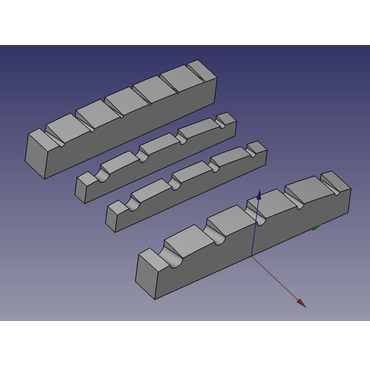
Description
Guitar Nut Maker est une macro FreeCAD qui crée une forme d'écrou de guitare complexe.
Cette macro crée un écrou avec le bas des fentes de cordes à la hauteur souhaitée au-dessus d'un manche du rayon souhaité.
Les fentes peuvent être élargies à l'arrière de l'écrou puis sur la face, et les fentes peuvent être créées avec l'angle de rupture souhaité. Les emplacements peuvent être sur des centres égaux ou avoir un espace égal entre eux.
Le diamètre de chaque chaîne est configurable et les fentes peuvent être rendues plus configurables que la chaîne pour empêcher la liaison. Le haut de l'écrou est sphérique et peut être configuré au-dessus / en dessous du point central des cordes. Les bords de l'écrou ne sont pas façonnés, ni le haut profilé de la face vers l'arrière, mais ces transformations peuvent être appliquées manuellement dans FreeCAD, ou bien après le fraisage de la pièce.
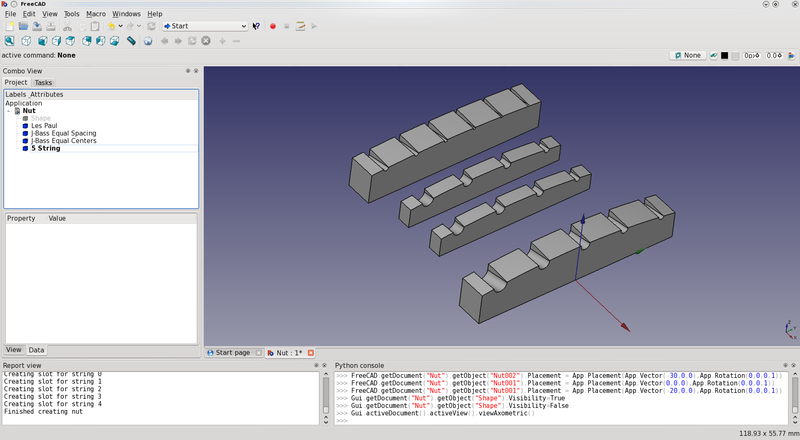
Résultats à l'aide de la macro Guitar Nut Maker
Utilisation
- Télécharger la macro depuis le
 Gestionnaire des extensions
 - Exécuter la macro
Limitations
- Le code de la macro doit être modifié avec les paramètres souhaités avant l'utilisation.
Script
Icône de la barre d'outils 
GuitarNut.FCMacro
# FreeCAD Guitar Nut Macro
# This macro creates a guitar/bass nut with conical slots at the
# desired spacing and diameter to export to CAM software

__Name__ = 'Guitar Nut'
__Comment__ = 'This macro creates a guitar/bass nut'
__Author__ = 'Jeff Siddall'
__Version__ = '0.1'
__Date__ = '2020-01-27'
__License__ = 'GPL-3.0-or-later'
__Web__ = ''
__Wiki__ = ''
__Icon__ = 'https://wiki.freecad.org/images/9/94/Macro_Guitar_Nut.png'
__Help__ = 'Macro file must be edited with the desired nut parameters before use'
__Status__ = 'Beta'
__Requires__ = ''
__Communication__ = ''
__Files__ = ''

import FreeCAD, Part, math
from FreeCAD import Base, Vector

class Nut():
    if App.ActiveDocument is None:
        # Create new document called "Nut" if there is no open document
        doc = App.newDocument("Nut")

# Enter desired values below
# Unless specified, units are mm
equalcenters = 0 # If equalcenters = 1 then the spacing of the strings is equal; if 0 then the space between the strings is equal
strings = 5 # Number of strings

# Always enter values below with a decimal point, even if that means adding ".0" on the end!
length = 49.0 # Nut length (neck width); 38.1 mm = 1.5", 41.275 = 1-5/8"
width = 6.350 # Nut width; 3.175 mm = 1/8"; 6.35 mm = 1/4"
fretboardmaxheight = 6.350 # Maximum fretboard height above the bottom of the nut slot; 6.35 mm = 1/4"
radius = 184.15 # Fretboard radius; 184.15 mm = 7.25"; 304.8 = 12"; 406.4 mm = 16"
# List of string thicknesses, starting at bottom string, separated by commas, enclosed in square brackets
# Bottom string 1.143 mm = 0.045"
# 1.651 mm = 0.065"
# 2.159 mm = 0.085"
# Top string on a 4 string 2.667 mm = 0.105"
# Top string on a 5 string 3.175 mm = 0.125"
stringthickness = [1.143, 1.651, 2.159, 2.667, 3.175] # 5 string bass, 45-125/ 4 string bass 45-105
#stringthickness = [3.175, 2.667, 2.159, 1.651, 1.143] # Reverse string, 5 string bass, 45-125/ 4 string bass 45-105
#stringthickness = [0.254, 0.3302, 0.4318, 0.6604, 0.9144, 1.1684] # 6 string guitar, 10-46
stringheight = 1.1938 # Height of bottom of strings above fretboard; 1.1938 mm = 0.047" or the height of a typical medium/jumbo fret
slotmargin = 0.05 # extra slot width on each side of the string; 0.05 mm = 0.00197"
overhang = 3.0 # Distance from edge of each outside string to end of nut
breakangle = 14.0 # Angle of the nut slot in degrees; this should be greater than the actual string angle to ensure the string only contacts at the leading edge of the nut
slotradincrease = 0.2 # How much bigger the radius of the end of the slot is than the face
slotdepthfactor = 1.3 # Factor to control how deep the slots should be.  Values greater than 1 create deeper slots than default.
toparcoffsetfactor = 1.8 # Factor to control how far off-center the nut top arc is.  Adjust as required.
# End of user configuration variables
# Do not make any changes below this line!

stringindex = 0 # Start at the bottom string
stringspacing = 0

# Find the centers of the outside strings
# Bottom string
center1 = (length / 2) - overhang - (stringthickness[0] / 2)

# Top string
center2 = -((length / 2) - overhang - (stringthickness[strings - 1] / 2))

# Outside string values
outsidestringradiusdiff = (stringthickness[strings - 1] - stringthickness[0]) / 2
outsidestringavgradius = (stringthickness[strings - 1] + stringthickness[0]) / 2 / 2
centerspacing = center1 - center2

# Find the string spacings for both spacing models
if equalcenters:
    # Calculate the correct spacing for equal spaced strings
    stringspacing = centerspacing / (strings - 1)

else:
    # Calculate the space between strings
    totalstringwidth = 0
    stringindex1 = 0
    while (stringindex1 < strings):
        totalstringwidth = totalstringwidth + stringthickness[stringindex1]
        stringindex1 = stringindex1 + 1

    stringspacing = (centerspacing - totalstringwidth + (2 * outsidestringavgradius)) / (strings - 1)

print("Creating nut blank")
# Height is much larger than needed but will be cut down with the "common" operation later
nutshape = Part.makeBox(width, length, ((fretboardmaxheight + stringheight) * 2), Vector(-width, -(length / 2), 0))

print("Creating nut top surface")
# Make a sphere to shape the top of the nut, which should pass through  each string center
# Because the thickness of the strings varies, the Y-position of the sphere needs to be compensated
# The fretboard "z" portion is:
fretboardz = radius - (((radius ** 2) - ((centerspacing / 2) ** 2)) ** 0.5)

# The formula to calculate the effective radius of the center of outside strings is:
# r^2 = z^2 + y^2
# r^2 = ((r - (outsidestringradiusdiff + fretboardz))^2) + ((centerspacing/2)^2)
# r^2 = r^2 - 2r*(outsidestringradiusdiff + fretboardz) + ((outsidestringradiusdiff + fretboardz)^2) + (centerspacing^2)
# 2r*(outsidestringradiusdiff + fretboardz) = ((outsidestringradiusdiff + fretboardz)^2) + (centerspacing^2)
# r  = ((outsidestringradiusdiff + fretboardz)/2) + ((centerspacing^2)/(2*(outsidestringradiusdiff + fretboardz)))
nutradius = ((abs(outsidestringradiusdiff / 4) + fretboardz) / 2) + (((centerspacing / 2) ** 2) / (2 * (abs(outsidestringradiusdiff / 4) + fretboardz)))

# The center of the arc of the nut radius must also be offset
# This formula was derived empirically so might nead adjusting
yoffset = -centerspacing / 2 * toparcoffsetfactor * (outsidestringradiusdiff / (2 * outsidestringavgradius)) * (1 - (nutradius / radius))

top = Part.makeSphere(nutradius, Vector(0, yoffset, (-nutradius + fretboardmaxheight + stringheight + (outsidestringavgradius * slotdepthfactor) + slotmargin)))

nutshape = nutshape.common(top)

cumulativestringwidth = 0 # Add up the amount of string thickness for equal spacing

# Build the slots
while (stringindex < strings):
    print("Creating slot for string " + str(stringindex))
    ypos = 0

    if equalcenters:
        # For equal centers move each string over by the fixed amount of stringspacing
        ypos = center1 - (stringindex * stringspacing)

    else:
        # For equal spacing adjust for the thickness of each string

        # Add up the cumulative string thickness
        if stringindex == 0:
            # For the first string the thickness is already included in center1 so don't add anything
            cumulativestringwidth = 0

        else:
            # Add half the previous string and half this string
            cumulativestringwidth = cumulativestringwidth + (stringthickness[stringindex] / 2) + (stringthickness[stringindex - 1] / 2)

        ypos = center1 - (stringindex * stringspacing) - cumulativestringwidth

    zstartpos = (((radius ** 2) - (ypos ** 2)) ** 0.5) - radius + fretboardmaxheight + stringheight + (stringthickness[stringindex] / 2) + slotmargin # Cartesian coordinate formula: z = sqrt(r^2 - y^2)
    # calculate the end of the slot based on the string break angle
    zendpos = zstartpos - (math.tan(math.radians(breakangle)) * width)

    slotstartrad = (stringthickness[stringindex] / 2) + slotmargin
    slotendrad = slotstartrad + slotradincrease

    # Make the string slot as 2 circles offset in the Z axis to create the break angle, then made into a face, then extruded up to allow the slot to protrude to the nut surface
    slotstart = Part.makeCircle(slotstartrad, Vector(0, ypos, zstartpos), Vector(1, 0, 0), 180, 360)
    slotend = Part.makeCircle(slotendrad, Vector(-width, ypos, zendpos), Vector(1, 0, 0), 180, 360)
    slotbottom = Part.makeRuledSurface(slotstart, slotend)
    slotextrude = slotbottom.extrude(Vector(0, 0, ((fretboardmaxheight + stringheight) * 2)))

    nutshape = nutshape.cut(slotextrude)
    stringindex = stringindex + 1

nut = App.ActiveDocument.addObject("Part::Feature","Nut")
nut.Shape = nutshape
print("Finished creating nut")
Liens
Discussion sur le forum Guitar fretboard macro / guitar body
Cette page est extraite de https://wiki.freecad.org/Macro_Guitar_Nut