|
|
| Description |
|---|
| Cette macro crée un dôme géodésique paramétrique. Le rayon du dôme et le paramètre de fréquence seront définis au moment de la création. Version macro : 01.00 Date dernière modification : 2019-03-24 Version FreeCAD : Toutes Téléchargement : Icône de la barre d'outils Auteur: Ulrich Brammer, DeepSOIC, galou |
| Auteur |
| Ulrich Brammer, DeepSOIC, galou |
| Téléchargement |
| Icône de la barre d'outils |
| Liens |
| Page des macros Comment installer une macro Comment créer une barre d'outils |
| Version Macro |
| 01.00 |
| Dernière modification |
| 2019-03-24 |
| Version(s) FreeCAD |
| Toutes |
| Raccourci clavier |
| None |
| Voir aussi |
| None |
Description
Cette macro crée la coque d'un dôme géodésique paramétrique. Le rayon du dôme et les paramètres de fréquence sont définis au moment de la création.
Temporary code for external macro link. Do not use this code. This code is used exclusively by Addon Manager. Link for optional manual installation: Macro
# This code is copied instead of the original macro code
# to guide the user to the online download page.
# Use it if the code of the macro is larger than 64 KB and cannot be included in the wiki
# or if the RAW code URL is somewhere else in the wiki.

from PySide import QtGui, QtCore

diag = QtGui.QMessageBox(QtGui.QMessageBox.Information,
    "Information",
    "This macro must be downloaded from this link\n"
    "\n"
    "https://raw.githubusercontent.com/FreeCAD/FreeCAD-macros/master/ParametricObjectCreation/geodesic_dome/geodesic_dome.py" + "\n"
    "\n"
    "Quit this window to access the download page")

diag.setWindowFlags(QtCore.Qt.WindowStaysOnTopHint)
diag.setWindowModality(QtCore.Qt.ApplicationModal)
diag.exec_()

import webbrowser
webbrowser.open("https://raw.githubusercontent.com/FreeCAD/FreeCAD-macros/master/ParametricObjectCreation/geodesic_dome/geodesic_dome.py")
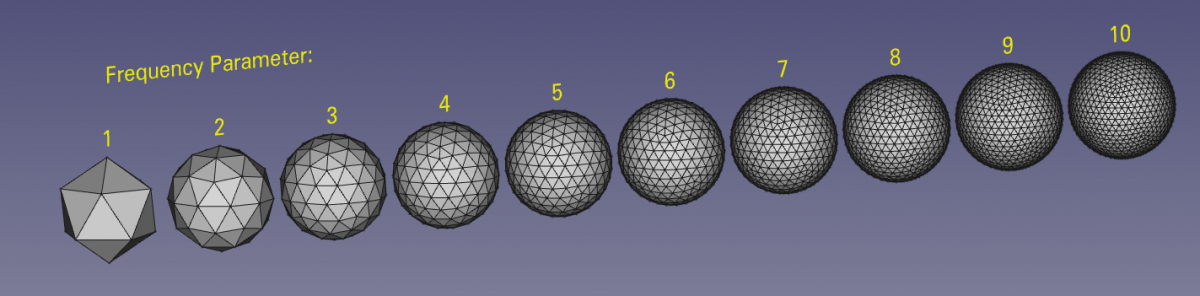
Utilisation
1. Installez la macro en utilisant le gestionnaire (menu Outils → Gestionnaire des extensions). Sur l'onglet "Macros", sélectionnez "GeodesicDome", cliquez sur "Installer". Fermez ensuite le Gestionnaire des extensions.
2. Exécutez GeodesicDome.FCMacro. Une fenêtre de dialogue devrait apparaître
3. Spécifiez les paramètres et cliquez sur OK.
La forme d'un dôme devrait apparaître. Vous pouvez ensuite modifier les paramètres du dôme en modifiant les propriétés de l'objet GeoDome.
Script
(Il s'agit d'une ancienne version non paramétrique du script. La version à jour est dans le référentiel FreeCAD-macros, here ! )
Icône de la barre d'outils 
Macro_Geodesic_Dome.FCMacro
# -*- coding: utf-8 -*-

# Form implementation generated from reading ui file 'geodesic_dialog.ui'
# And changed manually to use FreeCAD "Gui::InputField"
# Created: Sun Jan  4 22:20:58 2015
#      by: pyside-uic 0.2.15 running on PySide 1.2.2
#
# Upgrade 2019/06/16 for use with FreeCAD 0.19 version
#OS: Windows 10 (10.0)
#Word size of OS: 64-bit
#Word size of FreeCAD: 64-bit
#Version: 0.19.16993 (Git)
#Build type: Release
#Branch: master
#Hash: 5ea062f6699666b2f284f6a52105acf20828b481
#Python version: 3.6.8
#Qt version: 5.12.1
#Coin version: 4.0.0a
#OCC version: 7.3.0

'''
************************************************************************
* Copyright (c)2015 2019 Ulrich Brammer <ulrich1a[at]users.sourceforge.net> *
*                                                                      *
* This file is a supplement to the FreeCAD CAx development system.     *
*                                                                      *
* This program is free software; you can redistribute it and/or modify *
* it under the terms of the GNU Lesser General Public License (LGPL)   *
* as published by the Free Software Foundation; either version 2 of    *
* the License, or (at your option) any later version.                  *
* for detail see the LICENCE text file.                                *
*                                                                      *
* This software is distributed in the hope that it will be useful,     *
* but WITHOUT ANY WARRANTY; without even the implied warranty of       *
* MERCHANTABILITY or FITNESS FOR A PARTICULAR PURPOSE.  See the        *
* GNU Library General Public License for more details.                 *
*                                                                      *
* You should have received a copy of the GNU Library General Public    *
* License along with this macro; if not, write to the Free Software    *
* Foundation, Inc., 59 Temple Place, Suite 330, Boston, MA  02111-1307 *
* USA                                                                  *
*                                                                      *
************************************************************************
'''


from PySide import QtCore, QtGui
import FreeCAD, FreeCADGui, math, Part
from FreeCAD import Base

class Ui_Dialog(object):
  def setupUi(self, Dialog):
    Dialog.setObjectName("Dialog")
    Dialog.resize(477, 188)
    self.dia = Dialog
    self.gridLayoutWidget = QtGui.QWidget(Dialog)
    self.gridLayoutWidget.setGeometry(QtCore.QRect(19, 19, 440, 141))
    self.gridLayoutWidget.setObjectName("gridLayoutWidget")
    self.gridLayout = QtGui.QGridLayout(self.gridLayoutWidget)
    self.gridLayout.setContentsMargins(0, 0, 0, 0)
    self.gridLayout.setObjectName("gridLayout")
    self.label = QtGui.QLabel(self.gridLayoutWidget)
    self.label.setObjectName("label")
    self.gridLayout.addWidget(self.label, 0, 0, 1, 1)
    #self.lineEdit = QtGui.QLineEdit(self.gridLayoutWidget)
    fui = FreeCADGui.UiLoader()
    self.lineEdit = fui.createWidget("Gui::InputField")

    self.lineEdit.setObjectName("lineEdit")
    self.gridLayout.addWidget(self.lineEdit, 0, 1, 1, 1)
    self.label_2 = QtGui.QLabel(self.gridLayoutWidget)
    self.label_2.setObjectName("label_2")
    self.gridLayout.addWidget(self.label_2, 1, 0, 1, 1)
    self.lineEdit_2 = QtGui.QLineEdit(self.gridLayoutWidget)
    self.lineEdit_2.setObjectName("lineEdit_2")
    self.gridLayout.addWidget(self.lineEdit_2, 1, 1, 1, 1)
    self.label_3 = QtGui.QLabel(self.gridLayoutWidget)
    self.label_3.setObjectName("label_3")
    self.gridLayout.addWidget(self.label_3, 2, 0, 1, 1)
    self.buttonBox = QtGui.QDialogButtonBox(self.gridLayoutWidget)
    self.buttonBox.setOrientation(QtCore.Qt.Horizontal)
    self.buttonBox.setStandardButtons \
      (QtGui.QDialogButtonBox.Cancel|QtGui.QDialogButtonBox.Ok)
    self.buttonBox.setObjectName("buttonBox")
    self.gridLayout.addWidget(self.buttonBox, 2, 1, 1, 1)

    self.retranslateUi(Dialog)
    QtCore.QObject.connect(self.buttonBox, \
      QtCore.SIGNAL("accepted()"), self.makeSomething)
    QtCore.QObject.connect(self.buttonBox, \
      QtCore.SIGNAL("rejected()"), self.makeNothing)
    QtCore.QMetaObject.connectSlotsByName(Dialog)

  def retranslateUi(self, Dialog):
    # original code commented 2019/06/16
    # Dialog.setWindowTitle(QtGui.QApplication.translate \
    #   ("Dialog", "Geodesic Dome Creator",  \
    #   None, QtGui.QApplication.UnicodeUTF8))
    # self.label.setText(QtGui.QApplication.translate \
    #   ("Dialog", "Dome Radius", None, QtGui.QApplication.UnicodeUTF8))
    # self.label_2.setText(QtGui.QApplication.translate \
    #   ("Dialog", "Frequency Parameter\n(Integer between 1 to 10)", \
    #   None,QtGui.QApplication.UnicodeUTF8))
    # self.label_3.setText(QtGui.QApplication.translate \
    #   ("Dialog", "This Macro creates \na full geodesic dome shell.\nX-Y-symmetry plane \nfor even frequencies", \
    #   None, QtGui.QApplication.UnicodeUTF8))
    ####
    # replacement code  2019/06/16
    Dialog.setWindowTitle("Geodesic Dome Creator")
    self.label.setText("Dome Radius")
    self.label_2.setText("Frequency Parameter\n(Integer between 1 to 10)")
    self.label_3.setText("This Macro creates \na full geodesic dome shell.\nX-Y-symmetry plane \nfor even frequencies")
    ####

  def makeSomething(self):
    print( "accepted! Dome radius: ", self.lineEdit.property("text"), \
      " with Frequency: ", int(self.lineEdit_2.text()))

    doc=App.activeDocument()
    label = "GeodesicDome"

    theDome = doc.addObject("Part::Feature",label)
    radius = self.lineEdit.property("text")
    frequency = int(self.lineEdit_2.text())

    self.dia.close()
    self.makeDome(theDome, radius, frequency)
    doc.recompute()


  def makeNothing(self):
    print( "rejected!!")
    self.dia.close()


  def makeDome(self, obj, domeRad_str, ny):

    def makeFreqFaces(fPt, sPt, thPt, ny = 1):
      # makes the geodesic dome faces out of the points of an
      # icosahedron triangle
      b = self.a/ny # length of frequent triangles
      # definition of direction vectors
      growVec = (sPt - fPt)
      # growVec = (fPt - sPt)
      growVec.multiply(1.0/ny)
      crossVec = (thPt - sPt)
      # crossVec = (sPt - thPt)
      crossVec.multiply(1.0/ny)

      for k in range(ny):
        kThirdPt = fPt + growVec * (k+0.0)
        dThirdPt = Base.Vector(kThirdPt.x, kThirdPt.y, kThirdPt.z)
        dThirdPt = dThirdPt.normalize().multiply(domeRad.Value)
        kSecPt = fPt + growVec * (k+1.0)
        dSecPt = Base.Vector(kSecPt.x, kSecPt.y, kSecPt.z)
        dSecPt = dSecPt.normalize().multiply(domeRad.Value)
        # thirdEdge = Part.makeLine(kSecPt, kThirdPt)
        # thirdEdge = Part.makeLine(dSecPt, dThirdPt)
        for l in range(k+1):
          firstPt = kSecPt + crossVec *(l+1.0)
          dFirstPt = firstPt.normalize().multiply(domeRad.Value)
          secPt = kSecPt + crossVec *(l+0.0)
          dSecPt =secPt.normalize().multiply(domeRad.Value)
          thirdPt = kThirdPt + crossVec *(l+0.0)
          dThirdPt = thirdPt.normalize().multiply(domeRad.Value)
          #thirdEdge = Part.makeLine(secPt, thirdPt)
          thirdEdge = Part.makeLine(dSecPt, dThirdPt)
          # Part.show(thirdEdge)
          if l > 0:
            print( "in l: ", l, " mod 2: ", l%2)
            # What to do here?
            #secEdge = Part.makeLine(oThirdPt,thirdPt)
            secEdge = Part.makeLine(doThirdPt,dThirdPt)
            # Part.show(secEdge)
            #thirdEdge = Part.makeLine(secPt, thirdPt)
            #thirdEdge = Part.makeLine(dSecPt, dThirdPt)
            # Part.show(thirdEdge)
            triWire = Part.Wire([firstEdge, secEdge, thirdEdge])
            # Part.show(triWire)
            triFace = Part.Face(triWire)
            self.domeFaces.append(triFace)
            #Part.show(triFace)

          oThirdPt = thirdPt
          doThirdPt = oThirdPt.normalize().multiply(domeRad.Value)
          # oFirstPt = firstPt
          #firstEdge = Part.makeLine(thirdPt,firstPt)
          firstEdge = Part.makeLine(dThirdPt,dFirstPt)
          oFirstEdge = firstEdge
          #secEdge = Part.makeLine(firstPt,secPt)
          secEdge = Part.makeLine(dFirstPt,dSecPt)
          #Part.show(firstEdge)
          #Part.show(secEdge)
          #Part.show(thirdEdge)
          triWire = Part.Wire([firstEdge, secEdge, thirdEdge])
          triFace = Part.Face(triWire)
          self.domeFaces.append(triFace)
          #Part.show(triFace)


    domeRad = FreeCAD.Units.Quantity(domeRad_str)

    # self.a = Strutlength of underlying icosahedron:
    self.a=(4.0*domeRad.Value)/math.sqrt(2.0*math.sqrt(5.0)+10.0)

    # icoAngle: angle of vertices of icosahedron points
    # not a north or south pole
    self.icoAngle = math.atan(0.5)

    self.icoLat = domeRad.Value * math.sin(self.icoAngle)
    self.latRad = domeRad.Value * math.cos(self.icoAngle)
    self.ang36 = math.radians(36.0)

    # Calculation all points of the icosahedron
    self.icoPts = []
    self.icoPts.append(Base.Vector(0.0, 0.0, domeRad.Value))

    for i in range(10):
      self.icoCos = self.latRad * math.cos(i*self.ang36)
      self.icoSin = self.latRad * math.sin(i*self.ang36)
      if i%2 == 0:
        self.icoPts.append(Base.Vector(self.icoSin, self.icoCos, self.icoLat))
      else:
        self.icoPts.append(Base.Vector(self.icoSin, self.icoCos, -self.icoLat))

    self.icoPts.append(Base.Vector(0.0, 0.0, -domeRad.Value))

    # making the faces of the icosahedron

    self.icoFaces = [] # collects faces of the underlying icosahedron
    self.domeFaces = [] # collects the faces of the geodesic dome

    thirdPt = self.icoPts[9]
    thirdEdge = Part.makeLine(self.icoPts[0],thirdPt)
    for i in range(5):
      j = i*2+1
      firstEdge = Part.makeLine(thirdPt,self.icoPts[j])
      secEdge = Part.makeLine(self.icoPts[j],self.icoPts[0])
      triWire = Part.Wire([firstEdge, secEdge, thirdEdge])
      triFace = Part.Face(triWire)
      self.icoFaces.append(triFace)
      # Part.show(triFace)
      makeFreqFaces(self.icoPts[j], self.icoPts[0], thirdPt, ny)

      thirdEdge = Part.makeLine(self.icoPts[0],self.icoPts[j])
      thirdPt = self.icoPts[j]

    thirdPt = self.icoPts[9]
    secPt = self.icoPts[10]
    thirdEdge = Part.makeLine(secPt,thirdPt)

    for i in range(10):
      j = i+1
      firstEdge = Part.makeLine(thirdPt,self.icoPts[j])
      secEdge = Part.makeLine(self.icoPts[j],secPt)
      triWire = Part.Wire([firstEdge, secEdge, thirdEdge])
      triFace = Part.Face(triWire)
      self.icoFaces.append(triFace)
      #Part.show(triFace)
      makeFreqFaces(self.icoPts[j], secPt, thirdPt, ny)

      thirdPt = secPt
      secPt = self.icoPts[j]
      thirdEdge = Part.makeLine(secPt,thirdPt)


    thirdPt = self.icoPts[10]
    thirdEdge = Part.makeLine(self.icoPts[11],thirdPt)
    for i in range(5):
      j = i*2+2
      firstEdge = Part.makeLine(thirdPt,self.icoPts[j])
      secEdge = Part.makeLine(self.icoPts[j],self.icoPts[11])
      triWire = Part.Wire([firstEdge, secEdge, thirdEdge])
      triFace = Part.Face(triWire)
      self.icoFaces.append(triFace)
      #Part.show(triFace)
      makeFreqFaces(self.icoPts[j], self.icoPts[11], thirdPt, ny)

      thirdEdge = Part.makeLine(self.icoPts[11],self.icoPts[j])
      thirdPt = self.icoPts[j]

    # Shell of a corresponding icosahedron
    newShell = Part.Shell(self.icoFaces)
    #Part.show(newShell)

    # Shell of the geodesic dome
    #self.domeShell = Part.Shell(self.domeFaces)
    #Part.show(self.domeShell)
    obj.Shape = Part.Shell(self.domeFaces)

    # Shere with radius of geodesic dome for debugging purposes
    testSphere = Part.makeSphere(domeRad.Value)
    #Part.show(testSphere)


d = QtGui.QWidget()
d.ui = Ui_Dialog()
d.ui.setupUi(d)
d.ui.lineEdit_2.setText("2")
d.ui.lineEdit.setProperty("text", "2 m")

d.show()
Lien
La discussion sur le forum Designing geodesic dome
Cette page est extraite de https://wiki.freecad.org/Macro_Geodesic_Dome