FreeCAD Logo FreeCAD 1.0
  • angielski afrykanerski arabski białoruski kataloński czeski niemiecki grecki hiszpański hiszpański baskijski fiński filipiński francuski galicyjski chorwacki węgierski Indonezyjski włoski japoński kabylski koreański litewski duński Norweski Bokmal polski portugalski portugalski rumuński rosyjski słowacki słoweński serbski szwedzki turecki ukraiński walenciański wietnamski chiński chiński
  • Funkcjonalność programu
  • Pobierz
  • Blog
  • Dokumentacja
    Spis dokumentacji Jak zacząć Dokumentacja użytkowników Podręcznik do programu FreeCAD Dokumentacja środowisk pracy Dokumentacja skryptów środowiska Python Dokumentacja kodowania C++ Poradniki Najczęściej zadawane pytania Polityka prywatności O FreeCAD
  • Przyłącz się do projektu
    Jak pomóc Sponsor Zgłoś błąd Utwórz pull request Praca i finansowanie Zasady współpracy Podręcznik dla programistów Tłumaczenia
  • Społeczność
    Kodeks postępowania Forum The FPA GitHub GitLab Codeberg Mastodon Matrix IRC IRC via Webchat Gitter Discord Reddit Twitter Facebook LinkedIn Kalendarz
  • ♥ Donate

Donate

$
Informacje o SEPA
Skonfiguruj przelew bankowy SEPA do:
Beneficiary: The FreeCAD project association
IBAN: BE04 0019 2896 4531
BIC/SWIFT: GEBABEBBXXX
Bank: BNP Paribas Fortis
Adres: Rue de la Station 64, 1360 Perwez, Belgium

While Stripe doesn't support monthly donations, you can still become a sponsor! Simply make a one-time donation equivalent to 12 months of support, and you'll gain access to the corresponding sponsoring tier. It's an easy and flexible way to contribute.

If you are not sure or not able to commit to a regular donation, but still want to help the project, you can do a one-time donation, of any amount.

Choose freely the amount you wish to donate one time only.

You can support FreeCAD by sponsoring it as an individual or organization through various platforms. Sponsorship provides a steady income for developers, allowing the FPA to plan ahead and enabling greater investment in FreeCAD. To encourage sponsorship, we offer different tiers, and unless you choose to remain anonymous, your name or company logo will be featured on our website accordingly.

from 1 USD / 1 EUR per month. You will not have your name displayed here, but you will have helped the project a lot anyway. Together, normal sponsors maintain the project on its feet as much as the bigger sponsors.

from 25 USD / 25 EUR per month. Your name or company name is displayed on this page.

from 100 USD / 100 EUR per month. Your name or company name is displayed on this page, with a link to your website, and a one-line description text.

from 200 USD / 200 EUR per month. Your name or company name and logo displayed on this page, with a link to your website and a custom description text. Companies that have helped FreeCAD early on also appear under Gold sponsors.

Instead of donating each month, you might find it more comfortable to make a one-time donation that, when divided by twelve, would give you right to enter a sponsoring tier. Don't hesitate to do so!

Choose freely the amount you wish to donate each month.

Please inform your forum name or twitter handle as a notein your transfer, or reach to us, so we can give you proper credits!

GMSH Macro

Description
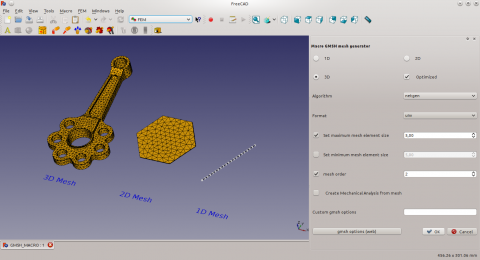
Create FEM Meshes by GMSH Mesh Generator. It is possible to create linear or bilinear (quadratic) like Beam, Shell and Volume elements.

Macro version: 1.0
Last modified: 2015-08-24
FreeCAD version: All
Download: ToolBar Icon
Author: psicofil
Author
psicofil
Download
ToolBar Icon
Links
Macros recipes
How to install macros
How to customize toolbars
Macro Version
1.0
Date last modified
2015-08-24
FreeCAD Version(s)
All
Default shortcut
None
See also
FEM Mesh from shape by Gmsh

Important information

This macro is outdated. It is Python 2.x code. All the code has been directly integrated in the FEM Workbench before FreeCAD Version 0.20. See FEM MeshGmshFromShape.

Description

Simple macro to create FEM Meshes by the Mesh Generator GMSH. It is possible to create linear or bilinear (quadratic) like Beam, Shell and Volume elements.

Temporary code for external macro link. Do not use this code. This code is used exclusively by Addon Manager. Link for optional manual installation: Macro


# This code is copied instead of the original macro code
# to guide the user to the online download page.
# Use it if the code of the macro is larger than 64 KB and cannot be included in the wiki
# or if the RAW code URL is somewhere else in the wiki.

from PySide import QtGui, QtCore

diag = QtGui.QMessageBox(QtGui.QMessageBox.Information,
    "Information",
    "This macro must be downloaded from this link\n"
    "\n"
    "https://raw.githubusercontent.com/psicofil/Macros_FreeCAD/master/Macros/GMSHMesh.FCMacro" + "\n"
    "\n"
    "Quit this window to access the download page")

diag.setWindowFlags(QtCore.Qt.WindowStaysOnTopHint)
diag.setWindowModality(QtCore.Qt.ApplicationModal)
diag.exec_()

import webbrowser 
webbrowser.open("https://raw.githubusercontent.com/psicofil/Macros_FreeCAD/master/Macros/GMSHMesh.FCMacro")
<class="rawcodeurl"><a href="https://raw.githubusercontent.com/psicofil/Macros_FreeCAD/master/Macros/GMSHMesh.FCMacro">raw code</a>


GMSH

Script

The macro you can find in the following github repository: GMSH Macro

ToolBar Icon

GMSHMesh.FCMacro GMSH Macro.FCMacro

Additional Installations

GMSH has to be installed. See gmsh.info. The macro is intended to run on Linux, OSX and Windows operating system. The binary path of GMSH has to be adapted in the macro.

Links

The page discussion GMSH macro

See the how to use the macro on YouTube.

Ta strona pochodzi z https://wiki.freecad.org/Macro_GMSH

Bądźmy w kontakcie!
Forum GitHub Mastodon Matrix IRC Gitter.im Discord Reddit Twitter Facebook LinkedIn

© Załoga FreeCAD. Autorami grafiki na stronie głównej (od góry do dołu) są: ppemawm, r-frank, epileftric, regis, rider_mortagnais, bejant.

Ten projekt jest wspierany przez: , KiCad Services Corp. oraz pozostałych sponsorów

GitHubUlepsz tę stronę na GitHub