|
|
| Description |
|---|
| Gives information about the selected shape and can display a conversion of radius, diameter, length, area, volume ... in different units (metric and imperial) in a toolBar. The information to be displayed in real time is parametrizable in the Parameter of FreeCAD. Macro version: 00.11 Last modified: 2026/04/08 FreeCAD version: 0.18 and more Download: ToolBar Icon Author: Mario52 |
| Author |
| Mario52 |
| Download |
| ToolBar Icon |
| Links |
| Macros recipes How to install macros How to customize toolbars |
| Macro Version |
| 00.11 |
| Date last modified |
| 2026/04/08 |
| FreeCAD Version(s) |
| 0.18 and more |
| Default shortcut |
| None |
| See also |
| Arch Survey, Macro FCInfo, Macro FCInfoGlass |


Description
Gives information about the selected shape and can display a conversion of radius, diameter, length, area, volume ... in different units (metric and imperial) in a toolBar. The information to be displayed in real time is parametrizable in the FreeCAD preferences.
Temporary code for external macro link. Do not use this code. This code is used exclusively by Addon Manager. Link for optional manual installation: Macro
# This code is copied instead of the original macro code
# to guide the user to the online download page.
# Use it if the code of the macro is larger than 64 KB and cannot be included in the wiki
# or if the RAW code URL is somewhere else in the wiki.

from PySide import QtGui, QtCore

diag = QtGui.QMessageBox(QtGui.QMessageBox.Information,
    "Information",
    "This macro must be downloaded from this link\n"
    "\n"
    "https://gist.githubusercontent.com/mario52a/e382adbe41747788ad15a18eb206a872/raw/e362ce4d6ee3fa624272be61d65df5d35bf58f4b/FCInfo_ToolBar.FCMacro" + "\n"
    "\n"
    "Quit this window to access the download page")

diag.setWindowFlags(QtCore.Qt.WindowStaysOnTopHint)
diag.setWindowModality(QtCore.Qt.ApplicationModal)
diag.exec_()

import webbrowser
webbrowser.open("https://gist.githubusercontent.com/mario52a/e382adbe41747788ad15a18eb206a872/raw/e362ce4d6ee3fa624272be61d65df5d35bf58f4b/FCInfo_ToolBar.FCMacro")

FCInfo_ToolBar
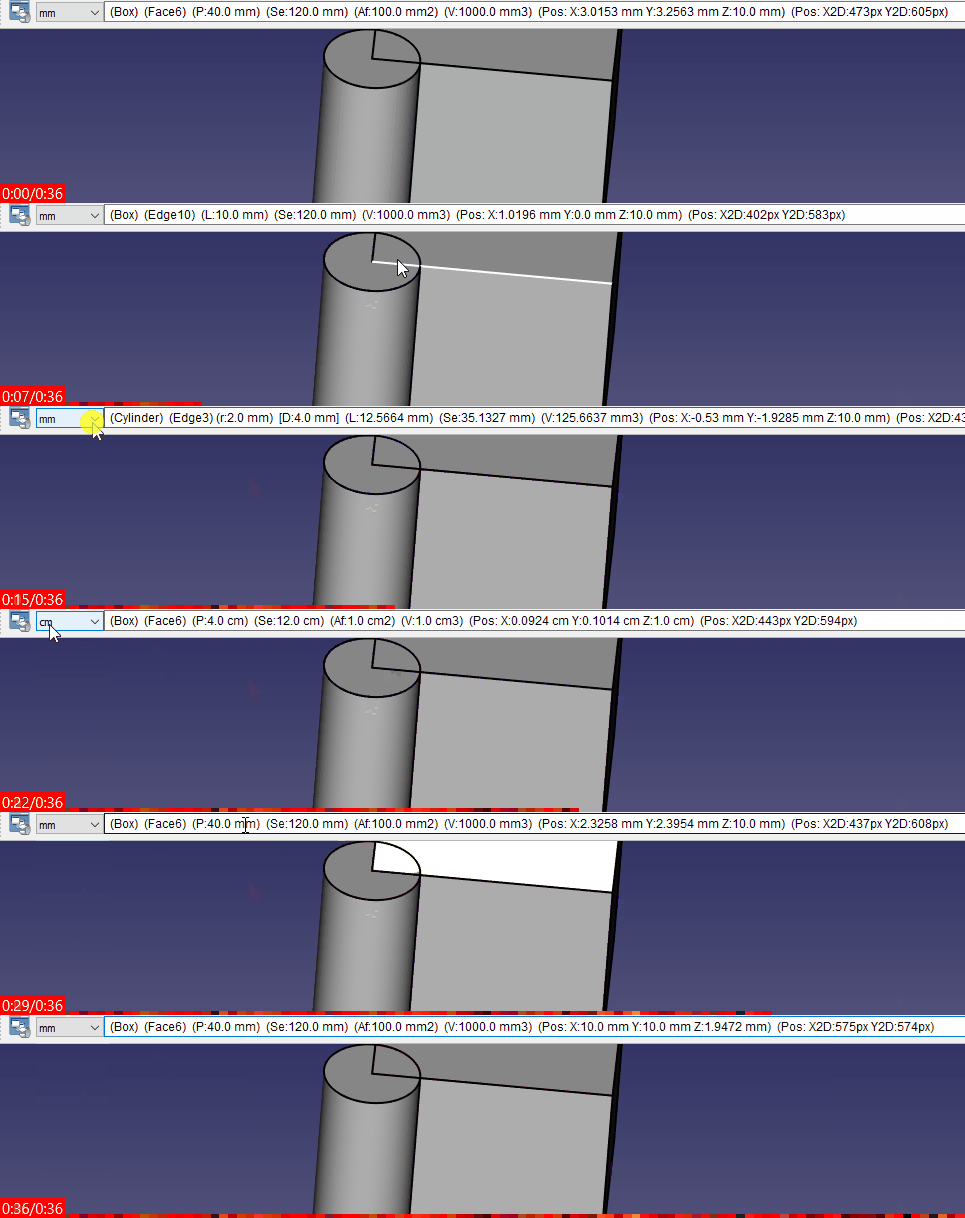
FCInfo ToolBar in action
Usage
After run the macro, go to Menu → Tools → Edit parameters ... :BaseApp/Preferences/Macros/FCMmacros/FCInfo_ToolBar
and check the info to display.
The complete info hare displayed in the ToolTip window, the checked option is visible if the "*" is displayed.
Use the button reset after change one option in the parameter window.
The Unit size can be selected : km, hm, dam, m, dm, cm, mm, µm, nm, pm, fm, inch, link, foot, yard, perch, chain, furlong, mile, league, nautique.
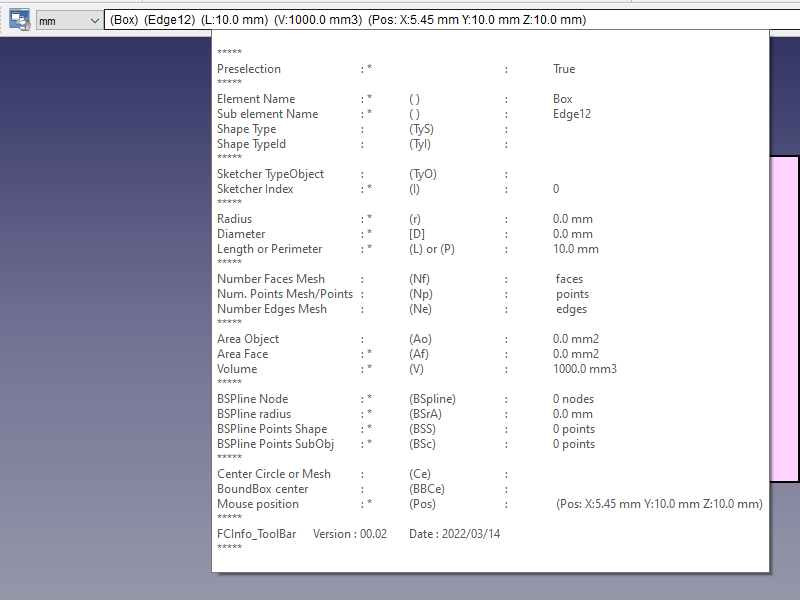
FCInfo_ToolBar the info toolTip
Options
The options are located in the Parameter of FreeCAD:
Menu → Tools → Edit parameters ... :BaseApp/Preferences/Macros/FCMmacros/FCInfo_ToolBar
- switch_User_ToolbarIconSize
- if =
false: the icon toolBar respect the FreeCAD value for the icon size - if =
true: the icon take the values of the variable seT_User_sizeIconX and seT_User_sizeIconY
- if =
- seT_User_sizeIconX
- set the value X of the Icon
- seT_User_sizeIconY
- set the value Y of the Icon
- seT_User_setFixed_Tool_Bar_Width
- set the Width of the ToolBar
- seT_User_setFixed_Tool_Bar_Height
- set the Height of the ToolBar
- switch_User_Work_With_Preselection
- Work With the Preselectiond, update the data in real time
- seT_User_StyleSheetColorToolBar
- set the color of the toolBar in HTML format example : #F8E6E0
- if the value is 0 the toolBar take the system color
- seT_User_DecimalValue
- give the number of decimal of the number (Default 2)
- seT_User_TextHeigthValue
- give the text height of the toolBar
- switch_User_Display_documentName
- display the document Name ()
- switch_User_Display_objectName
- display the object Name ()
- switch_User_Display_SubElementName
- display the SubElementName ()
- switch_User_Display_ShapeType
- display the Shape type (TyS:)
- switch_User_Display_TypeId
- display the TypeId (TyI:)
- switch_User_Display_RadiusObject
- display the radius and the diameter (r:) [D:]
- switch_User_Display_RadiusSurface
- display the radius and the diameter on surface (rS:) [DS:]
- switch_User_Display_LengthObject
- display the Length of the edge selected or the Perimeter of the face selected
- (L:) display the Length of the wire, edge, line selected
- (P:) display the Perimeter if the face is selected
- display the Length of the edge selected or the Perimeter of the face selected
- switch_User_Display_SommeAllEdgesObject
- display the somme of the all edge of the object selected (Se:)
- switch_User_Display_NumberFacesMesh
- display the number of Faces of the Mesh object (Nf:)
- switch_User_Display_NumberPointsMeshPoints
- display the number of points of the Mesh object (Np:)
- switch_User_Display_NumberEdgesMesh
- display the number of edges of the Mesh object (Ne:)
- switch_User_Display_AreaObject
- display the area of the object (A:)
- switch_User_Display_AreaSubObject
- display the area of the face selected (Af:)
- switch_User_Display_VolumeObject
- display the volume of the object (V:)
- switch_User_Display_BsplineObject
- display the number of node of the Bspline selected
- (BSpline) display the number of node of the BSpline
- (BSrA) BSPline radius approximative first radius of the BSpline
- (BSS) BSPline Points Shape number points of the Bspline (case Shape)
- (BSc) BSPline Points Sub Object number points of sub object selected (case Edge)
- display the number of node of the Bspline selected
- switch_User_Display_CentreObject
- display the center of the circle (if one circle is detected) or of the object selected
- (Ce:) display the center of circle (if detected), face, edge ... BBoxCenter of face, edge ... Sub selection" + "\n\n")
- display the center of the circle (if one circle is detected) or of the object selected
- switch_User_Display_CentreBoundBoxObject
- display the boundingBox center of the object (BBCe:)
- switch_User_Display_BoundBoxObject
- display the boundingBox
- switch_User_Display_Position
- display the coordinates point mouse pointed (Pos:)
- switch_User_Display_Position_2D_CAD
- display the coordinates point 2D Cad (x, y) 0,0 = bottom left corner
- switch_User_Display_Position_2D_BMP
- display the coordinates point 2D Bmp (x, y) 0,0 = top left corner
- switch_User_NotInfoOnBeginning
- if it is
falsethe info (this information) is not displayed - if it is
truethe info is displayed
- if it is
- seT_User_UnitSymbolSquare
- give the symbol square (Default 2)
- seT_User_UnitSymbolCube
- give the symbol cube (Default 3)
- seT_User_UnitSymbolMicro
- give the symbol micro (Default u)
For automatic Run
in command line
In your shortcut verify your right path
"Complete_path_of_FreeCAD" "Complete_path_of_the_macro.FCMacro"
example:
"C:/FreeCAD_0.20.26858_Win-LPv12.5.4_vc17.x-x86-64/bin/FreeCAD.exe" "C:/Users/User/AppData/Roaming/FreeCAD/Macro/FCInfo_ToolBar.FCMacro"
in Mod directory
- After install the macro with Addon Manager
- Create the FCInfo_ToolBar directory
- Copy the macro FCInfo_ToolBar.FCMacro (copy not move) in the FCInfo_ToolBar directory and rename it in FCInfo_ToolBar.py
- Create a file named InitGui.py
- Paste the code in InitGui.py:
#### FC Version: 0.1 #16/02/2022
#### Mario52
#### FCInfo_ToolBar : mini FCInfo ####
#
import importlib
from importlib import reload
import FreeCAD, FreeCADGui
App = FreeCAD
Gui = FreeCADGui

switch_User_NotRunAuto = FreeCAD.ParamGet("User parameter:BaseApp/Preferences/Macros/FCMmacros/FCInfo_ToolBar").GetBool("switch_User_NotRunAuto")
## switch_User_NotRunAuto 0 (False) = run the macro in begin
## switch_User_NotRunAuto 1 (True)  = not run automatic the macro

if switch_User_NotRunAuto == False:
    import FCInfo_ToolBar
    #reload(FCInfo_ToolBar)
    FreeCAD.ParamGet("User parameter:BaseApp/Preferences/Macros/FCMmacros/FCInfo_ToolBar").SetBool("switch_User_NotRunAuto", False)
    #FreeCAD.Console.PrintMessage("InitGui Ok FCInfo_ToolBar" + "\n")
- save the file
- run FreeCAD
- if the macro not run (normal) execute the macro FCInfo_ToolBar.FCMacro as a normal macro
- the next start of FreeCAD the macro must start automatically
enjoy
Link
The forum discussion Feature request: coordinates display
Version
version 00.11 08/04/2026 : adapt to 1.1 weekly add switch_User_Display_documentName
version 00.10 17/02/2026 : add try: except in clearSelection
version 00.09 10/02/2026 : add test Visibility Y/N before display BoundBox
version 00.08 07/2/2026 : add option switch_User_Display_BoundBoxObject for display the BoundBox of the object preSelected
version 00.07 16/06/2025 : correct selection grandeur not change
replace :
QtCore.QObject.connect(comboBox_ToolBar, QtCore.SIGNAL("currentIndexChanged(QString)"), SIGNAL_comboBox_Changed)
by :
comboBox_ToolBar.currentTextChanged.connect(SIGNAL_comboBox_Changed)
version 00.06 01/06/2025 : return to PySide
version 00.05b 06/09/2023 : correct bug calcul 2D Bmp
version 00.05 06/09/2023 : add coordinate 2D Cad (x, y) 0,0 = bottom left corner or Bmp (x, y) 0,0 = top left corner, radiusSurface
create the test "if" switch_User_NotInfoOnBeginning i forgot !!
version 00.04 28/06/2023 : correction styleSheet and:
sommeEdgesSTR = str(sommeEdges)
replaced by:
sommeEdgesSTR = str(round(sommeEdges * uniteM, seT_User_DecimalValue)) + " " + uniteMs
version: (00.02 +) 00.03 2022/03/22 : add sum of all edges
version: 00.02 2022/03/14 : add calculation in real time (with preselection), dimension of toolBar, add info mesh and points
version: 00.01 2022/02/16 :
Ta strona pochodzi z https://wiki.freecad.org/Macro_FCInfo_ToolBar