|
|
| Beschreibung |
|---|
| Teilt Kreise oder Kreisbögen in mehrere Bögen auf. Die erstellten Bögen können zur Unterscheidung abwechselnd eingefärbt werden. (Befehlszeile, füge das komplette Makro in die Python-Konsole ein). Versionsmakro : 00.03 Datum der letzten Änderung : 2019-07-02 FreeCAD version : Alle Herunterladen : Werkzeugleisten-Symbol Autor: mario52 |
| Autor |
| mario52 |
| Herunterladen |
| Werkzeugleisten-Symbol |
| Links |
| Makros Rezepte Wie man Makros installiert Symbolleisten anpassen |
| Macro-Version |
| 00.03 |
| Datum der letzten Änderung |
| 2019-07-02 |
| FreeCAD-Version(s) |
| Alle |
| Standardverknüpfung |
| None |
| Siehe auch |
| None |


Beschreibung
Dieses Makro schneidet Kreise oder Kreisbögen in mehrere Bögen. Die Bögen können zur Unterscheidung abwechselnd eingefärbt werden.
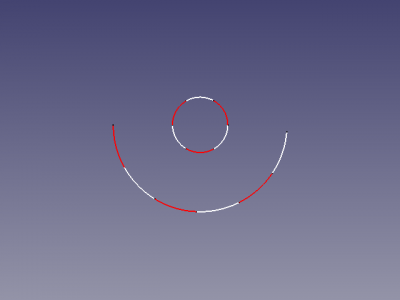
Kreis Schneiden
Anwendung
- Das Makro cutCircle in die Python-Konsole kopieren.
- Enter drücken (Der Code ist jetzt im Speicher).
- Einen oder mehrere Kreise oder Kreisbögen auswählen.
- Die Funktion
cutCircle()mit 1 oder 2 Argumenten von der Python-Konsole aus aufrufen:- Beispiel mit 1 Argument:
cutCircle(4). Dies erstellt 4 neue Bögen zu jedem ausgewählten Kreis oder Kreisbogen und stoppt an der Stelle (keine Einfärbung). - Beispiel mit 2 Argumenten:
cutCircle(6, 1). Dies erstellt 6 neue Bögen zu jedem ausgewählten Kreis oder Kreisbogen, die abwechselnd in Rot und Weiß eingefärbt werden, wie in der Abbildung dargestellt.
- Beispiel mit 1 Argument:
- Das originale Objekt wird nicht gelöscht.
Skript
Werkzeugleisten-Symbol 
Macro_Cut_Circle.FCMacro
# selection circle(s) (circles and arcs)
# give number of cut, biColor 0/1
# cut the circle to x arcs
# if biColor is <> 0 the arcs are colored alternately Red White Red White ....
#

__title__   = "cutCircle"
__author__  = "Mario52"
__date__    = "02/07/2019"
__version__ = "00.03"

import Draft
global biscolor ; biscolor = 0
def cutCircle(number = 2, biColor = 0):
    global biscolor
    def defbiColor(objet):
        global biscolor
        if biscolor == 0:
            FreeCADGui.ActiveDocument.getObject(objet.Name).LineColor = (1.0,0.0,0.0) # 255 = 1 (10 = (1/255 * 10 ))
            biscolor = 1
        else:
            FreeCADGui.ActiveDocument.getObject(objet.Name).LineColor = (1.0,1.0,1.0) # 255 = 1 (10 = (1/255 * 10 ))
            biscolor = 0
    selection = FreeCADGui.Selection.getSelection()
    for piece in selection:
        nom = piece.Name
        if (nom[:6] == "Circle") or (nom[:8] == "Cylinder"):
            circonference = piece.Shape.Length
            rayon = piece.Radius
            placem = piece.Placement

            if (nom[:8] == "Cylinder"):
                pivot0 = float(piece.Angle/number)
                FreeCAD.Console.PrintMessage("Cylinder"+"\n")
            else:
                pivot0 = float(360/number)
                FreeCAD.Console.PrintMessage("Circle"+"\n")
            pivot1 = 0.0
            for i in range(number):
                cercle = Draft.makeCircle(radius=rayon,placement=placem,face=False,startangle=(pivot1),endangle=(pivot0+pivot1),support=None)
                if biColor != 0:
                    defbiColor(cercle)
                pivot1 += pivot0
        elif nom[:3] == "Arc":
            FreeCAD.Console.PrintMessage("Arc"+"\n")
            circonference = piece.Shape.Length
            rayon = piece.Radius
            placem = piece.Placement
            First = float(piece.FirstAngle)
            Last  = float(piece.LastAngle)
            pivot0 = abs((First - Last) / number)
            pivot1 = 0.0
            for i in range(number):
                cercle = Draft.makeCircle(radius=rayon,placement=placem,face=False,startangle=(pivot1+First),endangle=(pivot0+pivot1+First),support=None)
                if biColor != 0:
                    defbiColor(cercle)
                pivot1 += pivot0
    App.ActiveDocument.recompute()

#cutCircle(5, 1)  # here with 5 arcs and colored
#cutCircle(4)     #
Beispiel
cutCircle(5, 1)  # here with 5 arcs and colored
cutCircle(4)     #
Projekt
Kreis auf Zylinder schneiden
Version
ver 00.03 02/07/2019 : "App.ActiveDocument.recompute()" hinzugefügt
ver 00.02 09/03/2015 : Erzeugen von Bögen, die abwechselnd rot-weiß-rot-weiß oder nicht eingefärbt sind, hinzugefügt
ver 00.01 24/02/2015 :
Diese Seite wird abgerufen von https://wiki.freecad.org/Macro_Cut_Circle