|
|
| Description |
|---|
| Creates a Clone/Copy/Compound of the object(s) and then converted into a chosen position and size (inch, mm, m, µm...) or free. The base object is recognized in mm (FreeCAD base). Macro version: 00.16 Last modified: 2025-01-06 FreeCAD version: ≥0.18 Download: ToolBar Icon Author: mario52 |
| Author |
| mario52 |
| Download |
| ToolBar Icon |
| Links |
| Macros recipes How to install macros How to customize toolbars |
| Macro Version |
| 00.16 |
| Date last modified |
| 2025-01-06 |
| FreeCAD Version(s) |
| ≥0.18 |
| Default shortcut |
| None |
| See also |
| None |

Description
Creates a clone or copy of the object and then converts it into a chosen position and size (inch, mm, m, µm...) or free. The base object is recognized in mm (FreeCAD base)
Temporary code for external macro link. Do not use this code. This code is used exclusively by Addon Manager. Link for optional manual installation: Macro
# This code is copied instead of the original macro code
# to guide the user to the online download page.
# Use it if the code of the macro is larger than 64 KB and cannot be included in the wiki
# or if the RAW code URL is somewhere else in the wiki.

from PySide import QtGui, QtCore

diag = QtGui.QMessageBox(QtGui.QMessageBox.Information,
    "Information",
    "This macro must be downloaded from this link\n"
    "\n"
    "https://gist.githubusercontent.com/mario52a/9f2f2f6144e1307a048f1840ef99300c/raw/fb76b3c728c1c7cd085e87f5d6d223d9f79bb574/Macro_CloneConvert.FCMacro" + "\n"
    "\n"
    "Quit this window to access the download page")

diag.setWindowFlags(QtCore.Qt.WindowStaysOnTopHint)
diag.setWindowModality(QtCore.Qt.ApplicationModal)
diag.exec_()

import webbrowser
webbrowser.open("https://gist.githubusercontent.com/mario52a/9f2f2f6144e1307a048f1840ef99300c/raw/fb76b3c728c1c7cd085e87f5d6d223d9f79bb574/Macro_CloneConvert.FCMacro")
Usage
- Run the macro
- Set the XYZ settings
- Choose "Clone" or "Copy"
- Choose a measurement unit
- Select your object
- Click Ok
Notes
- If no value is entered a copy or clone will be created without modification.
- If no object is selected the Ok button will be colored in red.
The value of the BoundingBox, Volume and Surface is displayed in the Report view, in the case of Copy multiple object, the display will show BoundingBox 0.0.
The base is the mm example with a 1 mm side of cube:
Select in the comboBox inch, 1 inch = 25.4 mm , the fields "Scale free" automatically adjusts to 25.4 (the values in "Scale-free" can be changed separately). Click Ok button, the clone created will have 25,4 mm x 25,4 mm x 25,4 mm
150% = 1,50 in the "Scale free" fields
104% = 1,04 in the "Scale free" fields
Inverse operation :
If you want to reduce an object ex: a cube 25.4 mm (1 inch) in cube 1 mm sides, use the following formula, 1 / 25.4 = 0.0393700 and enter the value 0,0393700 (with comma) in the Scale field XY and Z.
In a cube of 5 mm, made 5 / 25.4 = 0.1968503 and enter the value 0,1968503 (with comma) in the Scale field XY and Z.
50% = 0,50 in the "Scale free" fields
4% = 0,04 in the "Scale free" fields
Predefined units are:
km, hm, dam, m, dm, cm, mm, µm, nm, inch, link, foot, yard, perch, chain, furlong, mile, league, nautique.
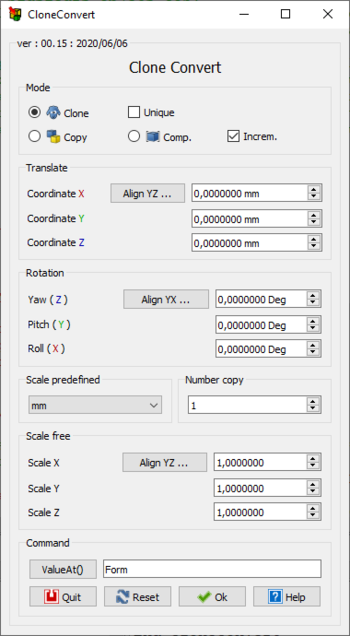
- Mode
- Clone : The object(s) clone are create
- Copy : One copy of the objet(s) is create
- Comp : One compound of the objet(s) is create
- Increm. : incrementing the coordinates data to the original coordinates of the object (Placement, Rotation ...)
If this is not checked the Placement begin in coordinates 0,0,0 of FreeCAD
In case a compound Placement information is [0,0,0] the Placement begin in the position of object
If the real location is away from the base coordinates 0,0,0 use the ValueAt() button for the real Placement of the subObject selected Face, Wire, Line .... - Unique : If this checkBox is checked and multiple object selected, the clone created is one unique object
- Coordinates
- ... : This button align the YZ values on the value of X to have the same values XYZ (or manually). Two click reset the coordinates values to 0.0
- Coordinate X : Move the copy to the Coordinate X selected (Base 0,0,0 if Increm. is not checked)
- Coordinate Y : Move the copy to the Coordinate Y selected (Base 0,0,0 if Increm. is not checked)
- Coordinate Z : Move the copy to the Coordinate Z selected (Base 0,0,0 if Increm. is not checked)
- Rotation
- ... : This button align the Pitch and Roll values on the value of Yaw to have the same values Rotation (or manually)
Two click reset the rotations values to 0.0 - Yaw (Z ) : Rotate the copy to the axis Z (Yaw) (Begin 0 if Increm. is not checked)
- Pitch ( Y ) : Rotate the copy to the axis Y (Pitch) (Begin 0 if Increm. is not checked)
- Roll ( X ) : Rotate the copy to the axis X (Roll) (Begin 0 if Increm. is not checked)
- Scale predefined
- Scale predefined : predefined scales in units, km, hm, dam, m, dm, cm, mm, µm, nm, inch, link, foot, yard, perch, chain, furlong, mile, league, nautique or choose a free value in the Scale free field.
- Number copy
- Number copy : number of copies
- Scale free
- ... : This button align the Scales values on the value of Scale X to have the same values XYZ (or manually)
Two click reset the scales values to 1.0 - Scale X : free scale , if the value is negative ( -10) , the object is scaled x 10 and will be reversed in the X axis, to reduce the shape give a decimal value (0,5)
- Scale Y : free scale , if the value is negative ( -10) , the object is scaled x 10 and will be reversed in the Y axis, to reduce the shape give a decimal value (0,5)
- Scale Z : free scale , if the value is negative ( -10) , the object is scaled x 10 and will be reversed in the Z axis, to reduce the shape give a decimal value (0,5)
- ValueAt() : Give the valueAt() the subObject selected Face, Wire, Line ...
This option is useful in case a compound Placement information [0,0,0] and its real location is away from the base coordinates 0,0,0 (gives no provide information about the rotation of the object) - Ok : the OK button validates and launches the command, if no object is selected the Ok button will be coloured in red
- Reset : the Reset button puts all the values to zero
- Quit : the Quit button exit the macro
Script
The icon 
Macro_CloneConvert.FCMacro
Download the macro to Gist Macro_CloneConvert.FCMacro
Revision
06/01/2025 ver 00.16 replace PySide2 to PySide augmente mini et maxi efface toutes les reference a PySide, PySide2 et QtWidgets et correction clone, compound
06/06/2020 ver 0.15 = icon
20/05/2020 ver 0.14 = grid layout PySide2 Qt5
15/09/2019 ver 0.13 = replace the grec sign micro to "um", replace all "_translate("MainWindow", "mm", None)" to "mm" and comment line "text.encode('utf-8')" cause not work with FC 0.19 18.213
01/06/2019 ver 0.12 = adapted for 0.19 et correction "Copy:legacy=True" and ShapeColor .....
30/03/2018 ver 0.11 = odd checkBox, if multi selection the clone are object unique or object separate
07/06/2017 ver 0.10 = replace Draft...Copy to Part..Shape cause section Copy : not draw copy scaled of object but copy not scaled ??
14/06/2016 ver 0.9 = adding the choice of number of copies and labels optimization
31/01/2016 ver 0.8 = modify the buttons reset section for two click for reset (in case modification the value)
30/01/2016 ver 0.7 = rewriting code with Placement and Increment and adding buttons Compound, Increment, ValueAt(),
26/01/2016 ver 0.6 = correction placement with many objets Copy
26/07/2015 ver 0.5 = correction rotate many objects Function Copy
25/07/2015 ver 0.4 = adding rotation
11/08/2014 replace "AttributeError" to "Exception"
02/07/2014 ver. 0.3 = modified to operate PyQt4 and PySide
09/05/2014 ver. 0.2 = adding function "Copy"
This page is retrieved from https://wiki.freecad.org/Macro_CloneConvert