|
|
| Opis |
|---|
| Centru daje višestruku masu odabranih više objekata. Makronaredba verzije : 0.4.1 Datum zadnje izmjene : 2019-05-25 Verzija FreeCAD : 0.18 Preuzimanje datoteka : Download the Macro_CenterOfMass_Icon package and extract it in the same directory of the macro. Autor : schupin |
| Autor |
| schupin |
| Preuzimanje datoteka |
| Download the Macro_CenterOfMass_Icon package and extract it in the same directory of the macro. |
| Linkovi |
| Makro recepti Kako instalirati makronaredbe Kako prilagoditi alatne trake |
| Verzija |
| 0.4.1 |
| Datum zadnje izmjene |
| 2019-05-25 |
| Verzije FreeCAD-a |
| 0.18 |
| Zadani prečac |
| None |
| Vidi također |
| None |
Opis
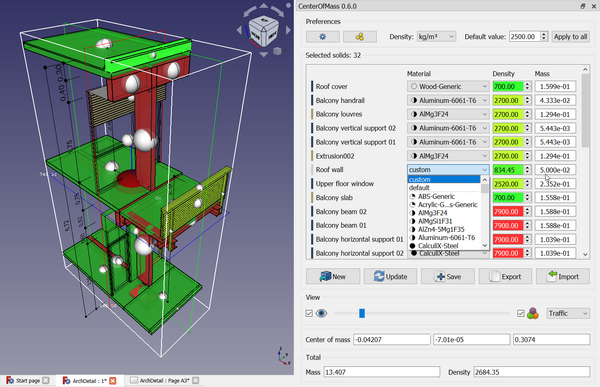
Daje ukupnu masu i mjesto središta mase koje proizlazi iz odabranih više objekata. Za svaki objekt mogu se odabrati različite gustoće.
Temporary code for external macro link. Do not use this code. This code is used exclusively by Addon Manager. Link for optional manual installation: Macro
# This code is copied instead of the original macro code
# to guide the user to the online download page.
# Use it if the code of the macro is larger than 64 KB and cannot be included in the wiki
# or if the RAW code URL is somewhere else in the wiki.

from PySide import QtGui, QtCore

diag = QtGui.QMessageBox(QtGui.QMessageBox.Information,
    "Information",
    "This macro must be downloaded from this link\n"
    "\n"
    "https://raw.githubusercontent.com/FreeCAD/FreeCAD-macros/master/Information/CenterOfMass.FCMacro" + "\n"
    "\n"
    "Quit this window to access the download page")

diag.setWindowFlags(QtCore.Qt.WindowStaysOnTopHint)
diag.setWindowModality(QtCore.Qt.ApplicationModal)
diag.exec_()

import webbrowser
webbrowser.open("https://raw.githubusercontent.com/FreeCAD/FreeCAD-macros/master/Information/CenterOfMass.FCMacro")
Kako koristiti
Odaberite objekte
Available Options
- Color the solids according to density.
- Display the location of the center of mass.
- Export and import masses, materials and densities (even if it's not a .csv file from the macro, but columns must be named accordingly).
- Save densities in the document (remove them again when setting material to default
 ).
). - You can change some preferences at Tools → Edit parameters → Preferences → Macros.
Skripta
Preuzmite u Github
preuzmite datoteku s ikonom i zalijepite ju u podmapu pod nazivom CenterOfMass u direktoriju makronaredbe

Poveznice
Raspravu na forumu Macro to compute center of mass
Verzija
Version / Date of merge
0.8.4 / 2025-06-10:
0.8.3 / 2025-01-23:
- Fix: Several fixes (PR#191), FreeCAD 0.19 no longer supported
0.8.0 / 2025-01-06: Thanks to farahats9 for the contribution
- New: Show Volume and Surface area
- New: Calculate Moments of Inertia
- Fix: Macro now works with the Assembly example in FreeCAD 1.0
- Fix: Automatically select material for solids if it is already assigned by the new material system
- Minor UI changes
0.7.6 / 2024-08-01: Prepare for major FreeCAD release
- Fix: Make 0.22.0dev AssemblyExample work
- Fix: BOM Import containing custom material
- Fix: Support the new material cards
- Fix: Changed or missing icons, version checks
0.7.3 / 2023-09-11:
- New: Added buttons for Copy to clipboard
- New: Scalable Vector Graphics icon
- Fix: Compatibility for FreeCAD versions and web
0.7.0 / 2023-02-13:
- New: Searchbar for solids
- New: Reworked import function to improve external bill of materials (BOM) import with better input tolerance. Caption "weight" has to be changed to "mass" if you want to import mass from an old file export of the macro.
- New: Mass can be set zero to exclude solid from calculation and visualization
- Fix: Behaviour of default value spin and "Apply to all"
- Fix: Preserve original solids color when "New" button pressed
0.6.0 / 2022-08-27:
- New: Masses are editable (a highly requested feature)
- New: Highlights the solid you are working on
- New: No duplicate entries when container and content selected concurrently
- New: Pie charts show density relation in combo box
- New: Legibility of text on colored combo box with WCAG21 1.4.6 Contrast (Enhanced) conformity
- Fix: A Part used as a container for meshes (e.g. .stl's) is recognized correctly
- Fix: Fixes for error and language handling, material editing, combo box and GUI size adjustment
0.5.8 / 2022-05-31:
- Reinserted: Bounding Box
- New: Setting to color spheres
- New: Setting to change color maps
- Rearranged GUI: Update calculation added, Total density added
- Fix: Message Boxes could not be used when not running FreeCAD on primary screen in a multimonitor setup
- Fix: More than one Mesh was not calculated correctly
0.5.0 / 2022-04-07: complete rewrite by s-quirin (SyProLei project at Saarland University)
- New: Code base, Requirement raised to Qt5.12+ and Python3 (FreeCAD 0.19).
- New: Show mass of each solid.
- New: Start window docked or floating (can be set in Parameter Editor).
- New: Selection matches up tree view or is sorted by name (can be set in Parameter Editor).
- New: Option to save densities in document.
- Improved: FreeCAD alike Gui look and feel.
- Improved: Scaled color palette (from green to red) to colorify shapes.
- Improved: Visualising the displacement of centre of mass to the geometry.
- Improved: Internal tracking of units.
- Fix: Handling of groups and group objects.
- Fix: Handling of App::Link.
- Fix: Replaced deprecated Qt class.
0.4.1 / 2019-05-25: Last update with old requirements and GUI available in official repository
0.1.2 / 2018-11-10: Initial version from chupins merged in official repository
Ova stranica je preuzeta s https://wiki.freecad.org/Macro_CenterOfMass