|
|
| Description |
|---|
| This macro provides a Build Utility to assemble multiple project files into one project file. Macro version: 1.0 Last modified: 2015-01-21 FreeCAD version: All Download: ToolBar Icon Author: Piffpoof |
| Author |
| Piffpoof |
| Download |
| ToolBar Icon |
| Links |
| Macros recipes How to install macros How to customize toolbars |
| Macro Version |
| 1.0 |
| Date last modified |
| 2015-01-21 |
| FreeCAD Version(s) |
| All |
| Default shortcut |
| None |
| See also |
| None |

Description
This macro is intended for use on large projects, ones involving hundreds of objects. It's use on a small single file project would be pointless and unnecessary. However on a large project with many objects and many files to be merged into the final one, it will save time, avoid the user being involved in repetitive actions, and remove human errors.
Installation
All the code for buildUtility.FCMacro is in one macro. So installation is comprised of copying the code to the appropriate Macro directory and invoking the Build Utility from the Macro menu, the Python console or a toolbar button (the preferred method).
- see How to install macros for information on how to install this macro code
- see Customize Toolbars for information how to install as a button on a toolbar
Usage
The Build Utility works on the same principals as the build files that are used to assemble large software system (like FreeCAD). A text editor is used to create a text file which adheres to the formats required by the Build Utility. The Build Utility then simply reads each line of the text file and performs the actions specified by that text file.
The macro asks the user for a "build file". It then parses that build file, there are 3 legal line types:
- lines starting with the comment character "#" which are ignored as being comments or remarks
- lines starting with the subfile character "@" which are ignored
Note: the "@" character is for future enhancement when sub-build files will be handled - all other lines which may be a project file or a sub-directory
The file extension for Build Utility file is ".FCBld". This is so file do not get mixed up with other uses and applications.
Any file specified in the build file is assumed to have the extension ".FCStd" If the line starts with a directory then the project file is read from that subfolder. Otherwise it is assumed the line specifies a project file. Directories within directories are supported so nesting of arbitrary depths is possible. The file specification format is the "Unix" style with different levels separated by the forward slash character "/".
Any missing file is printed onto the Report view. Any missing directory is printed onto the Report view.
A new document is created and each project is "Project Merged" into that new and empty document. The document is not saved at the end, this is left for the user if desired. If the file does not exist then the file name is Printed to the Report view
User Interface
There really isn't a GUI at all for this macro. The macro reads a text file that has been prepared with a text editor and produces a model in an output document. Other than clicking the button on the toolbar to start the process, there is no user interaction.
Options
There is no GUI so there are no options. The only alternatives that exist are by using the 3 types of lines in the text file as described above.
Remarks
To reiterate what was stated at the outset, there is no use for this macro on a small single file model. But for persons modeling a plane, locomotive, ship, building, physical plant, complex circuity there is a definitive use and advantage. By choosing the ".FCBld" file extension it is hoped a standard of sorts can be set for build files within FreeCAD. By reserving the "@" prefix character in the command file definition it is hoped that future use and (if needed) growth can be accommodated.
Links
none (so far)
Script
ToolBar Icon 
Macro_Build_Utility.FCMacro
#
#						Build Utility
#                       v 0.0 - build from files and files in sub-folders
#
#***********************************************************************************
# routine to read in a build file and merge all specified projects
"""
This function asks the user for a "build file". It then parses that build file, there
are 3 legal line types:
- lines starting with the comment character "#" which are ignored
- lines starting with the subfile character "@" which are ignored
	Note:	the "@" character is for future enhancement when sub-build files
			will be handled
- all other lines which may be a project file or a subfolder (sub-directory)
If the line is a subfolder then the project file is read from that subfolder.
Otherwise it is assumed the line specifies a project file.
A new document is created and each project is "Project Merged" into that new and empty document.
The document is not saved at the end, this is left for the user if desired.
If the file does not exist then the file name is Printed to the Report view
"""
"""
Example file:
#this is a sample build file
#==============================
@sub-build-files - not presently inplemented
# first the top-level file
metal
# now some misc files
./black/black
./blue/blue
# file does not exist
zebra
# folder does not exist
/bear/bear
# multiple files in one sub-folder
./engineering/green
./engineering/grey
#multiple files in hierarchical folders
./externalModules/white
./externalModules/red/red
#./externalModules/red/stackerAssembly - commented out as not currently loading
./externalModules/red/orange
./externalModules/red/level3/yellow
"""
# import statements
import FreeCAD
import os.path
from PySide import QtGui

# UI Class definitions

# Class definitions

# Function definitionss

# Constant definitions
buildTargetDocument = "build_target"
commentTag = "#"
subfileTag = "@"
lineFeed = "\n"
subfolder = "./"
carriageReturn = "\r"
fileSeparator = "/"
fcFileExtension      = ".FCStd"
fcFileExtensionUC  = ".FCSTD"
fcFileExtensionLen = -6

# code ***********************************************************************************
buildFilePathName=QtGui.QFileDialog.getOpenFileName()[0]
if len(buildFilePathName) > 0:
	# set up a new empty "build_target" document
	FreeCAD.newDocument(buildTargetDocument)
	FreeCAD.setActiveDocument(buildTargetDocument)
	FreeCAD.ActiveDocument=FreeCAD.getDocument(buildTargetDocument)
	guiDoc=FreeCADGui.ActiveDocument
	#
	lastFileSeparator = buildFilePathName.rindex(fileSeparator)
	buildFilePath = buildFilePathName[: lastFileSeparator]
	buildFileName = buildFilePathName[lastFileSeparator +1:]
	#
	buildFileContents = open(buildFilePathName,"r")
	buildFileLines = buildFileContents.readlines()
	buildFileContents.close()
	#
	for line in buildFileLines:
		if line[0] == commentTag:
			# line of internal comment
			pass
		elif line[0] == subfileTag:
			# line of sub-build-file (not presently implemented)
			pass
		else:
			# a line which should specify a FreeCAD project file
			# - may be preceded by a sub-directory e.g. "./subdir309/"
			# - project file may be missing file extension
			#
			# if line break at end of file spec then remove
			if line[-1:] == lineFeed:
				line = line[:-1]
			if line[-1:] == carriageReturn:
				line = line[:-1]
			# if no FreeCAD project file extension supplied then append one
			# make an uppercase comparison in case of mixed case
			tempLine = fcFileExtension + line.upper()
			if fcFileExtensionUC != tempLine[fcFileExtensionLen:]:
				line = line + fcFileExtension
			# if there is a leading subdirectory then remove "./" from beginning
			if subfolder[0:2] == line[0:2]:
				line = line[2:]
			projectFileSpec = str(buildFilePath) + str("/") + str(line)
			if os.path.exists(projectFileSpec):
				guiDoc.mergeProject(projectFileSpec)
			else:
				FreeCAD.Console.PrintMessage('project file "' + projectFileSpec + '" not found' + "\n")

	# set view back to "build_target", it is up to user to save it (if they want)
	FreeCAD.setActiveDocument(buildTargetDocument)
	FreeCAD.ActiveDocument=FreeCAD.getDocument(buildTargetDocument)
	FreeCADGui.ActiveDocument=FreeCADGui.getDocument(buildTargetDocument)
	FreeCADGui.SendMsgToActiveView("ViewFit")
	FreeCADGui.activeDocument().activeView().viewAxometric()
#
#OS: Mac OS X
#Word size: 64-bit
#Version: 0.14.3703 (Git)
#Branch: releases/FreeCAD-0-14
#Hash: c6edd47334a3e6f209e493773093db2b9b4f0e40
#Python version: 2.7.5
#Qt version: 4.8.6
#Coin version: 3.1.3
#SoQt version: 1.5.0
#OCC version: 6.7.0
#
#thus ends the macro...
Example
You are working with some other departments in your company to use FreeCAD to generate a large CAD model for an external client. To prepare for the upcoming presentation you need to integrate the models represented in the 'black' and 'blue' subsystems, the engineering department has responsibility for the 'green' and 'grey' subsystems and you have the 'metal' subsystem on your own computer. The client also uses FreeCAD and your design must integrate with their subsystems "red', and 'yellow'. The external client has told you that the Stacker Assembly is not ready for you to use so you comment it out in your build file.
There are a lot of directory paths to type in so you enter the commands into the Build Utility text file which means you can run it with a single click on a toolbar button.
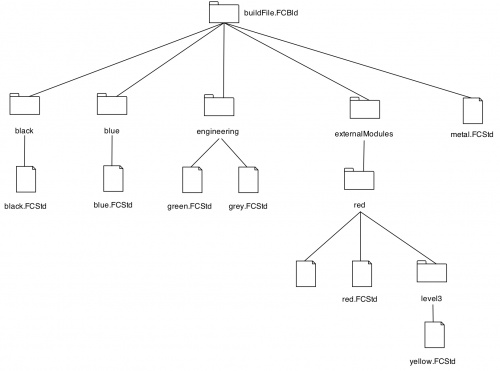
The contents of the build file "buildFile.FCBld" shown below shows the file structure for the project described above.
#this is the build file for the complete assembly
#==============================
@sub-build-files - not presently implemented
# first the top-level file
metal
# now some misc files
./black/black
./blue/blue
# file does not exist
zebra
# folder does not exist
/bear/bear
# multiple files in one sub-folder
./engineering/green
./engineering/grey
#multiple files in hierarchical folders
./externalModules/white
./externalModules/red/red
#./externalModules/red/stackerAssembly - commented out as not currently loading
./externalModules/red/orange
./externalModules/red/level3/yellow
A summary of the file and how it is processed is:
- the first two lines are treated as comments and everything following the initial character of the hash sign is ignored
#this is the build file for the complete assembly
#==============================
- the third line is also ignored because it's first character is the ampersand character which is reserved for future use where command files can invoke other commend files
@sub-build-files - not presently implemented
- the fifth line is the first file specification, the file is in the same directory as the build file, not in a sub-directory
metal
- the seventh and eighth lines are both file specifications where the file is in a sub-directory, note that the sub-directory is of the form "./black/" where "black" is the directory name, so a file called "sheetFold.FCstd" in the directory "outsourcing" would appear "./outsourcing/sheetFold"
./black/black
./blue/blue
- the nineteenth line shows a file specification which exists but is not being included in this build operation
#./externalModules/red/stackerAssembly - commented out as not currently loading
- the last two lines show file specifications where the file is in more than one level of sub-directory
./externalModules/red/orange
./externalModules/red/level3/yellow
This page is retrieved from https://wiki.freecad.org/Macro_Build_Utility