|
|
| Description |
|---|
| AeroFoil creates airfoil curves and faces using pre-defined models, algebraic functions, and DAT or CSV Files. Macro version: 2.0.1 Last modified: 2021-03-10 FreeCAD version: 0.17 and above Download: ToolBar Icon Author: Melwyncarlo |
| Author |
| Melwyncarlo |
| Download |
| ToolBar Icon |
| Links |
| Personal Github - AeroFoil AeroFoil.zip FC Github - AeroFoil FC Forum - AeroFoil Macros recipes How to install macros How to customize toolbars |
| Macro Version |
| 2.0.1 |
| Date last modified |
| 2021-03-10 |
| FreeCAD Version(s) |
| 0.17 and above |
| Default shortcut |
| None |
| See also |
| None |

Description
AeroFoil is a user-created macro to be used within the FreeCAD application. AeroFoil creates airfoil curves and faces using pre-defined models, algebraic functions, as well as imported DAT or CSV files.
 This is the AeroFoil Macro icon.
The AeroFoil Macro can be downloaded using the in-built Addon Manager within the FreeCAD software.
Key Features
- Airfoil points refinement
- Multiple airfoil copy generation
- 2D curves and planar face output
- DWire/PolyLine and BSpline output
- Sketcher workbench and Draft workbench output
- Fully constrained sketches in Sketcher workbench
- Split (upper and lower) airfoil curves generation
- Ready-made NACA 4-digit and 5-digit solvers
- Symmetric and asymmetric curve functions parser
- DAT text file and CSV spreadsheet data parser
- Chord length input in mm, cm, m, in., ft, and yards
Additional Features 0.19 and above
AeroFoil object properties (read-only) :
Base
- DataAirfoil Type (
String) - DataAirfoil Chord Length (
Length) - DataDesign Curve Type (
String) - DataNumber Of Points (
Integer)
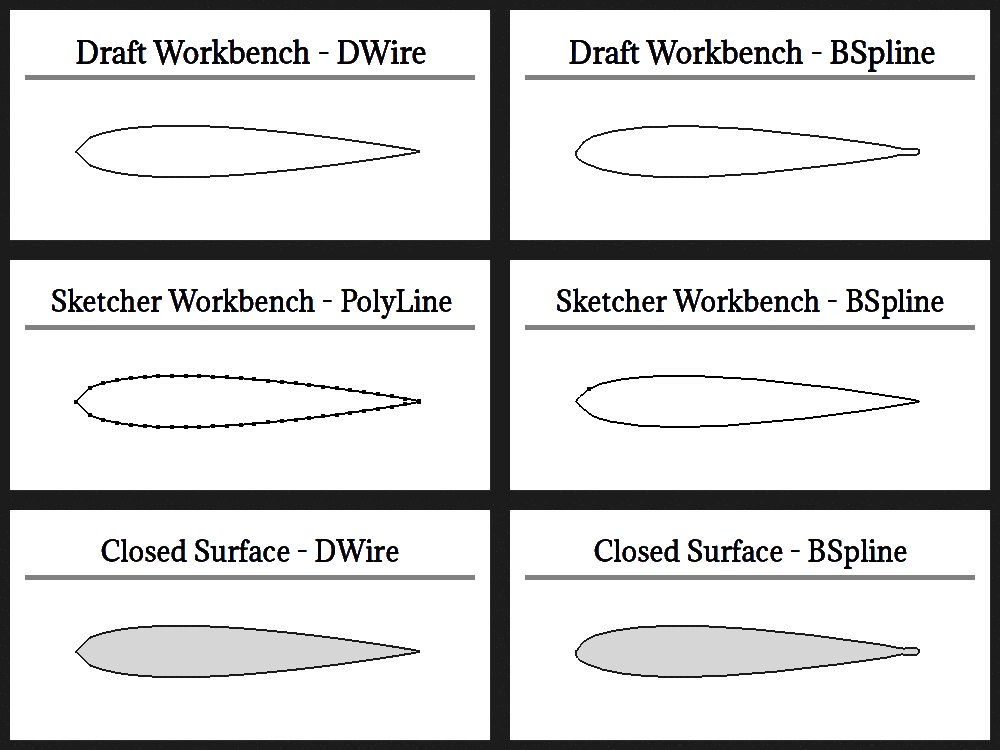
AeroFoil Macro Output Types
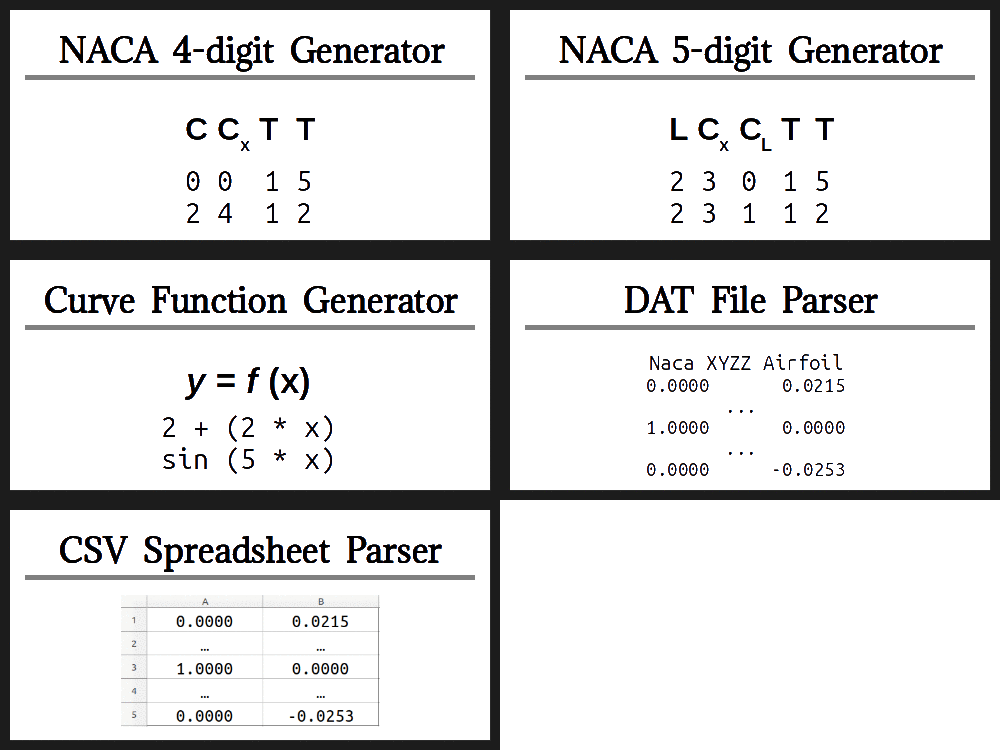
AeroFoil Macro Input Types
Installation
Linux
AeroFoil can be installed manually, similar to Windows installation, or by using the command terminal and its relevant commands as mentioned in the INSTALL file.
By default, the Linux command terminal can be launched by pressing the following keyboard keys simultaneously :
Control + Alt + T
Windows
AeroFoil can be installed with the help of the following two steps :-
- Download the AeroFoil.zip file.
- Extract the ZIP file's contents into the FreeCAD User Macro directory location.
By default, the FreeCAD User Macro directory should be located at :
C:/Users/User_Name/AppData/Roaming/FreeCAD/Macro
Usage
AeroFoil can be loaded by performing the following steps :-
- Launch the FreeCAD application.
- Go to Macro → Macros ....
- Click on the User macros tab in the pop-up dialog box.
- Select AeroFoil.FCMacro.
- Click on Execute.
Once the AeroFoil macro has been loaded, follow the instructions in the respective dialog boxes, fill in the relevant inputs, and navigate accordingly. In case of error or warning, you will automatically be notified of the same. In case you are notified to report an unexpected error, communicate the error by mentioning the FreeCAD version, tracing the steps taken, and mentioning whether (and how much) or not any ouput was generated.
Notes
| (1) | Performing the macro operation with custom points and refinement produces no visible changes. |
| (2) | The AeroFoil object properties are only visible on the FreeCAD software version 0.19. On older versions, you will be shown a warning on the console. This warning will not affect the output. |
Hints to keep in mind during usage :
- For the NACA airfoils, the last two digits (combined) cannot have a value of zero; thickness cannot be a zero value.
- The NACA 5-digit airfoils are limited to the following models ('XX' denotes the last two digits, thickness, of the airfoil) :
- 210XX
- 220XX
- 221XX
- 230XX
- 231XX
- 240XX
- 241XX
- 250XX
- 251XX
- For curve functions, only use the preset characters and functions.
- For curve functions, is correct, whereas is incorrect.
- For curve functions, ranges from 0 to 1, both inclusive.
- For curve functions, the trigonometric theta is in degrees (θ °)
- For curve functions, the trigonometric theta ranges from 0° to 360°, subject to computational limits.
- Curves or points that are intersecting between 0 and 1, both exclusive, will return an error.
- Curves or points that contain the bottom airfoil data cannot be mirrored
- For file imports, it is suggested to leave the line, row, and column numbers to their default values, unless you are well-informed.
- Increasing the refine and quantity parameters increases the computation time and resources.
- Absolute chord length, in millimetres, cannot be less than 1mm.
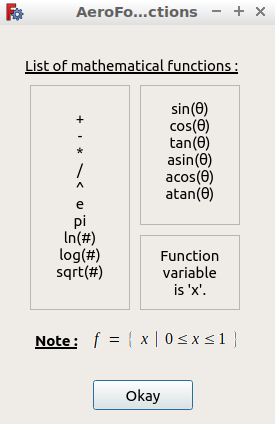
Preset Characters and Functions
Script
__Title__         = "AeroFoil"
__Author__        = "Melwyncarlo"
__Version__       = "2.0.0"
__Date__          = "2021-03-09"
__Comment__       = "AeroFoil creates airfoil curves and faces using pre-defined models, algebraic functions, and DAT or CSV Files"
__Web__           = "https://github.com/melwyncarlo/AeroFoil"
__Wiki__          = "https://wiki.freecad.org/index.php?title=Macro_AeroFoil"
__Icon__          = "https://wiki.freecad.org/images/5/59/AeroFoil-reduced.png"
__Help__          = "Click on the AeroFoil button/macro, and follow the instructions in the subsequent dialog boxes."
__Status__        = "stable"
__Requires__      = "Freecad >= v0.17"
__Communication__ = "https://github.com/melwyncarlo/AeroFoil/issues"
__Files__         = "AeroFoil_UI_Files/AeroFoil_Initial_Dialog.ui, AeroFoil_UI_Files/AeroFoil_NACA4Digit_Dialog.ui, \
AeroFoil_UI_Files/AeroFoil_NACA5Digit_Dialog.ui, AeroFoil_UI_Files/AeroFoil_CurvesInput_Dialog.ui, \
AeroFoil_UI_Files/AeroFoil_PointsInput_Dialog.ui, AeroFoil_UI_Files/AeroFoil_DATInput_Dialog.ui, \
AeroFoil_UI_Files/AeroFoil_CSVInput_Dialog.ui, AeroFoil_UI_Files/AeroFoil_FileLoad_Dialog.ui, \
AeroFoil_UI_Files/AeroFoil_Final_Dialog.ui, AeroFoil_UI_Files/AeroFoil_Math_Functions_Box.ui, \
AeroFoil_UI_Files/AeroFoil_mfb_img.gif, AeroFoil_UI_Files/AeroFoil.svg"


#  OS: Ubuntu 18.04.5 LTS
#  Word size of OS: 64-bit
#  Word size of FreeCAD: 64-bit
#  Version: 0.18.4.
#  Build type: Release
#  Python version: 3.6.8
#  Qt version: 5.9.5
#  Coin version: 4.0.0a
#  OCC version: 7.3.0
#  Locale: English/UnitedKingdom (en_GB)

#  OS: Ubuntu 18.04.5 LTS (LXDE/Lubuntu)
#  Word size of OS	: 64-bit
#  Word size of FreeCAD: 64-bit
#  Version: 0.19
#  Build type: Release
#  Branch: unknown
#  Hash: 32200b604d421c4dad527fe587a7d047cf953b4f
#  Python version: 3.6.9
#  Qt version: 5.9.5
#  Coin versio: 4.0.0a
#  OCC version: 7.3.0
#  Locale: English/UnitedKingdom (en_GB)
Temporary code for external macro link. Do not use this code. This code is used exclusively by Addon Manager. Link for optional manual installation: Macro
# This code is copied instead of the original macro code
# to guide the user to the online download page.
# Use it if the code of the macro is larger than 64 KB and cannot be included in the wiki
# or if the RAW code URL is somewhere else in the wiki.

from PySide import QtGui, QtCore

diag = QtGui.QMessageBox(QtGui.QMessageBox.Information,
    "Information",
    "This macro must be downloaded from this link\n"
    "\n"
    "https://raw.githubusercontent.com/melwyncarlo/AeroFoil/main/AeroFoil.FCMacro" + "\n"
    "\n"
    "Quit this window to access the download page")

diag.setWindowFlags(QtCore.Qt.WindowStaysOnTopHint)
diag.setWindowModality(QtCore.Qt.ApplicationModal)
diag.exec_()

import webbrowser
webbrowser.open("https://raw.githubusercontent.com/melwyncarlo/AeroFoil/main/AeroFoil.FCMacro")
Links
[1] AeroFoil Github Repository
[2] FreeCAD Macros Github Repository - AeroFoil
[3] FreeCAD Forum Discussion Page - AeroFoil
[4] Airfoil Tools contains about 1,638 different airfoils.
[5] UIUC Airfoil Coordinates Database contains nearly 1,600 different airfoils.
This page is retrieved from https://wiki.freecad.org/Macro_AeroFoil