|
|
| Description |
|---|
| Export to slicing software for 3D printers. Exports stl file in the same directory as original design file, then opens it in slicing software. This code, when run, will export the currently open design to STL file, and open it in the slicing software that you use. This example is for KISSlicer, but can be modified to use Slic3r, Cura, or any other 3d printer software. It can also be modified slightly to open up CAM software for CNC machines. Macro version: 1.0 Last modified: 2013-10-10 FreeCAD version: All Download: ToolBar Icon Author: cae2100 |
| Author |
| cae2100 |
| Download |
| ToolBar Icon |
| Links |
| Macros recipes How to install macros How to customize toolbars |
| Macro Version |
| 1.0 |
| Date last modified |
| 2013-10-10 |
| FreeCAD Version(s) |
| All |
| Default shortcut |
| None |
| See also |
Macro 3d Printer Slicer Individual Parts 
|

Description
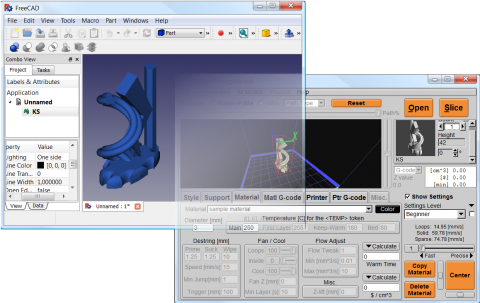
This code, when run, will export the currently open design to STL file, and open it in the slicing software that you use. This example is for KISSlicer, but can be modified to use Slic3r, Cura, or any other 3d printer software. It can also be modified slightly to open up CAM software for CNC machines.
It is best used by creating a link to the macro on the toolbar, and when your ready to slice the object, just click it and your object, as it appears on the screen in FreeCAD will appear on your slicing software's interface, ready to slice. It will also create an STL file with the same filename as the design file in the same directory as the design file as a backup.
Script
The SLICER variable can be changed to any slicing software of your choosing, just make sure to set it before you try running it or it'll flag an error with the script.
ToolBar Icon 
Macro_3d_Printer_Slicer.py
import FreeCAD
import Mesh
import sys
import math
import os
import subprocess
# some fuctions
def getPlacement(quat,vect,obj):
  if quat[3] > -1  and quat[3] < 1:
    delta = math.acos(quat[3])*2.0
    scale = math.sin(delta/2)
    rx = quat[0]/scale
    ry = quat[1]/scale
    rz = quat[2]/scale
  else:
    delta = 0
    rx = 0
    ry = 0
    rz = 1
  info0 = "translation "+str(vect.x)+" "+str(vect.y)+" "+str(vect.z)
  info1 = "rotation "+str(rx)+" "+str(ry)+" "+str(rz)+" "+str(delta)
  return info0+" "+info1
# some definitions
placement = App.Placement(App.Vector(0,0,0),App.Rotation(0,0,0,1))
# user need to set this directory where slicing software is located
OutDir = FreeCAD.ActiveDocument.FileName.replace(FreeCAD.ActiveDocument.Label + ".fcstd", "")
visible_objs = []
SLICER = "/kisslicer location/"                          # Put your Slicer program location here
os.chdir(SLICER)
# Get Objects in document
doc = App.ActiveDocument
objs = doc.Objects
# hide all
for obj in objs:
   if obj.ViewObject.isVisible():
      visible_objs.append(obj)
for obj in visible_objs:
  # get volume
  volume = obj.Shape.Volume
  # get Rotation and translation of volume
  quat = obj.Placement.Rotation.Q
  vect = obj.Placement.Base
  pinfo = getPlacement(quat,vect,obj)
  # reset placement, export it and set at original placement
  oldPlacement = obj.Placement
  obj.Placement = placement
  obj.Placement = oldPlacement
stlFile = OutDir+str(doc.Label)+".stl"
Mesh.export(visible_objs,stlFile)
subprocess.Popen([SLICER + "KISSlicer", stlFile])
Credits
Thanks to Wmayer for his help in writing this script.
Original forum topic: https://forum.freecad.org/viewtopic.php?f=10&t=4686
This page is retrieved from https://wiki.freecad.org/Macro_3d_Printer_Slicer