|
|
| Description |
|---|
| Draw a function described by parametric equations x(t), y(t) and z(t) with the possibility to choose between B-spline and polyline for the type of line between points. Macro version: 2.0 Last modified: 2015-03-06 FreeCAD version: All Download: ToolBar Icon Author: Lucio Gomez (psicofil) |
| Author |
| Lucio Gomez (psicofil) |
| Download |
| ToolBar Icon |
| Links |
| Macros recipes How to install macros How to customize toolbars |
| Macro Version |
| 2.0 |
| Date last modified |
| 2015-03-06 |
| FreeCAD Version(s) |
| All |
| Default shortcut |
| None |
| See also |
| Macro Parametric Curve FP |

Описание
This macro creates a curve described by parametric equations x(t), y(t) and z(t), with the possibility to choose between B-spline and polyline for the type of line between points.
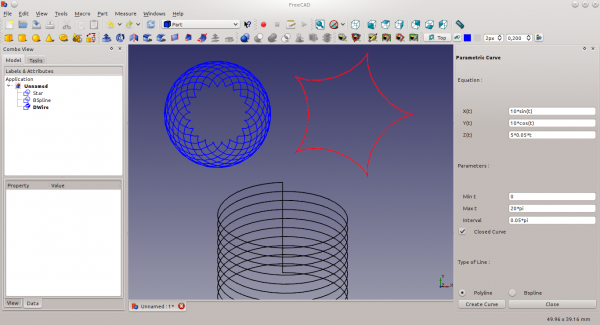
Example Epicycloid curve
Original Script
You can find the updated code (13/05/2015) on the following Github repository: Get the code here!
Modified Script
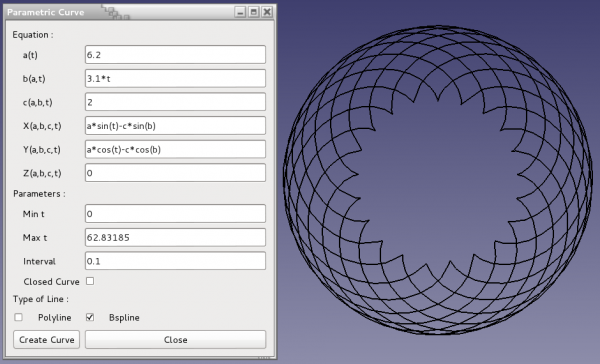
ToolBar Icon 
Macro 3D Parametric Curve.FCMacro
# -*- coding: utf-8 -*-
# Create a 3D parametric Curve.
# Author: Gomez Lucio
# Modified by Laurent Despeyroux on 9th feb 2015
#   - 3 helping variables added a, b and c
#   - enlarged GUI
#   - more flexible GUI
#   - basic error mangement

import FreeCAD
from PySide import QtGui,QtCore
import Part
import Draft
from math import *

class ParamCurv(QtGui.QWidget):
    def __init__(self):
        super(ParamCurv, self).__init__()
        self.initUI()
    def initUI(self):
        self.t0 = QtGui.QLabel("Equation :",self)
        self.ta = QtGui.QLabel("    a(t) ",self)
        self.la = QtGui.QLineEdit(self)
        self.la.setText("37")
        self.tb = QtGui.QLabel("    b(a,t) ",self)
        self.lb = QtGui.QLineEdit(self)
        self.lb.setText("1")
        self.tc = QtGui.QLabel("    c(a,b,t) ",self)
        self.lc = QtGui.QLineEdit(self)
        self.lc.setText("(a+cos(a*t)*2)*b")
        self.t1 = QtGui.QLabel("    X(a,b,c,t) ",self)
        self.l1 = QtGui.QLineEdit(self)
        self.l1.setText("cos(t)*c")
        self.t2 = QtGui.QLabel("    Y(a,b,c,t) ",self)
        self.l2 = QtGui.QLineEdit(self)
        self.l2.setText("sin(t)*c")
        self.t3 = QtGui.QLabel("    Z(a,b,c,t) ",self)
        self.l3 = QtGui.QLineEdit(self)
        self.l3.setText("0")
        self.t31 = QtGui.QLabel("Parameters :",self)
        self.t4 = QtGui.QLabel("    Min t ",self)
        self.l4 = QtGui.QLineEdit(self)
        self.l4.setText("0")
        self.t5 = QtGui.QLabel("    Max t ",self)
        self.l5 = QtGui.QLineEdit(self)
        self.l5.setText("6.283185")
        self.t6 = QtGui.QLabel("    Interval ",self)
        self.l6 = QtGui.QLineEdit(self)
        self.l6.setText("0.01")
        self.t7 = QtGui.QLabel("Type of Line :",self)
        self.op1 = QtGui.QCheckBox("    Polyline",self)
        self.poly = False
        self.op1.stateChanged.connect(self.polyState)
        self.op1.setCheckState(QtCore.Qt.Checked)
        self.op2 = QtGui.QCheckBox("    Bspline",self)
        self.bsline = False
        self.op2.stateChanged.connect(self.bsplineState)
        self.t8 = QtGui.QLabel("    Closed Curve",self)
        self.op3 = QtGui.QCheckBox("",self)
        self.cclose = False
        self.op3.stateChanged.connect(self.ccloseState)
        self.createbutt = QtGui.QPushButton("Create Curve",self)
        self.exitbutt = QtGui.QPushButton("Close",self)
        layout = QtGui.QGridLayout()
        self.resize(420, 380)
        self.setWindowTitle("Parametric Curve ")
        i = 0
        layout.addWidget(self.t0, i, 0)
        i = i+1
        layout.addWidget(self.ta, i, 0)
        layout.addWidget(self.la, i, 1)
        i = i+1
        layout.addWidget(self.tb, i, 0)
        layout.addWidget(self.lb, i, 1)
        i = i+1
        layout.addWidget(self.tc, i, 0)
        layout.addWidget(self.lc, i, 1)
        i = i+1
        layout.addWidget(self.t1, i, 0)
        layout.addWidget(self.l1, i, 1)
        i = i+1
        layout.addWidget(self.t2, i, 0)
        layout.addWidget(self.l2, i, 1)
        i = i+1
        layout.addWidget(self.t3, i, 0)
        layout.addWidget(self.l3, i, 1)
        i = i+1
        layout.addWidget(self.t31, i, 0)
        i = i+1
        layout.addWidget(self.t4, i, 0)
        layout.addWidget(self.l4, i, 1)
        i = i+1
        layout.addWidget(self.t5, i, 0)
        layout.addWidget(self.l5, i, 1)
        i = i+1
        layout.addWidget(self.t6, i, 0)
        layout.addWidget(self.l6, i, 1)
        i = i+1
        layout.addWidget(self.t8, i, 0)
        layout.addWidget(self.op3, i, 1)
        i = i+1
        layout.addWidget(self.t7, i, 0)
        i = i+1
        layout.addWidget(self.op1, i, 0)
        layout.addWidget(self.op2, i, 1)
        i = i+1
        layout.addWidget(self.createbutt, i, 0)
        layout.addWidget(self.exitbutt, i, 1)
        self.setLayout(layout)
        self.show()
        QtCore.QObject.connect(self.createbutt, QtCore.SIGNAL("pressed()"),self.draw)
        QtCore.QObject.connect(self.exitbutt, QtCore.SIGNAL("pressed()"),self.close)
    def ccloseState(self, state):
        if state == QtCore.Qt.Checked:
            self.cclose = True
        else:
            self.cclose = False
    def bsplineState(self, state):
        if state == QtCore.Qt.Checked:
            self.bsline = True
            self.op1.setCheckState(QtCore.Qt.Unchecked)
        else:
            self.bsline = False
    def polyState(self, state):
        if state == QtCore.Qt.Checked:
            self.poly = True
            self.op2.setCheckState(QtCore.Qt.Unchecked)
        else:
            self.poly = False
    def draw(self):
        msgBox = QtGui.QMessageBox()
        fa = str(self.la.text())
        fb = str(self.lb.text())
        fc = str(self.lc.text())
        fx = str(self.l1.text())
        fy = str(self.l2.text())
        fz = str(self.l3.text())
        t = float(str(self.l4.text()))
        tf = float(self.l5.text())
        intv = float(str(self.l6.text()))
        d=(tf-t)/intv
        matriz = []
        for i in range(int(d)):
            try:
              value="a"
              a=eval(fa)
              value="b"
              b=eval(fb)
              value="c"
              c=eval(fc)
              value="X"
              fxx=eval(fx)
              value="Y"
              fyy=eval(fy)
              value="Z"
              fzz=eval(fz)
            except ZeroDivisionError:
              msgBox.setText("Error division by zero in calculus of "+value+"() for t="+str(t)+" !")
              msgBox.exec_()
            except:
              msgBox.setText("Error in the formula of "+value+"() !")
              msgBox.exec_()
            matriz.append(FreeCAD.Vector(fxx,fyy,fzz))
            t+=intv
        curva = Part.makePolygon(matriz)
        if self.bsline == True:
            Draft.makeBSpline(curva,closed=self.cclose,face=False)
        if self.poly == True:
            Draft.makeWire(curva,closed=self.cclose,face=False)
    def close(self):
        self.hide()

ParamCurv()
Эта страница получена от https://wiki.freecad.org/Macro_3D_Parametric_Curve