


|
|
| Umístění Menu |
|---|
| Kreslení -> Nákres do Náčrtu |
| Pracovní stoly |
| Kreslení, Architektura |
| Výchozí zástupce |
| Nikdo |
| Představen ve verzi |
| - |
| Viz také |
| Nikdo |

Description
Popis
Tento nástroj konvertuje objekty Kreslení do objektu Náčrt a naopak.
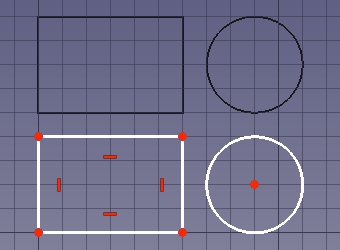
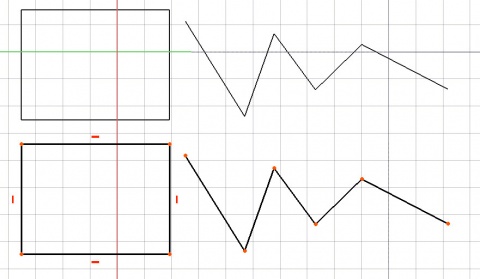
Usage
Použití
- Vyberte objekt Kreslení nebo Náčrt
- Stiskněte tlačítko
 Kreslení2Náčrt
Notes
- Non-Draft objects that are totally planar can also be converted.
- The command can only handle objects made up out of straight lines, circular arcs, elliptical arcs, B-splines and Bézier curves.
- Draft BezCurves will be approximated by Sketcher BSplines.
- The external KicadStepUp Workbench contains a command to convert a Draft BSpline into a series of Sketcher Arcs. For more information see the forum topic BSplines to Shape2DView and Sketcher.
- This other forum topic contains a macro for such a conversion.
Scripting
Skriptování
Není dostupné, podívejte se na dokumentaci Modulu Náčrt jak vytvořit náčrt pomocí skriptování.
To convert objects to a sketch use the make_sketch method (introduced in 0.19) of the Draft module. This method replaces the deprecated makeSketch method.
sketch = make_sketch(objects_list, autoconstraints=False, addTo=None, delete=False, name="Sketch", radiusPrecision=-1, tol=1e-3)
objects_listcontains the objects to be converted. It is either a single object or a list of objects.Draftobjects,Part::Featureobjects andPart.Shapeobjects are supported.- If
autoconstraintsisTruecoincident constraints are added to nodes belonging to the same source object. addTois the existing sketch object the geometry is added to. If not supplied a new sketch is created.- If
deleteisTruethe source objects are deleted. nameis the name for the new sketch.radiusPrecisionindicates how radius constraints should be handled:- Use
-1to disable radius constraints. - Use
0to add individual radius constraints. - Use a positive number to round radii according to this precision, and to add equal constraints between curves with equal radii.
- Use
tolis the tolerance used to check if shapes are planar and co-planar. Use-1for a strict analysis.sketchis returned with the sketch object.
To convert a sketch to Draft objects use the draftify method of the Draft module.
draftify(objectslist, makeblock=False, delete=True)
objectslistcontains the objects to be converted. It is either a single object or a list of objects.- If
makeblockisTruethe converted objects are grouped in aPart::Part2DObject. - If
deleteisTruethe source objects are deleted.
Example:
import FreeCAD as App
import Draft

doc = App.newDocument()

rectangle = Draft.make_rectangle(2000, 1000)
circle = Draft.make_circle(500)
doc.recompute()

sketch_from_draft = Draft.make_sketch([rectangle, circle], autoconstraints=True, delete=False, radiusPrecision=0)
doc.recompute()

draft_from_sketch = Draft.draftify(sketch_from_draft, delete=False)
doc.recompute()
Tato stránka je načtena z https://wiki.freecad.org/Draft_Draft2Sketch