Einleitung
Dies ist ein Beispiel, wie man das Symbol eines benutzerdefinierten viewproviders verändert, der normalerweise einem skriptgenerierten Objekt hinzugefügt wird.
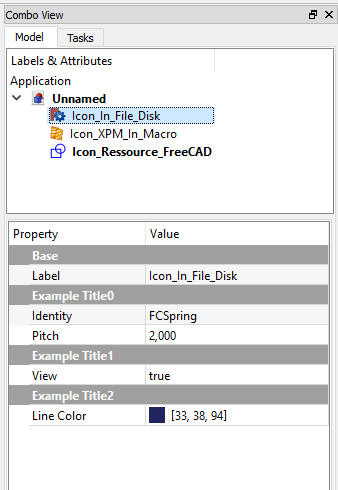
Ein personalisiertes Symbol in der Combo-Ansicht
Hier ein Beispiel zur Erstellung eines Objekts mit personalisierten Eigenschaften und Symbol in der Combo-Ansicht
Das Beispielsymbol in das Verzeichnis herunterladen, das das Makro enthält 
Drei Anwendungsfälle für die Verwendung eines Symbols: icon_in_file_disk (Symbol_in_Festplattenverzeichnis - PNG-Format), icon_XPM_in_macro (Symbol_im_Makro - XPM-Format) und icon_resource_FreeCAD (Symbol_aus_FreeCAD-Verzeichnis)
import PySide
import FreeCAD, FreeCADGui, Part
from pivy import coin
from PySide import QtGui ,QtCore
from PySide.QtGui import *
from PySide.QtCore import *
import Draft

global path
param = FreeCAD.ParamGet("User parameter:BaseApp/Preferences/Macro")# macro path in FreeCAD preferences
path = param.GetString("MacroPath","") + "/"                        # macro path
path = path.replace("\\","/")                                       # convert the "\" to "/"


class IconViewProviderToFile:                                       # Class ViewProvider create Property view of object
    def __init__( self, obj, icon):
        self.icone = icon

    def getIcon(self):                                              # GetIcon
        return self.icone

    def attach(self, obj):                                          # Property view of object
        self.modes = []
        self.modes.append("Flat Lines")
        self.modes.append("Shaded")
        self.modes.append("Wireframe")
        self.modes.append("Points")
        obj.addDisplayMode( coin.SoGroup(),"Flat Lines" )           # Display Mode
        obj.addDisplayMode( coin.SoGroup(),"Shaded" )
        obj.addDisplayMode( coin.SoGroup(),"Wireframe" )
        obj.addDisplayMode( coin.SoGroup(),"Points" )
        return self.modes

    def getDisplayModes(self,obj):
        return self.modes

#####################################################
########## Example with icon to file # begin ########
#####################################################

object1 = FreeCAD.ActiveDocument.addObject("App::FeaturePython", "Icon_In_File_Disk")                                     # create your object
object1.addProperty("App::PropertyString","Identity", "ExampleTitle0", "Identity of object").Identity = "FCSpring"        # Identity of object
object1.addProperty("App::PropertyFloat" ,"Pitch",    "ExampleTitle0", "Pitch betwen 2 heads").Pitch  = 2.0               # other Property Data
object1.addProperty("App::PropertyBool"  ,"View",     "ExampleTitle1", "Hello world").View            = True              # ...
object1.addProperty("App::PropertyColor" ,"LineColor","ExampleTitle2", "Color to choice").LineColor   = (0.13,0.15,0.37)  # ...
#...other Property Data
#...other Property Data
#
object1.ViewObject.Proxy = IconViewProviderToFile( object1, path + "FreeCADIco.png")                                      # icon download to file
App.ActiveDocument.recompute()
#
#__Detail__:
# FreeCAD.ActiveDocument.addObject( = create now object personalized
# "App::FeaturePython",             = object as FeaturePython
# "Icon_In_File_Disk")              = internal name of your object
#
#
# "App::PropertyString",    = type of Property , availlable : PropertyString, PropertyFloat, PropertyBool, PropertyColor
# "Identity",               = name of the feature
# "ExampleTitle0",          = title of the "section"
# "Identity of object")     = tooltip displayed on mouse
# .Identity                 = variable (same of name of the feature)
# object1.ViewObject.Proxy  = create the view object and gives the icon
#
########## example with icon to file end


#####################################################
########## Example with icon in macro # begin #######
#####################################################

def setIconInMacro(self):        # def contener the icon in format .xpm
    # File format XPM created by Gimp "https://www.gimp.org/"
    # Choice palette Tango
    # Create your masterwork ...
    # For export the image in XPM format
    #     Menu File > Export as > .xpm
    # (For convert image true color in Tango color palette :
    #     Menu Image > Mode > Indexed ... > Use custom palette > Tango Icon Theme > Convert)
    return """
            /* XPM */
            static char * XPM[] = {
            "22 24 5 1",
            " 	c None",
            ".	c #CE5C00",
            "+	c #EDD400",
            "@	c #F57900",
            "#	c #8F5902",
            "                      ",
            "                      ",
            "  ....                ",
            "  ..@@@@..            ",
            "  . ...@......        ",
            "  .+++++++++...       ",
            "  .      ....++...    ",
            "  .@..@@@@@@.+++++..  ",
            "  .@@@@@..#  ++++ ..  ",
            "  .       ++++  .@..  ",
            "  .++++++++  .@@@.+.  ",
            " .      ..@@@@@. ++.  ",
            " ..@@@@@@@@@.  +++ .  ",
            " ....@...# +++++ @..  ",
            " .    ++++++++ .@. .  ",
            " .++++++++  .@@@@ .   ",
            " .   #....@@@@. ++.   ",
            " .@@@@@@@@@.. +++ .   ",
            " ........  +++++...   ",
            " ...  ..+++++ ..@..   ",
            "    ......  .@@@ +.   ",
            "          ......++.   ",
            "                ...   ",
            "                      "};
        """

object2 = FreeCAD.ActiveDocument.addObject("App::FeaturePython", "Icon_XPM_In_Macro")                                    #
object2.addProperty("App::PropertyString","Identity","ExampleTitle","Identity of object").Identity = "FCSpring"
#...other Property Data
#...other Property Data
#
object2.ViewObject.Proxy = IconViewProviderToFile( object2, setIconInMacro(""))              # icon in macro (.XPM)
App.ActiveDocument.recompute()
########## example with icon in macro end


####################################################################
########## Example with icon to FreeCAD ressource # begin ##########
####################################################################

object3 = FreeCAD.ActiveDocument.addObject("App::FeaturePython", "Icon_Ressource_FreeCAD")                               #
object3.addProperty("App::PropertyString","Identity","ExampleTitle","Identity of object").Identity = "FCSpring"
#...other Property Data
#...other Property Data
#
object3.ViewObject.Proxy = IconViewProviderToFile( object3, ":/icons/Draft_Draft.svg")       # icon to FreeCAD ressource
App.ActiveDocument.recompute()
########## example with icon to FreeCAD ressource end
Vollständiges Beispiel zur Erstellung eines Würfels und seines Symbols
#https://forum.freecad.org/viewtopic.php?t=10255#p83319
import FreeCAD, Part, math
from FreeCAD import Base
from PySide import QtGui

global path
param = FreeCAD.ParamGet("User parameter:BaseApp/Preferences/Macro")# macro path in FreeCAD preferences
path = param.GetString("MacroPath","") + "/"                        # macro path
path = path.replace("\\","/")                                       # convert the "\" to "/"

def setIconInMacro(self):
    return """
        /* XPM */
        static char * xpm[] = {
        "22 22 12 1",
        " 	c None",
        ".	c #A40000",
        "+	c #2E3436",
        "@	c #CE5C00",
        "#	c #F57900",
        "$	c #FCAF3E",
        "%	c #5C3566",
        "&	c #204A87",
        "*	c #555753",
        "=	c #3465A4",
        "-	c #4E9A06",
        ";	c #729FCF",
        "                      ",
        "                      ",
        "                      ",
        "        ..   ..       ",
        "       +@#+++.$$      ",
        "       +.#+%..$$      ",
        "       &*$  &*#*      ",
        "      &   =&=  =      ",
        "   ++&  +.==   %=     ",
        "  ++$@ ..$ %=   &     ",
        "  ..-&%.#$$ &## +=$   ",
        "   .#  ..$ ..#%%.#$$  ",
        "     ;    =+=## %-$#  ",
        "     &=   ;&   %=     ",
        "      ;+ &=;  %=      ",
        "      ++$- +*$-       ",
        "      .#&&+.@$$       ",
        "      ..$# ..$#       ",
        "       ..   ..        ",
        "                      ",
        "                      ",
        "                      "};
        """

class PartFeature:
    def __init__(self, obj):
        obj.Proxy = self

class Box(PartFeature):
    def __init__(self, obj):
        PartFeature.__init__(self, obj)
        obj.addProperty("App::PropertyLength", "Length", "Box", "Length of the box").Length = 1.0
        obj.addProperty("App::PropertyLength", "Width",  "Box", "Width of the box" ).Width  = 1.0
        obj.addProperty("App::PropertyLength", "Height", "Box", "Height of the box").Height = 1.0

    def onChanged(self, fp, prop):
        try:
            if prop == "Length" or prop == "Width" or prop == "Height":
                fp.Shape = Part.makeBox(fp.Length,fp.Width,fp.Height)
        except:
            pass

    def execute(self, fp):
        fp.Shape = Part.makeBox(fp.Length,fp.Width,fp.Height)

class ViewProviderBox:
    def __init__(self, obj, icon):
        obj.Proxy  = self
        self.icone = icon

    def getIcon(self):
        return self.icone

    def attach(self, obj):
        return

    def setupContextMenu(self, obj, menu):
        action = menu.addAction("Set default height")
        action.triggered.connect(lambda f=self.setDefaultHeight, arg=obj:f(arg))

        action = menu.addAction("Hello World")
        action.triggered.connect(self.showHelloWorld)

    def setDefaultHeight(self, view):
        view.Object.Height = 15.0

    def showHelloWorld(self):
        QtGui.QMessageBox.information(None, "Hi there", "Hello World")

def makeBox():
    FreeCAD.newDocument()
    a=FreeCAD.ActiveDocument.addObject("Part::FeaturePython","Box")
    Box(a)
#    ViewProviderBox(a.ViewObject, path + "FreeCADIco.png")    # icon download to file
#    ViewProviderBox(a.ViewObject,  ":/icons/Draft_Draft.svg") # icon to FreeCAD ressource
    ViewProviderBox(a.ViewObject,  setIconInMacro(""))        # icon in macro (.XPM)
    App.ActiveDocument.recompute()

makeBox()
Diese Seite wird abgerufen von https://wiki.freecad.org/Custom_icon_in_tree_view