FreeCAD Logo FreeCAD 1.0
  • Engleză Afrikaans Arabă Belarusă Catalană Cehă Germană Greacă Spaniolă Spaniolă Bască Finlandeză Filipineză Franceză Galiciană Croată Maghiară Indoneziană Italiană Japoneză Kabyle Coreeană Lituaniană Olandeză Norvegiană Bokmål Poloneză Portugheză Portugheză Română Rusă Slovacă Slovenă Sârbă Suedeză Turcă Ucrainiană Valenciană Vietnameză Chineză Chineză
  • Funcții
  • Descarca
  • Blog
  • Documentaţie
    Indicele documentului Primii pasi Documentație utilizatori Manualul utilizatorului FreeCAD Documentaţia Atelierelor Documente despre codarea în limbajul python C++ coding documentation Tutoriale Întrebări frecvente Privacy policy About FreeCAD
  • Contribuiți
    Cum să ajuți Sponsor Raportează o problemă Efectuează o cerere de tragere Locuri de muncă și finanțare Orientări privind contribuția Developers handbook Translations
  • Comunitate
    Code of conduct Forum The FPA GitHub GitLab Codeberg Mastodon Matrix IRC IRC via Webchat Gitter Discord Reddit Twitter Facebook LinkedIn Calendar
  • ♥ Donate

Donate

$
Informaţii SEPA
Te rugăm să-ți configurezi transferul bancar SEPA în:
Beneficiary: The FreeCAD project association
IBAN: BE04 0019 2896 4531
BIC/SWIFT: GEBABEBBXXX
Agenție bancară: BNP Paribas Fortis
Adresă: Rue de la Station 64, 1360 Perwez, Belgium

While Stripe doesn't support monthly donations, you can still become a sponsor! Simply make a one-time donation equivalent to 12 months of support, and you'll gain access to the corresponding sponsoring tier. It's an easy and flexible way to contribute.

If you are not sure or not able to commit to a regular donation, but still want to help the project, you can do a one-time donation, of any amount.

Choose freely the amount you wish to donate one time only.

You can support FreeCAD by sponsoring it as an individual or organization through various platforms. Sponsorship provides a steady income for developers, allowing the FPA to plan ahead and enabling greater investment in FreeCAD. To encourage sponsorship, we offer different tiers, and unless you choose to remain anonymous, your name or company logo will be featured on our website accordingly.

from 1 USD / 1 EUR per month. You will not have your name displayed here, but you will have helped the project a lot anyway. Together, normal sponsors maintain the project on its feet as much as the bigger sponsors.

from 25 USD / 25 EUR per month. Your name or company name is displayed on this page.

from 100 USD / 100 EUR per month. Your name or company name is displayed on this page, with a link to your website, and a one-line description text.

from 200 USD / 200 EUR per month. Your name or company name and logo displayed on this page, with a link to your website and a custom description text. Companies that have helped FreeCAD early on also appear under Gold sponsors.

Instead of donating each month, you might find it more comfortable to make a one-time donation that, when divided by twelve, would give you right to enter a sponsoring tier. Don't hesitate to do so!

Choose freely the amount you wish to donate each month.

Please inform your forum name or twitter handle as a notein your transfer, or reach to us, so we can give you proper credits!

Panel Sheet
Frame
Arch

Arch Nest

poziția meniului
Arch → Panel tools → Nest
Ateliere
Arch
scurtătură
Nici unul
Prezentat în versiune
-
A se vedea, de asemenea,
Arch Panel/ro, Arch Panel Sheet/ro

Descriere

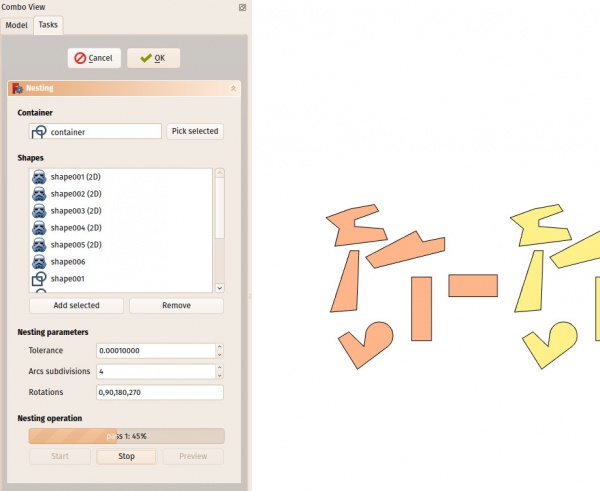
Instrumentul Nest permite selectarea unei forme plate pentru a fi un container și o serie de alte forme plate care urmează să fie organizate în interiorul spațiului definit de forma recipientului. Acest lucru este de obicei necesar pentru operațiunile CNC, unde doriți să tăiați o serie de bucăți dintr-un panou de bază și trebuie să organizați piesele în cel mai bun mod posibil, astfel încât acestea să ocupe mai puțin spațiu pe panou.

Algoritmul din spatele instrumentului Nest (Economizor) este în evoluție constantă și, în prezent, nu este pe deplin optimizat. În viitor, performanța acestui instrument ar trebui să devină mult mai bună.

Imaginea de mai sus prezintă o serie de forme înainte și după operația de cuibărit

Cum se folosește

  1. Apăsați butonul Arch Nest
  2. Selectați un obiect pentru a fi container. Acest obiect trebuie să fie plat, și, pentru moment, rectangular
  3. Click pe butonul "Pick container" pentru a utiliza acst obiect ca pe un container
  4. Selectați o serie de alte obiecte plane pe care doriți să le plasați în interiorul containerului. Aceste obiecte trebuie să fie toate plane și în același plan cu containerul.
  5. Ajustați opțiunile dorite de mai jos
  6. Start procesul de calcul
  7. L sfârșitul calculului, click pe butonul Preview pentru a crea o previzualizare temporară a rezultatului.
  8. Dacă doriți să aplicați rezultatul (mișcați și rotiți formele actual în ampalsament), click pe OK.

Notă

  • toate obiectele trebuie să aibă o fațetă
  • At the moment the tool will only work with flat objects that all have the same orientation.
  • At the moment, the container must be rectangular.
  • At the moment, margin / spacing between the pieces is not implemented yet
  • Calculul poate să ia mult timp pentru mai multe obiecte. Acest lucru va fi optimizat în viitor


Panel Sheet
Frame
Arch

Această pagină este preluată de la https://wiki.freecad.org/Arch_Nest

Intrați în legătură!
Forum GitHub Mastodon Matrix IRC Gitter.im Discord Reddit Twitter Facebook LinkedIn

© The FreeCAD Team. Homepage image credits (top to bottom): ppemawm, r-frank, epileftric, regis, rider_mortagnais, bejant.

Acest proiect este sprijinit de: , KiCad Services Corp. and other sponsors

GitHubImprove this page on GitHub