TutorialInfo: Topic: How To's and Misc Info Level: all Time: n/a Author: n/a FCVersion: 0.19
TechDraw HowTo Page
Introduction
This page provide a collection of hints and little guides on using the  TechDraw Workbench. Adding new findings and best practices is encouraged.
Enable/Disable Centermarks
When the centermarks are disabled hole centers and similar things can not be dimensioned. The centermarks are rendered as a little cross.
- Select the view port (e.g. \"Front\")
- In the property panel, \'ViewTab set the valueArc Center Marks\'\' to true
Note in this tab are other settings for the view that might be useful.
Toggle View Frame and Vertex dots
See here for switching them on and off and more information.
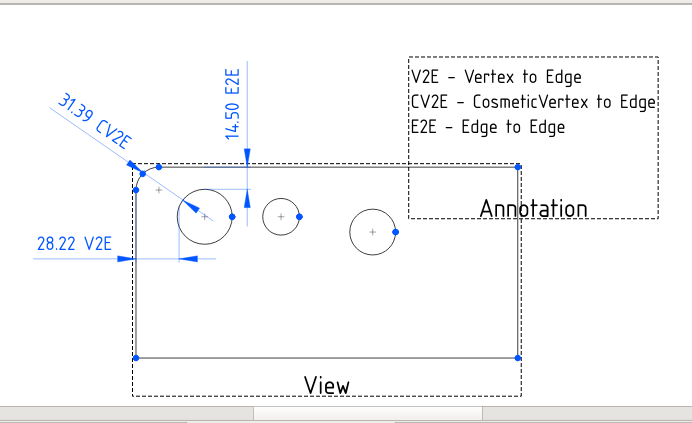
Curved edges as input to linear dimensions
Curved edges are accepted as input to linear dimensions. See this forum thread
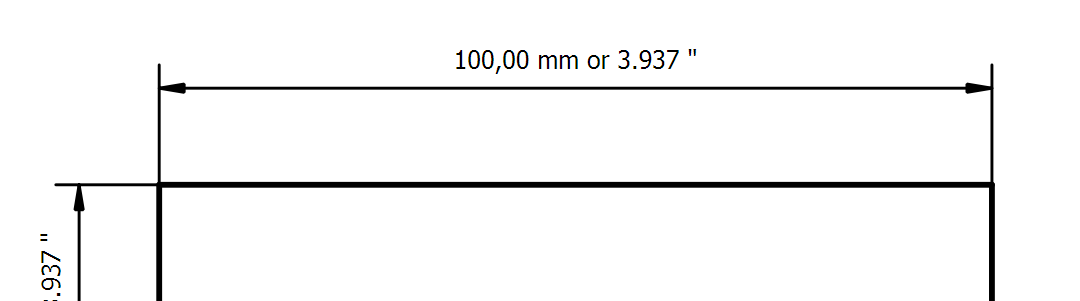
Show metric and imperial dimensions at the same time
It is possible to show metric and imperial decimal dimensions at the same time. See this forum thread
Dimensioning in case of oriented holes
Two use cases. See this forum thread.
See also Measurement Of Angles On Holes


{{TechDraw Tools navi
}}
⏵ documentation index > TechDraw > TechDraw HowTo Page
This page is retrieved from https://github.com/FreeCAD/FreeCAD-documentation/blob/main/wiki/TechDraw_HowTo_Page.md