GuiCommand: Name: Std DemoMode MenuLocation: Tools , View turntable... Workbenches: All
Std DemoMode
Description
The Std DemoMode command will continuously rotate the camera in a 3D view.
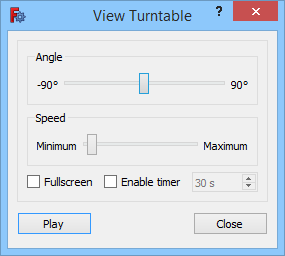
The View Turntable dialog box
Usage
- Select the Tools →
 View turntable... option from the menu.
 - The View Turntable dialog box opens.
- Move the Angle slider to tilt the camera\'s virtual turn table.
- Move the Speed slider to adjust the rotation speed of the camera.
- Check the Fullscreen checkbox to switch the 3D view to fullscreen mode.
- The Enable timer option is not supported at this time.
- Press the Play button. The button will stay pushed in and its text will change to Stop.
- In fullscreen mode the dialog will disappear after ca. 5 seconds. It will reappear if the mouse is moved over the 3D view.
- Press the Stop button to stop the camera rotation.
- Optionally change settings and restart.
- Press the Close button to close the dialog box.
Notes
- For more information about fullscreen mode see the Std ViewFullscreen command.
⏵ documentation index > Std DemoMode
This page is retrieved from https://github.com/FreeCAD/FreeCAD-documentation/blob/main/wiki/Std_DemoMode.md