GuiCommand: Name: Std Alignment MenuLocation: Edit , Alignment... Workbenches: All SeeAlso: Std_Placement
Std Alignment
Description
The Std Alignment command aligns an object in relation to a fixed reference object using one or more point pairs.
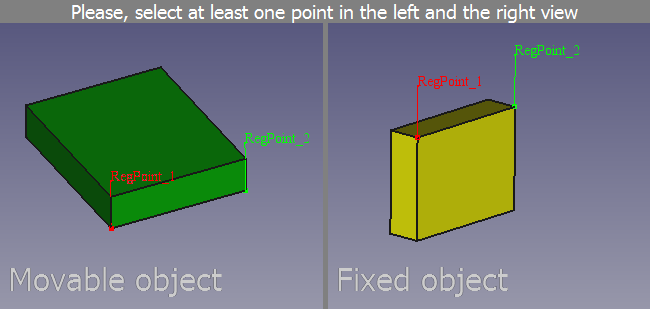 *The command interface after two point pairs have been defined*
Usage
- Select the reference object. This will be the fixed object and not be changed.
- Hold down the Ctrl key while you select the object whose placement you want to change.
- Select the Edit →
 Alignment... option from the menu.
 - A new window will appear in the Main view area. This window consists of two views: on the left the movable object is displayed and on the right the fixed object.
- Define the first point pair by clicking a point in each view. This point pair is used to move the movable object.
- Define one or two more point pairs if you also want to rotate the movable object.
- Right-click one of the views and select the Align option from the context menu to complete the command.
Options
The following additional options are available in the context menu:
- Select the Remove last point option to remove the last point in the view.
- Select the Cancel option to abort the command.
- Check the Syncronize views option if any view changes (pan, rotate and zoom) should be applied to both views.
⏵ documentation index > Std Alignment
This page is retrieved from https://github.com/FreeCAD/FreeCAD-documentation/blob/main/wiki/Std_Alignment.md