Macro Texture
{{Macro
|Name=Macro Texture
|Icon=FCTexture.png
|Description=Creates a 3D image from an 8 bit (256 color) BMP image.
In other words, it allows one to build a 3D project very easily from a bitmap image using grayscale (256 shades of gray).
If one 32 bit BMP image is selected, the image is represented in points.
The '''FCCreaLoft Macro Loft''' macro is used to automate the multi loft operation.
|Author=Mario52
|Version=0.15
|Date=2025/01/04
|FCVersion=0.18 and more
|Download=[https://www.freecad.org/wiki/https://raw.githubusercontent.com/FreeCAD/FreeCAD-documentation/master/wiki/images/9/90/FCTexture.png ToolBar Icon]
|SeeAlso=32px|FCCreaLoft Macro Loft
}}


Description
This small macro allows one to build a 3D project very easily from a bitmap image with 256 shades of gray.
I hope that this macro will revolutionize the way we think when modeling with CAD and CNC converting to 3D objects with little to no intervention.
Everything becomes possible regardless of the complexity of the image!
The  Macro Loft is used to automate the multi loft operation.
 *Texture 004 Honda*
Usage
This macro requires an image in 256 shades of gray (0-255) therefore before executing the macro, convert your image into grayscale (black and white). When running the macro, the number of colors is detected automatically. Note: if the image is more than 256 colors another function is expected (WIP). Each color (gray level) is regarded as a deep, white (255) the level high and black (0) the lowest level (deep).
Configuration is done before the opening of the file, default values are the settings provided to get a project\'s dimensions:
- width of the image in points in the coordinate X,
- height of the image in points in the coordinate Y,
- depth or thickness of the project leaked 10 mm (in raw mode, on 256 mm) in the coordinate Z.
The image file unfolds like a scanner x1 x2 x3 ... in 1 mm increments in FreeCAD similarly to the value y of 1 mm at a time. The value of z is given by the value of the color. These values are configurable in the macro.
Important note: depending on the size of the image, the project can become very large in size! For example, a simple image of (100px x 100px) width/height would be: 100 x 100 = 10000 points. Each of the 10,000 points corresponds to a coordinate, so that means 10000 X, 10000 Y, and 10000 Z coordinates in actuality.
Interface
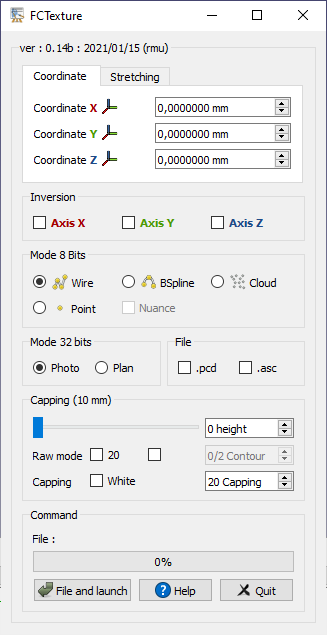
Coordinates
-
Coordinate X
 {{SpinBox|0,00 mm}}: The X coordinate position of the object (default: 0)
 -
Coordinate Y
{{SpinBox|0,00 mm}}: The Y coordinate position of the object (default: 0) -
Coordinate Z
{{SpinBox|0,00 mm}}: The Z coordinate position of the object (default: 0)
Stretching
-
Stretching X{{SpinBox|0,00 mm}}: narrowing or enlarging of the X (length) of the object (default: 0)
-
Stretching Y{{SpinBox|0,00 mm}}: narrowing or enlarging of the Y (height) of the object (default: 0)
-
Stretching Z{{SpinBox|0,00 mm}}: narrowing or enlarging of the Z (depth) of the object (default: 0)
Inversion
-
{{CheckBox|Axis X}}: inverts the X coordinates of the image.
-
{{CheckBox|Axis Y}}: inverts the Y coordinates of the image.
-
{{CheckBox|Axis Z}}: inverts the Z coordinates of the image.
8 bit Mode
The beginning of the operation value automatically adapts to the selected function: 0 if the setting is on black (Black) 255 or 20 if the setting is white (White).
-
{{RadioButton|TRUE|
 Wire}}: build the line (vector) in the form of Wire.
 -
{{RadioButton|
 Bspline}}: build the line (vector) in the form of Bspline.
 -
{{RadioButton|
 Cloud}}: build the points vectors in a point cloud.
 -
{{RadioButton|
 Point}}: creates a point at each pixel (vector) (Note: this procedure is CPU intensive)
 -
{{CheckBox|Nuance}}: if the shade option is checked, the color of the point is represented as a picture.
32 bit Mode
-
{{RadioButton|TRUE|Photo}}: photo mode is automatically activated when a 32-bit image is detected. (Note: this procedure is CPU intensive)
-
{{RadioButton|Plan}}: allows for importing a 32-bit image and ignore the background of the plan. By default the map background is black to ignore colors are adjustable with the Capping command. If White is checked, the bottom has ignore will be white. (Note: this procedure is CPU intensive)
File
-
{{CheckBox|.pcd}}: if checked, a file (originalName.bmp.pcd) is saved in the same directory of the file (pcd v0.7).
-
{{CheckBox|.asc}}: if checked, a file (originalName.bmp.asc) is saved in the same directory of the file. This file can be used as a point cloud (format: X Y Z).
Capping (10mm)
-
Slider: Enter the height of the form. The height is displayed on title frame.
-
{{SpinBox|0 height}}: Enter the height of the form. The height is displayed on title frame.
-
Raw mode {{CheckBox|20}}: For adjusting the number of colors (depth). The default mode is 0-20 (which constitutes a filter and to obtain more details according to the complexity of the image) once the checked the mode is 0 to 255 (the entire range of colors).
-
{{CheckBox}}: this option enables the ability to access the Contour spinbox
-
{{SpinBox|0/2 Contour}}: this spinbox gives the contour line. do not use (ex: 0 for the base).
-
Capping {{CheckBox|White}}: this function can be made on the choice of colours, white (default) or black. The degrees of capping rule 20 to 0 (or 255 to 0) if the checkbox is set on W (unchecked) or 0 to 20 (or 0 to 255) if the checkbox is set on B (checked).
-
{{SpinBox|20 Capping}}: this spinbox gives the degrees of capping.
Command
-
File and launch: opens the image file and launches the conversion.
-
Help:
-
Display the Wiki page in the FreeCAD browser
-
For change the parameter disponible: go to Tools → Edit parameter...
-
__The global step on spinBox:__
-
User parameter:BaseApp/Preferences/Macros/FCMmacros/FCTexture → SingleStep
-
Adjust the value desired (1.0 by default)
-
__For search if the macro is upgraded :__
-
User parameter:BaseApp/Preferences/Macros/FCMmacros/FCTexture → switchVesionMacroSearch
-
Adjust the switchVesionMacroSearch to
True(Falseby default) -
Quit: exits the function.
Script
The icons .png  and .svg
Macro_Texture.FCMacro
Download the macro to Gist Macro FCTexture.FCMacro
Example
The images were inclined to enhance the 3D effect.
<File:FCTexture_008.png%7CHonda>
<File:Macro_FCTexture_008b.png%7CHere> with option contour
Image:Texture 001 Logo.png|The logo of FreeCAD. Image:Texture 002 Fe FC.png|A portion of the screen FreeCAD. The file.
Image:Texture_003_napperon.png|A portion of a tablecloth. Image:Texture_005_larme.png|A diamond plate.
<File:FCTexture_007_FreeCAD_ASCII_00.png%7CImage> converted in ASCII caracter.
<File:FCTexture_Example.gif%7CProcedure> for create solid:
1: Create loft with the  tools or with the Macro Loft
2: Select all and extrude with the tools
tools or with the Macro Loft
2: Select all and extrude with the tools  3A: For Linux Download GMSHMesh (author psicofil) Macro_GMSH Wiki page
3B: For Windows Download GmshMesh2.zip unzip the file and install it in your Mod directory (author ulrich1a)
4: Create your Mesh file and use it
3A: For Linux Download GMSHMesh (author psicofil) Macro_GMSH Wiki page
3B: For Windows Download GmshMesh2.zip unzip the file and install it in your Mod directory (author ulrich1a)
4: Create your Mesh file and use it
Links
The discussion on the forum to give your impressions or contact me.
The macro Macro Loft for automate the multi loft.
How to handle pdf import properly and feasibly?
Revision
-
ver 0.15 2025/01/04 delette all references to PySide and QtWidgets , chrono by chrisb
-
Ver 0.14c : 15-01-2021 include Gui.SendMsgToActiveView(\"ViewFit\")
-
Ver 0.14b : 15-01-2021 Create Tab Coordinate and Tab Stretching for diminish the height of the macro and accepted in 15\" screen
-
ver 0.14 : 06/01/2021 change the search path procedure and adding preference option: search the new macro upgraded
                ####new2
                pathFile      = os.path.dirname(SaveName) + "/"  #= C:/Provisoire400/
                formatFichier = os.path.splitext(SaveName)[1]    #= .png
                SaveName      = os.path.splitext(SaveName)[0]    #= /home/kubuntu/.FreeCAD/Macro/Texture_007_H #= C:/Provisoire400/image3D
                SaveNameformatFichier = SaveName + formatFichier #= C:/Provisoire400/image3D.png
                ####new2
                FreeCAD.ParamGet("User parameter:BaseApp/Preferences/Macros/FCMmacros/FCTexture").SetString("Path",pathFile)
####new-
ver 0.13b: 30/12/2020 add try for time.clock() and time.process_time() for Python 3xyz...
-
ver 0.13 : 17/04/2020 Layout and PySide2 Qt5
-
ver 0.12 : 04/08/2019 add spinbox button for height
-
ver 0.11 :03/07/2019 adapt to Python 3
-
ver 0.10 : 28/12/2016 add save point in .pcd, .asc display a points cloud, height form, contour
-
ver 0.9 : 12/12/2016 adding save file .asc for cloud point
-
ver 0.8 : 16/03/2016 adding progressBar
-
ver 0.7 : 03/09/2014 Delete \"translate\" forgotten and bug fix discovered by the passage of PyQt to Pyside !
-
ver 0.6 : 26/08/2014 Delete all \"_translate\"
-
ver 0.5 : 25/08/2014 Delete \"_translate (\" MainWindow \",\" Stretching X \", None)\" that prevented the display of tooltip with PySide (Windows Vista)
-
ver 0.4 : 08/08/2014 PyQt4 PySide
-
ver 0.3 : 28/03/2014 :comment out the line \"# self.checkBox_5.setAccessibleName(_fromUtf8(\"\"))\"
that causes an error with the version FreeCAD : Version: 0.14.3343 (Git), Python version: 2.7.6, Qt version: 4.8.5
⏵ documentation index > Macro Texture
This page is retrieved from https://github.com/FreeCAD/FreeCAD-documentation/blob/main/wiki/Macro_Texture.md