HiDPI support
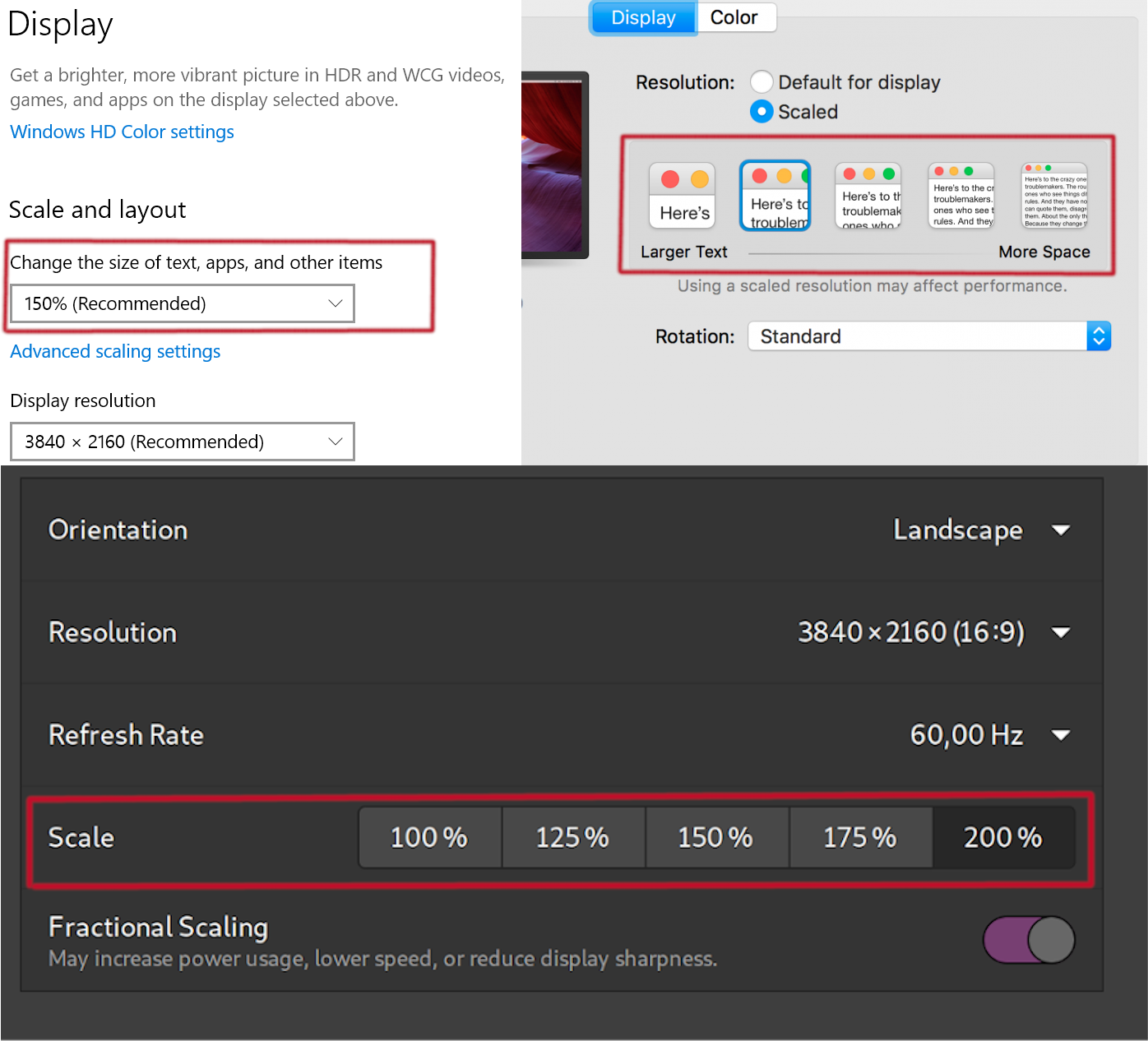
This is a project dedicated to support high-resolution displays in FreeCAD.
HiDPI support refers to the issue of displaying raster graphics (fonts, cursors, images) and UI elements (buttons, menus, handles) on high-resolution displays. It\'s also a term introduced by Apple.
The issue is that the physical size of a display remains the same (from 21 to 32 inches) while its resolution increases (FullHD, 4K, 8K).
To solve the issue, Apple introduced \"HiDPI\", that is scaling all the UI elements according to the font size. Font sizes are specified in points, while their pixel value is calculated using DPI and device pixel ratio which is a scale factor specified by a user in OS settings. At the same time, raster images are rendered at their true pixel size, so individual pixels are less noticeable. It means that raster images are provided at higher resolution to make up for their size on a screen. Vector graphics (UI elements) are rendered accordingly, at higher resolution.
Master plan
Part one
Goal: Make sure that we make the most out of Qt support.
- In progress. Migrate the user base to Qt > 5.6 and set the AA_EnableHighDpiScaling to true.
- Scale all cursors and icons (multiplying them by devicePixelRatio) https://github.com/FreeCAD/FreeCAD/pull/3712
- Make all pixel graphics vector or available at various pixel density
Part two
Goal: Make sure that the system font is correctly determined.
- Bundle appropriate QPA theme plugins on all major platforms (AppImage, etc)
- Find ways to detect that system\'s font is changed
- Remove the toolbar/icon size setting and make the toolbar size relative to the system font
- Add an experimental setting \"scale factor\" which will depend on device pixel ratio and/or system font size
- Rescale the toolbar/icon size according to the new experimental setting
- Gather user feedback whether we need the customizable toolbar icon size
Part three
Goal: Make all UI widgets size relative to the font size
- In all appropriate places, get system font metrics to determine the size of a widget.
- In places where real size is referenced, assume font size as a relative measure (72 points = 96 virtual pixels = 1 inch).
- Choose a reference device relative to which UI could scale up and down.
- 2D coordinates and sizes should assume device-independent pixels.
- Make sure qreal versions of APIs are used.
- Turn off AA_EnableHighDpiScaling
Part four
Goal: Support rescaling when the window is moved from one screen to another
- Detect that device pixel ratio has changed
- Notify all widgets depending on device pixel ratio or the font size
Background
Display resolutions

Device pixel ratio
It\'s a well-known concept for Web and Android developers. But not so much for desktop developers.
Basically, it\'s the ratio between physical pixels and device-independent pixels.
First things first. UI positioning and size (x, y, width, height) are historically defined in pixels.
But as more variety of displays resolutions become available at many different physical sizes, it\'s become a problem software developers need to be aware of.
FreeCAD development was started in 2002, long before such a problem was even foreseen.
Ok, why not just increase DPI, you ask. Well, the issue is that you still want to benefit from the high-resolution display.
All the raster graphics need to contain more pixels, while vector graphics (fonts and icons) should be of the same physical size as visible on the display.
If you just change DPI, you would scale everything up and down. But in fact, you need all the pixel sizes to remain the same, while resources (images) to be displayed in a higher resolution.
So the concept of \"Device-independent pixels\" was introduced. The idea was that developers could keep not worrying about the physical size of a display and design UIs in virtual pixels.
But the reality is that if you use raster graphics, it becomes pixelized, blurry, or aliased as it is displayed in non-native resolution. So developers now need to provide multiple versions of raster images, for each device pixel ratio. Usually, it\'s whole numbers: 1, 2, 3, 4. But it can also be fractional (125%, 150%, 175% = 1.25, 1.5, 1.75) meaning that there\'s still some scaling involved, but not as apparent.
- https://stackoverflow.com/questions/8785643/what-exactly-is-device-pixel-ratio
- https://stackoverflow.com/questions/13911786/what-is-device-pixel-ratio-for
Issue testing/demonstration
macOS
- Open \"Display\"
- Choose \"Scaled\"
- Choose \"Larger text\" - this increases device pixel ratio
Video: https://www.youtube.com/watch?v=4U3eh_fMo4o
X Window
Useful commands:
~$ xrdb -query
*customization: -color
Xft.dpi:    192
Xft.antialias:  1
Xft.hinting:    1
Xft.hintstyle:  hintslight
Xft.rgba:   rgb
Xcursor.size:   128
Xcursor.theme:  DMZ-White

~$ xdpyinfo | grep -B 2 resolution
screen #0:
  dimensions:    3840x2160 pixels (1016x572 millimeters)
  resolution:    96x96 dots per inch
Ubuntu (GNOME Shell)
- Open \"Displays\" (Settings > Devices > Displays)
- Select the highest resolution available
- Select scaling higher than 100%
Issues and solutions
- Raster images (cursors, icons)
- Fonts (defined in pixels rather than points)
- Cursor hot point
- Zoom/Rotate origin
- Snap distance
- Selection distance (the hot area around selectable objects)
Font size
Fonts are usually vector. So they don\'t require a higher resolution version to be able to scale up (in pixels). However, we can\'t just increase every font size and call it a day. People are used to font sizes in relation to how they look on paper. And on paper, it is known that 72pt font takes one inch, and on displays of old days, an inch was equal to 96 pixels at 1:1 zoom level.
So, as display resolutions become higher, displays could fit more text lines of the same size. So naturally, as display physical size remains the same and our eyes don\'t become better at discerning smaller detail, we perceive the same font point size as smaller on higher resolutions.
To overcome this issue, OS implemented what it\'s called DPI scaling (or DPI font settings in the older days) or High-DPI scaling of the recent 4K displays. Users could change the DPI and benefit from much more real estate in terms of pixels while keeping a comfortable to read font size.
Custom cursor size
The cursor size is kind of difficult. Qt recommends using a hardcoded image size of 32x32. As of 5.x it doesn\'t provide any functionality to integrate with OS and query the size of the mouse pointer. It\'s a shame since it means you can\'t benefit from accessibility settings, where cursor size can be set to an arbitrarily large value.
So, until Qt provides better guidance on the cursor size, let\'s use an image of 32 * device pixel ratio.
In OS, for example in GNOME, cursor size appears to be fixed in terms of virtual pixels. That is, it respects the device pixel ratio (keep the same apparent size). But it does increase when you change the display resolution (that is, stays the same in pixels, but increase in apparent size).
For example, here\'s a default setting for virtual pixels in GNOME:
~$ gsettings get org.gnome.desktop.interface cursor-size
64
Taking into account the scale factor, it means the physical pixel size of 128.
Qt doesn\'t provide the functionality to retrieve that value. So we have to either hard code it or provide a user setting to change that.
Forum threads
- Improve support of high DPI displays - general Qt support
- News: Qt 5.14 Is Bringing Significantly Better HiDPI Support - general Qt support
- Custom cursors and high dpi (Windows and macOS testers needed) - raster cursor image issue
- HiDPI Support in Sketcher View - selection distance issue
- High DPI Improvements - PR \"High DPI Fixes\" https://github.com/FreeCAD/FreeCAD/pull/54, bad quality, 2015
- High dpi - experimental build with \"High DPI Improvements\" PR
- GUI font size - font size issue and the QT_SCALE_FACTOR workaround
- BUG? Cropped icons - issues with HiDPI on multiple displays
- FreeCAD 0.17 on macOS Update (Qt 5 builds now available) - issues with HiDPI on macOS after upgrade to Qt5
- Ticket #3537 - Draft Edit mode not working on macOS (HiDPi issue) - macOS + HiDPI, Qt5
- Menu distorted on MAC external display - macOS + HiDPI, external display
- macOS Qt5 plan and status - macOS dropped support for Qt4, HiDPI issues
- https://www.google.com/search?q=freecad+hidpi+site:forum.freecadweb.org
- A suggestion to disable \"dump\" scaling before tackling the font size issues
- Navigation cube scaling
- Navigation cube scaling 2
Relevant changes
-
{{commit|a14b99e77}}
-
{{commit|2f2d50535}}
-
{{commit|bb6e4e6ad}}
-
{{commit|23ecb8eac}}
-
{{commit|ca7770b80}}
-
{{commit|51fcdd2c0}}
-
{{commit|805ccd8deb}}
-
{{commit|347156403}}
-
{{commit|094dda5900d}}
-
{{commit|925cffc1535}}
-
{{commit|7dfeb801a}}
Bugtracker Issues
- Tickets tagged with HiDPI
External references
- https://doc.qt.io/qt-5/highdpi.html
- https://doc.qt.io/qt-5/scalability.html
- https://docs.microsoft.com/en-us/windows/win32/hidpi/high-dpi-desktop-application-development-on-windows
- https://docs.microsoft.com/en-us/windows/win32/w8cookbook/high-dpi-for-desktop-apps-in-windows-8-1?redirectedfrom=MSDN
⏵ documentation index > Roadmap > HiDPI support
This page is retrieved from https://github.com/FreeCAD/FreeCAD-documentation/blob/main/wiki/HiDPI_support.md