TutorialInfo: Topic: Example Slab Having Mesh Of Straight Rebars Level: Intermediate Time: Author: Shiv Charan FCVersion: 0.20 Files:
Example Slab Having Mesh Of Straight Rebars
Description
The  Reinforcement SlabRebars tool allows the user to create reinforcing bars inside a Slab Arch Structure object.
This tool is part of the  Reinforcement Workbench, an external workbench that can be installed with the
  Addon Manager.
In this example we will create Slab Reinforcement for Slab having Mesh of Straight Rebars (straight rebars in both parallel and cross direction ) as shown in below figure.
 *A Example of Slab Reinforcement of Slab Spanning having Straight Rebars in Slab [Arch Structure](wiki-test2.php?gitpage=Arch_Structure)*
Usage
1. Select any face of a previously created Slab  Arch Structure object. as shown in below image.
 *Selected face for Slab Arch Structure*
2. Then select Slab Reinforcement from the rebar tools.
3. A dialog box will pop-out on screen as shown below.
: 
:
Dialog Box for the Slab Reinforcement
4. Select the desired type of cover of reinforcement mesh (Top or Bottom) In example Bottom is selected.
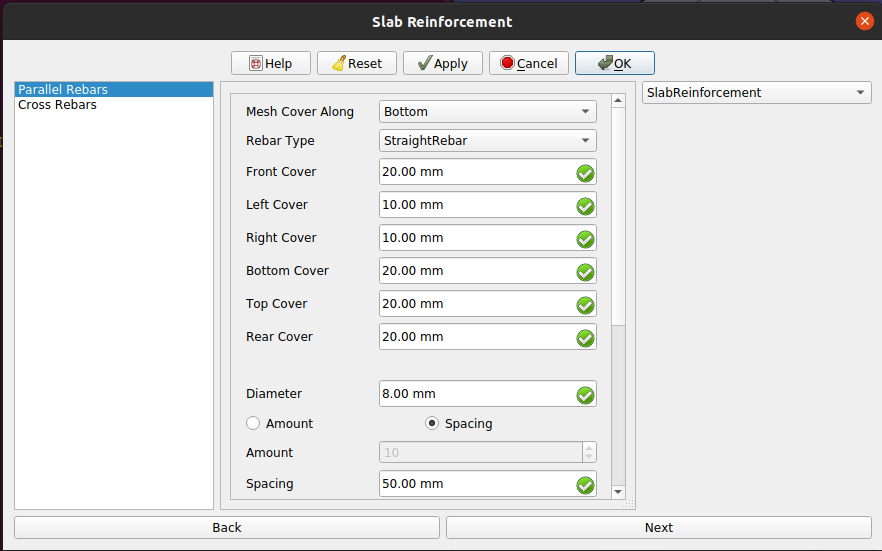
5. Select the StraightRebar rebar type and other input data for rebars in parallel direction of selected face as show in below image.
: 
:
Dialog Box for Slab Reinforcement of the Rebars in parallel direction of selected face
6. Now click on Next button or select Cross Rebars in list view.
7. Now select StraightRebar rebar type and other desired data for input data for rabars in cross direction of selected face as show in below image.
: 
:
Dialog Box for Slab Reinforcement of the Rebars in cross direction of selected face
8. Click OK or Apply or Finish to generate Slab reinforcement.
9. Click Cancel to exit the dialog box.
Properties Used for Slab Spanning in One direction
Properties for Rebars in Parallel Direction to selected face:
-
Mesh Cover Along: It represent alignment of rebar mesh along top or bottom face of structure. It can have two values \"Top\" and \"Bottom\".
-
Rebar Type: Type of rebar for parallel rebars for slab reinforcement. It can have four values \'StraightRebar\', \'LShapeRebar\', \'UShapeRebar\', \'BentShapeRebar\'.
-
Front Cover: The distance between parallel rebar and selected face.
-
Left Cover: The distance between the left end of the parallel rebar to the left face of the structure.
-
Right Cover: The distance between the right end of the parallel rebar to right face of the structure.
-
Bottom Cover: The distance between parallel rebars from the bottom face of the structure.
-
Top Cover: The distance between parallel rebars from the top face of the structure.
-
Rear Cover: Rear cover for slab reinforcement of parallel rebars.
-
Diameter: Diameter of parallel rebars
-
Amount: It contains count of parallel rebars.
-
Spacing: It contains spacing between parallel rebars.
Properties for Rebars in Cross Direction to selected face:
-
Rebar Type: Type of rebar for cross rebars for slab reinforcement. It can have four values \'StraightRebar\', \'LShapeRebar\', \'UShapeRebar\', \'BentShapeRebar\'.
-
Front Cover: The distance between cross rebar and selected face.
-
Left Cover: The distance between the left end of the cross rebar to the left face of the structure.
-
Right Cover: The distance between the right end of the cross rebar to right face of the structure.
-
Bottom Cover: The distance between cross rebars from the bottom face of the structure.
-
Top Cover: The distance between cross rebars from the top face of the structure.
-
Rear Cover: Rear cover for slab reinforcement of cross rebars.
-
Diameter: Diameter of cross rebars
-
Amount: It contains count of cross rebars.
-
Spacing: It contains spacing between cross rebars.
Scripting
See also:
Arch API, Reinforcement API and FreeCAD Scripting Basics.
The Slab Reinforcement tool can be used from the Python console by using the following function:
Create Slab reinforcement having Straight Rebars Reinforcement
To create Slab reinforcement having Straight Rebars Reinforcement shown in above figures you can use makeSlabReinforcement function as follows:
from SlabReinforcement.SlabReinforcement import makeSlabReinforcement
SlabReinforcementGroup = makeSlabReinforcement(
    parallel_rebar_type="StraightRebar",
    parallel_front_cover=20,
    parallel_rear_cover=20,
    parallel_left_cover=10,
    parallel_right_cover=10,
    parallel_top_cover=30,
    parallel_bottom_cover=20,
    parallel_diameter=8,
    parallel_amount_spacing_check=False,
    parallel_amount_spacing_value=50,
    cross_rebar_type="StraightRebar",
    cross_front_cover=20,
    cross_rear_cover=20,
    cross_left_cover=10,
    cross_right_cover=10,
    cross_top_cover=29,
    cross_bottom_cover=20,
    cross_diameter=8,
    cross_amount_spacing_check=False,
    cross_amount_spacing_value=50,
    mesh_cover_along = "Bottom",
    structure=App.getDocument("slab").getObject("Beam"),
    facename='Face4',
)- Creates a
SlabReinforcementGroupobject for Slab Spanning having Straight Rebars Reinforcement from the givenstructure, which is a Slab Arch Structure, andfacename, which is a face of that structure.- If no
structurenorfacenameare given, it will take the user selected face as input.
- If no
Properties used for slab spanning in two direction for scripting
Properties for Rebars in Parallel Direction to selected face:
-
parallel_rebar_type: Type of rebar for parallel rebars for slab reinforcement. It can have four values \'StraightRebar\', \'LShapeRebar\', \'UShapeRebar\', \'BentShapeRebar\'.
-
parallel_front_cover: The distance between parallel rebar and selected face.
-
parallel_rear_cover: Rear cover for slab reinforcement of parallel rebars.
-
parallel_left_cover: The distance between the left end of the parallel rebar to the left face of the structure.
-
parallel_right_cover: The distance between the right end of the parallel rebar to right face of the structure.
-
parallel_top_cover: The distance between parallel rebars from the top face of the structure.
-
parallel_bottom_cover: The distance between parallel rebars from the bottom face of the structure.
-
parallel_diameter: Diameter of parallel rebars.
-
parallel_amount_spacing_check: If is set to True, then value of parallel_amount_spacing_value is used as rebars count else parallel_amount_spacing_value\'s value is used as spacing in parallel rebars.
-
parallel_amount_spacing_value: It contains count of rebars or spacing between parallel rebars based on value of amount_spacing_check.
Properties for Rebars in Cross Direction to selected face:
-
cross_rebar_type: Type of rebar for cross rebars for slab reinforcement. It can have four values \'StraightRebar\', \'LShapeRebar\', \'UShapeRebar\', \'BentShapeRebar\'.
-
cross_front_cover: The distance between cross rebar and cross_face (face perpendicular to selected face).
-
cross_rear_cover: Rear cover for slab reinforcement of cross rebars.
-
cross_left_cover: The distance between the left end of the cross rebar to the left face of the structure.
-
cross_right_cover: The distance between the right end of the rebar to right face of the structure relative to cross_face.
-
cross_top_cover: The distance between cross rebar from the top face of the structure.
-
cross_bottom_cover: The distance between cross rebar from the bottom face of the structure.
-
cross_diameter: Diameter of cross rebars.
-
cross_amount_spacing_check: If is set to True, then value of cross_amount_spacing_value is used as rebars count else cross_amount_spacing_value\'s value is used as spacing in rebars.
-
cross_amount_spacing_value: It contains count of rebars or spacing between rebars based on value of cross_amount_spacing_check.
Common Properties for Parallel and Cross Rebars:
-
mesh_cover_along: It can have two values \"Top\" and \"Bottom\". It represent alignment of rebar mesh along top or bottom face of structure.
-
structure: Arch structure object. Default is None
-
facename: selected face of structure. Default is None
Edition of Slab Reinforcement of Slab Spanning having Straight Rebars Reinforcement
You can change the properties of the Slab Reinforcement for Slab Spanning having Straight Rebars Reinforcement by using editSlabReinforcement function as follows:
from SlabReinforcement.SlabReinforcement import editSlabReinforcement
SlabReinforcementGroup = editSlabReinforcement(
    SlabReinforcementGroup,
    parallel_rebar_type="StraightRebar",
    parallel_front_cover=20,
    parallel_rear_cover=20,
    parallel_left_cover=10,
    parallel_right_cover=10,
    parallel_top_cover=30,
    parallel_bottom_cover=20,
    parallel_diameter=8,
    parallel_amount_spacing_check=True,
    parallel_amount_spacing_value=10,
    cross_rebar_type="StraightRebar",
    cross_front_cover=20,
    cross_rear_cover=20,
    cross_left_cover=10,
    cross_right_cover=10,
    cross_top_cover=20,
    cross_bottom_cover=20,
    cross_diameter=8,
    cross_amount_spacing_check=True,
    cross_amount_spacing_value=10,
    mesh_cover_along = "Bottom",
    structure=App.getDocument("slab").getObject("Beam"),
    facename='Face4',
)-
slabReinforcementGroupis a previously createdSlab Reinforcementgroup object. -
The other parameters are the same as required by the
makeSingleTieFourRebars()function.
you can change any property to edit Slab Reinforcement.
⏵ documentation index > External_Command_Reference > Reinforcement > Example Slab Having Mesh Of Straight Rebars
This page is retrieved from https://github.com/FreeCAD/FreeCAD-documentation/blob/main/wiki/Example_Slab_Having_Mesh_Of_Straight_Rebars.md