Custom icon in tree view
Introduction
This is an example of modifying the icon of a custom viewprovider, which are normally added to scripted objects.
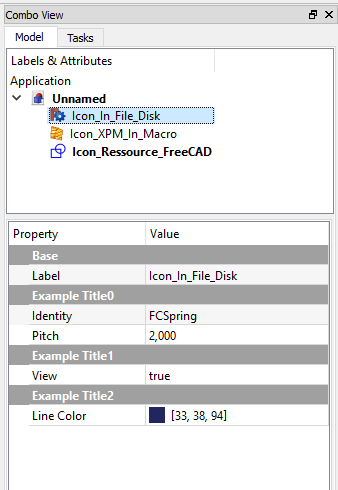
Personalized icon in the combo view
Here an example to create an object with properties and icon personalised in ComboView
Download the example icon to the same directory as the macro 
Use of an icon for three different use cases: icon_in_file_disk (format .png), icon_XPM_in_macro (format .XPM) and icon_resource_FreeCAD
import PySide
import FreeCAD, FreeCADGui, Part
from pivy import coin
from PySide import QtGui ,QtCore
from PySide.QtGui import *
from PySide.QtCore import *
import Draft

global path
param = FreeCAD.ParamGet("User parameter:BaseApp/Preferences/Macro")# macro path in FreeCAD preferences
path = param.GetString("MacroPath","") + "/"                        # macro path
path = path.replace("\\","/")                                       # convert the "\" to "/"


class IconViewProviderToFile:                                       # Class ViewProvider create Property view of object
    def __init__( self, obj, icon):
        self.icone = icon

    def getIcon(self):                                              # GetIcon
        return self.icone

    def attach(self, obj):                                          # Property view of object
        self.modes = []
        self.modes.append("Flat Lines")
        self.modes.append("Shaded")
        self.modes.append("Wireframe")
        self.modes.append("Points")
        obj.addDisplayMode( coin.SoGroup(),"Flat Lines" )           # Display Mode
        obj.addDisplayMode( coin.SoGroup(),"Shaded" )
        obj.addDisplayMode( coin.SoGroup(),"Wireframe" )
        obj.addDisplayMode( coin.SoGroup(),"Points" )
        return self.modes

    def getDisplayModes(self,obj):
        return self.modes

#####################################################
########## Example with icon to file # begin ########
#####################################################

object1 = FreeCAD.ActiveDocument.addObject("App::FeaturePython", "Icon_In_File_Disk")                                     # create your object
object1.addProperty("App::PropertyString","Identity", "ExampleTitle0", "Identity of object").Identity = "FCSpring"        # Identity of object
object1.addProperty("App::PropertyFloat" ,"Pitch",    "ExampleTitle0", "Pitch betwen 2 heads").Pitch  = 2.0               # other Property Data
object1.addProperty("App::PropertyBool"  ,"View",     "ExampleTitle1", "Hello world").View            = True              # ...
object1.addProperty("App::PropertyColor" ,"LineColor","ExampleTitle2", "Color to choice").LineColor   = (0.13,0.15,0.37)  # ...
#...other Property Data
#...other Property Data
#
object1.ViewObject.Proxy = IconViewProviderToFile( object1, path + "FreeCADIco.png")                                      # icon download to file
App.ActiveDocument.recompute()
#
#__Detail__:
# FreeCAD.ActiveDocument.addObject( = create now object personalized
# "App::FeaturePython",             = object as FeaturePython
# "Icon_In_File_Disk")              = internal name of your object
#
#
# "App::PropertyString",    = type of Property , availlable : PropertyString, PropertyFloat, PropertyBool, PropertyColor
# "Identity",               = name of the feature
# "ExampleTitle0",          = title of the "section"
# "Identity of object")     = tooltip displayed on mouse
# .Identity                 = variable (same of name of the feature)
# object1.ViewObject.Proxy  = create the view object and gives the icon
#
########## example with icon to file end


#####################################################
########## Example with icon in macro # begin #######
#####################################################

def setIconInMacro(self):        # def contener the icon in format .xpm
    # File format XPM created by Gimp "https://www.gimp.org/"
    # Choice palette Tango
    # Create your masterwork ...
    # For export the image in XPM format
    #     Menu File > Export as > .xpm
    # (For convert image true color in Tango color palette :
    #     Menu Image > Mode > Indexed ... > Use custom palette > Tango Icon Theme > Convert)
    return """
            /* XPM */
            static char * XPM[] = {
            "22 24 5 1",
            "   c None",
            ".  c #CE5C00",
            "+  c #EDD400",
            "@  c #F57900",
            "#  c #8F5902",
            "                      ",
            "                      ",
            "  ....                ",
            "  ..@@@@..            ",
            "  . ...@......        ",
            "  .+++++++++...       ",
            "  .      ....++...    ",
            "  .@..@@@@@@.+++++..  ",
            "  .@@@@@..#  ++++ ..  ",
            "  .       ++++  .@..  ",
            "  .++++++++  .@@@.+.  ",
            " .      ..@@@@@. ++.  ",
            " ..@@@@@@@@@.  +++ .  ",
            " ....@...# +++++ @..  ",
            " .    ++++++++ .@. .  ",
            " .++++++++  .@@@@ .   ",
            " .   #....@@@@. ++.   ",
            " .@@@@@@@@@.. +++ .   ",
            " ........  +++++...   ",
            " ...  ..+++++ ..@..   ",
            "    ......  .@@@ +.   ",
            "          ......++.   ",
            "                ...   ",
            "                      "};
        """

object2 = FreeCAD.ActiveDocument.addObject("App::FeaturePython", "Icon_XPM_In_Macro")                                    #
object2.addProperty("App::PropertyString","Identity","ExampleTitle","Identity of object").Identity = "FCSpring"
#...other Property Data
#...other Property Data
#
object2.ViewObject.Proxy = IconViewProviderToFile( object2, setIconInMacro(""))              # icon in macro (.XPM)
App.ActiveDocument.recompute()
########## example with icon in macro end


####################################################################
########## Example with icon to FreeCAD ressource # begin ##########
####################################################################

object3 = FreeCAD.ActiveDocument.addObject("App::FeaturePython", "Icon_Ressource_FreeCAD")                               #
object3.addProperty("App::PropertyString","Identity","ExampleTitle","Identity of object").Identity = "FCSpring"
#...other Property Data
#...other Property Data
#
object3.ViewObject.Proxy = IconViewProviderToFile( object3, ":/icons/Draft_Draft.svg")       # icon to FreeCAD ressource
App.ActiveDocument.recompute()
########## example with icon to FreeCAD ressource end
Complete example creating a cube and its icon
#https://forum.freecadweb.org/viewtopic.php?t=10255#p83319
import FreeCAD, Part, math
from FreeCAD import Base
from PySide import QtGui

global path
param = FreeCAD.ParamGet("User parameter:BaseApp/Preferences/Macro")# macro path in FreeCAD preferences
path = param.GetString("MacroPath","") + "/"                        # macro path
path = path.replace("\\","/")                                       # convert the "\" to "/"

def setIconInMacro(self):
    return """
        /* XPM */
        static char * xpm[] = {
        "22 22 12 1",
        "   c None",
        ".  c #A40000",
        "+  c #2E3436",
        "@  c #CE5C00",
        "#  c #F57900",
        "$  c #FCAF3E",
        "%  c #5C3566",
        "&  c #204A87",
        "*  c #555753",
        "=  c #3465A4",
        "-  c #4E9A06",
        ";  c #729FCF",
        "                      ",
        "                      ",
        "                      ",
        "        ..   ..       ",
        "       +@#+++.$$      ",
        "       +.#+%..$$      ",
        "       &*$  &*#*      ",
        "      &   =&=  =      ",
        "   ++&  +.==   %=     ",
        "  ++$@ ..$ %=   &     ",
        "  ..-&%.#$$ &## +=$   ",
        "   .#  ..$ ..#%%.#$$  ",
        "     ;    =+=## %-$#  ",
        "     &=   ;&   %=     ",
        "      ;+ &=;  %=      ",
        "      ++$- +*$-       ",
        "      .#&&+.@$$       ",
        "      ..$# ..$#       ",
        "       ..   ..        ",
        "                      ",
        "                      ",
        "                      "};
        """

class PartFeature:
    def __init__(self, obj):
        obj.Proxy = self

class Box(PartFeature):
    def __init__(self, obj):
        PartFeature.__init__(self, obj)
        obj.addProperty("App::PropertyLength", "Length", "Box", "Length of the box").Length = 1.0
        obj.addProperty("App::PropertyLength", "Width",  "Box", "Width of the box" ).Width  = 1.0
        obj.addProperty("App::PropertyLength", "Height", "Box", "Height of the box").Height = 1.0

    def onChanged(self, fp, prop):
        try:
            if prop == "Length" or prop == "Width" or prop == "Height":
                fp.Shape = Part.makeBox(fp.Length,fp.Width,fp.Height)
        except:
            pass

    def execute(self, fp):
        fp.Shape = Part.makeBox(fp.Length,fp.Width,fp.Height)

class ViewProviderBox:
    def __init__(self, obj, icon):
        obj.Proxy  = self
        self.icone = icon

    def getIcon(self):
        return self.icone

    def attach(self, obj):
        return

    def setupContextMenu(self, obj, menu):
        action = menu.addAction("Set default height")
        action.triggered.connect(lambda f=self.setDefaultHeight, arg=obj:f(arg))

        action = menu.addAction("Hello World")
        action.triggered.connect(self.showHelloWorld)

    def setDefaultHeight(self, view):
        view.Object.Height = 15.0

    def showHelloWorld(self):
        QtGui.QMessageBox.information(None, "Hi there", "Hello World")

def makeBox():
    FreeCAD.newDocument()
    a=FreeCAD.ActiveDocument.addObject("Part::FeaturePython","Box")
    Box(a)
#    ViewProviderBox(a.ViewObject, path + "FreeCADIco.png")    # icon download to file
#    ViewProviderBox(a.ViewObject,  ":/icons/Draft_Draft.svg") # icon to FreeCAD ressource
    ViewProviderBox(a.ViewObject,  setIconInMacro(""))        # icon in macro (.XPM)
    App.ActiveDocument.recompute()

makeBox()
⏵ documentation index > Developer Documentation > Python Code > Custom icon in tree view
This page is retrieved from https://github.com/FreeCAD/FreeCAD-documentation/blob/main/wiki/Custom_icon_in_tree_view.md