Create a FeaturePython object part II
Introduction
On the Create a FeaturePython object part I page we\'ve focused on the internal aspects of a Python class built around a FeaturePython object, specifically an App::FeaturePython object. We\'ve created the object, defined some properties, and added a document-level event callback that allows our object to respond to a document recompute with the execute() method. But our object still lacks a presence in the 3D view. Let\'s remedy that by adding a box.
Adding a box
First at the top of the box.py file, below the existing import, add:
import PartThen in execute() delete the print() statement and add the following line in its place:
Part.show(Part.makeBox(obj.Length, obj.Width, obj.Height))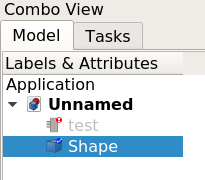
These commands execute Python methods that come with FreeCAD by default:
- The
Part.makeBox()method generates a box shape. - The enclosing call to
Part.show()adds the shape to the document and makes it visible.
Delete any existing objects, reload the box module and create a new box object using box.create(). Notice how a box immediately appears on the screen. That is because we force the document to recompute at the end of box.create() which in turn triggers the execute() method of our box class.
At first glance the result may look fine but there are some problems. The most obvious one is that the box is represented by an entirely different object than our FeaturePython object. Part.show() simply creates a separate box object and adds it to the document. Worse, if you change the dimensions of the FeaturePython object another box shape gets created, and the old one is left in place. And if you have the Report view open, you may have noticed an error stating \"Recursive calling of recompute for document Unnamed\". This has to do with using the Part.show() method inside a FeaturePython object.
Fixing the code
To solve these problems we have to make a number of changes. Until now we\'ve been using a App::FeaturePython object which is actually not intended to have a visual representation in the 3D view. We have to use a Part::FeaturePython object instead. In create() change the following line:
obj = App.ActiveDocument.addObject('App::FeaturePython', obj_name)to:
obj = App.ActiveDocument.addObject('Part::FeaturePython', obj_name)To get rid of the separate box object we need to assigns the result of the makeBox() method to the Shape property of our Part::FeaturePython object. Change this line in execute():
Part.show(Part.makeBox(obj.Length, obj.Width, obj.Height))to:
obj.Shape = Part.makeBox(obj.Length, obj.Width, obj.Height)
Save your changes, switch back to FreeCAD, delete any existing objects, reload the box module, and create a new box object. The new result is somewhat disappointing. There no longer is an extra object in the Tree view, and the icon in the Tree view has changed, but our box in the 3D view is also gone (which is why the icon is gray). What happened? Although we\'ve properly created our box shape and assigned it to a Part::FeaturePython object, to make it actually show up in the 3D view we need to assign a ViewProvider.
Writing a ViewProvider
A View Provider is the component of an object which allows it to have a visual representation in the 3D view. FreeCAD uses an application structure which is designed to separate the data (the \"model\") from it\'s visual representation (the \"view\"). If you\'ve spent any time working with FreeCAD in Python, you are likely already aware of this through the use of the two core Python modules: FreeCAD and FreeCADGui (often aliased as App and Gui repectively).
Our FeaturePython object also requires these elements. Thus far we\'ve focused purely on the \"model\" portion of the code, now it\'s time to write the \"view\" portion. Fortunately most ViewProviders are simple and require little effort to write, at least to get started. Here\'s an example ViewProvider borrowed and slightly modified from 1:
class ViewProviderBox:

    def __init__(self, obj):
        """
        Set this object to the proxy object of the actual view provider
        """

        obj.Proxy = self

    def attach(self, obj):
        """
        Setup the scene sub-graph of the view provider, this method is mandatory
        """
        return

    def updateData(self, fp, prop):
        """
        If a property of the handled feature has changed we have the chance to handle this here
        """
        return

    def getDisplayModes(self,obj):
        """
        Return a list of display modes.
        """
        return []

    def getDefaultDisplayMode(self):
        """
        Return the name of the default display mode. It must be defined in getDisplayModes.
        """
        return "Shaded"

    def setDisplayMode(self,mode):
        """
        Map the display mode defined in attach with those defined in getDisplayModes.
        Since they have the same names nothing needs to be done.
        This method is optional.
        """
        return mode

    def onChanged(self, vp, prop):
        """
        Print the name of the property that has changed
        """

        App.Console.PrintMessage("Change property: " + str(prop) + "\n")

    def getIcon(self):
        """
        Return the icon in XMP format which will appear in the tree view. This method is optional and if not defined a default icon is shown.
        """

        return """
            /* XPM */
            static const char * ViewProviderBox_xpm[] = {
            "16 16 6 1",
            "    c None",
            ".   c #141010",
            "+   c #615BD2",
            "@   c #C39D55",
            "#   c #000000",
            "$   c #57C355",
            "        ........",
            "   ......++..+..",
            "   .@@@@.++..++.",
            "   .@@@@.++..++.",
            "   .@@  .++++++.",
            "  ..@@  .++..++.",
            "###@@@@ .++..++.",
            "##$.@@$#.++++++.",
            "#$#$.$$$........",
            "#$$#######      ",
            "#$$#$$$$$#      ",
            "#$$#$$$$$#      ",
            "#$$#$$$$$#      ",
            " #$#$$$$$#      ",
            "  ##$$$$$#      ",
            "   #######      "};
            """

    def dumps(self):
        """
        Called during document saving.
        """
        return None

    def loads(self,state):
        """
        Called during document restore.
        """
        return None
In the code above, we define an XMP icon for this object. Icon design is beyond the scope of this tutorial, but basic design can be managed using open source tools like GIMP, Krita, and Inkscape. The getIcon() method is optional, FreeCAD will use a default icon if this method is not provided.
Add the ViewProvider code at the end of box.py and in the create() method insert the following line above the recompute() statement:
ViewProviderBox(obj.ViewObject)This instances the custom ViewProvider class and passes the FeaturePython\'s built-in ViewObject to it. When the ViewProvider class initializes, it saves a reference to itself in the FeaturePython\'s ViewObject.Proxy attribute. This way, when FreeCAD needs to render our box visually, it can find the ViewProvider class to do that.
Now, save the changes and return to FreeCAD. Import or reload the box module and call box.create(). You should now see two things:
- The icon for the box object has changed.
- And, more importantly, there is a box in the 3D view. If you do not see it press the
 Std ViewFitAll button. You can even alter the dimensions of the box by changing the values in the Property editor. Give it a try!
Trapping events
We have already discussed event trapping. Nearly every method of a FeaturePython class serves as a callback accessible to the FeaturePython object (which gets access to our class instance through the Proxy attribute).
Below is a list of the callbacks that may be implemented in the basic FeaturePython object:
++++
| | Called during document recomputes | Do not call recompute() from this method (or any method called from execute()) as this causes a nested recompute. |
| execute(self, obj) | | |
| | | |
++++
| | Called before a property value is changed | |
| onBeforeChange(self, obj, prop) | | prop |
| | | |
| | | is the name of the property to be changed, not the property object itself. Property changes cannot be cancelled. Previous / next property values are not simultaneously available for comparison. |
++++
| | Called after a property is changed | |
| onChanged(self, obj, prop) | | prop |
| | | |
| | | is the name of the property to be changed, not the property object itself. |
++++
| | Called after a document is restored or a FeaturePython object is copied. | Occasionally, references to the FeaturePython object from the class, or the class from the FeaturePython object may be broken, as the class __init__() method is not called when the object is reconstructed. Adding self.Object <nowiki>=</nowiki> obj or obj.Proxy <nowiki>=</nowiki> self often solves these issues. |
| {{Incode|onDocumentRestored(self, obj)}} | | |
| | | |
++++
: FeaturePython basic callbacks
For a complete reference of FeaturePython methods available, see FeaturePython methods.
In addition, there are two callbacks in the ViewProvider class that may occasionally prove useful:
++++
| | Called after a data (model) property is changed | |
| updateData(self, obj, prop) | | obj |
| | | |
| | | is a reference to the FeaturePython class instance, not the ViewProvider instance. prop is the name of the property to be changed, not the property object itself. |
++++
| | Called after a view property is changed | |
| onChanged(self, vobj, prop) | | vobj |
| | | |
| | | is a reference to the ViewProvider instance. prop is the name of the view property which was changed. |
++++
: ViewProvider basic callbacks
It is not uncommon to encounter a situation where the Python callbacks are not being triggered as they should. Beginners in this area can rest assured that the FeaturePython callback system is not fragile or broken. Invariably when callbacks fail to run it is because a reference is lost or undefined in the underlying code. If, however, callbacks appear to be breaking with no explanation, providing object/proxy references in the onDocumentRestored() callback (as noted in the first table above) may alleviate these problems. Until you are comfortable with the callback system, it may be useful to add print statements in each callback to print messages to the console during development.
Complete code
import FreeCAD as App
import Part

def create(obj_name):
    """
    Object creation method
    """

    obj = App.ActiveDocument.addObject('Part::FeaturePython', obj_name)

    box(obj)

    ViewProviderBox(obj.ViewObject)

    App.ActiveDocument.recompute()

    return obj

class box():

    def __init__(self, obj):
        """
        Default constructor
        """

        self.Type = 'box'

        obj.Proxy = self

        obj.addProperty('App::PropertyString', 'Description', 'Base', 'Box description').Description = ""
        obj.addProperty('App::PropertyLength', 'Length', 'Dimensions', 'Box length').Length = 10.0
        obj.addProperty('App::PropertyLength', 'Width', 'Dimensions', 'Box width').Width = '10 mm'
        obj.addProperty('App::PropertyLength', 'Height', 'Dimensions', 'Box height').Height = '1 cm'

    def execute(self, obj):
        """
        Called on document recompute
        """

        obj.Shape = Part.makeBox(obj.Length, obj.Width, obj.Height)

class ViewProviderBox:

    def __init__(self, obj):
        """
        Set this object to the proxy object of the actual view provider
        """

        obj.Proxy = self

    def attach(self, obj):
        """
        Setup the scene sub-graph of the view provider, this method is mandatory
        """
        return

    def updateData(self, fp, prop):
        """
        If a property of the handled feature has changed we have the chance to handle this here
        """
        return

    def getDisplayModes(self,obj):
        """
        Return a list of display modes.
        """
        return []

    def getDefaultDisplayMode(self):
        """
        Return the name of the default display mode. It must be defined in getDisplayModes.
        """
        return "Shaded"

    def setDisplayMode(self,mode):
        """
        Map the display mode defined in attach with those defined in getDisplayModes.
        Since they have the same names nothing needs to be done.
        This method is optional.
        """
        return mode

    def onChanged(self, vp, prop):
        """
        Print the name of the property that has changed
        """

        App.Console.PrintMessage("Change property: " + str(prop) + "\n")

    def getIcon(self):
        """
        Return the icon in XMP format which will appear in the tree view. This method is optional and if not defined a default icon is shown.
        """

        return """
            /* XPM */
            static const char * ViewProviderBox_xpm[] = {
            "16 16 6 1",
            "    c None",
            ".   c #141010",
            "+   c #615BD2",
            "@   c #C39D55",
            "#   c #000000",
            "$   c #57C355",
            "        ........",
            "   ......++..+..",
            "   .@@@@.++..++.",
            "   .@@@@.++..++.",
            "   .@@  .++++++.",
            "  ..@@  .++..++.",
            "###@@@@ .++..++.",
            "##$.@@$#.++++++.",
            "#$#$.$$$........",
            "#$$#######      ",
            "#$$#$$$$$#      ",
            "#$$#$$$$$#      ",
            "#$$#$$$$$#      ",
            " #$#$$$$$#      ",
            "  ##$$$$$#      ",
            "   #######      "};
            """

    def dumps(self):
        """
        Called during document saving.
        """
        return None

    def loads(self,state):
        """
        Called during document restore.
        """
return None??? documentation index > Developer Documentation > Python Code > Create a FeaturePython object part II
This page is retrieved from https://github.com/FreeCAD/FreeCAD-documentation/blob/main/wiki/Create_a_FeaturePython_object_part_II.md