GuiCommand: Name: CfdOF Physics Model MenuLocation: CfdOF , Select models Workbenches: CfdOF_Workbench
CfdOF Physics Model
Description
The Physics Model is used to select the solver that is to be used in the CFD simulation.
Usage
The Physics Model is added to the tree when the Analysis Container is created.
- There are several ways to open the Physics Model dialogue panel:
- Press the
 Physics Model button.
 - Click on the Physics Model in the tree.
- Press the
Options
The dialogue panel offers the following settings:
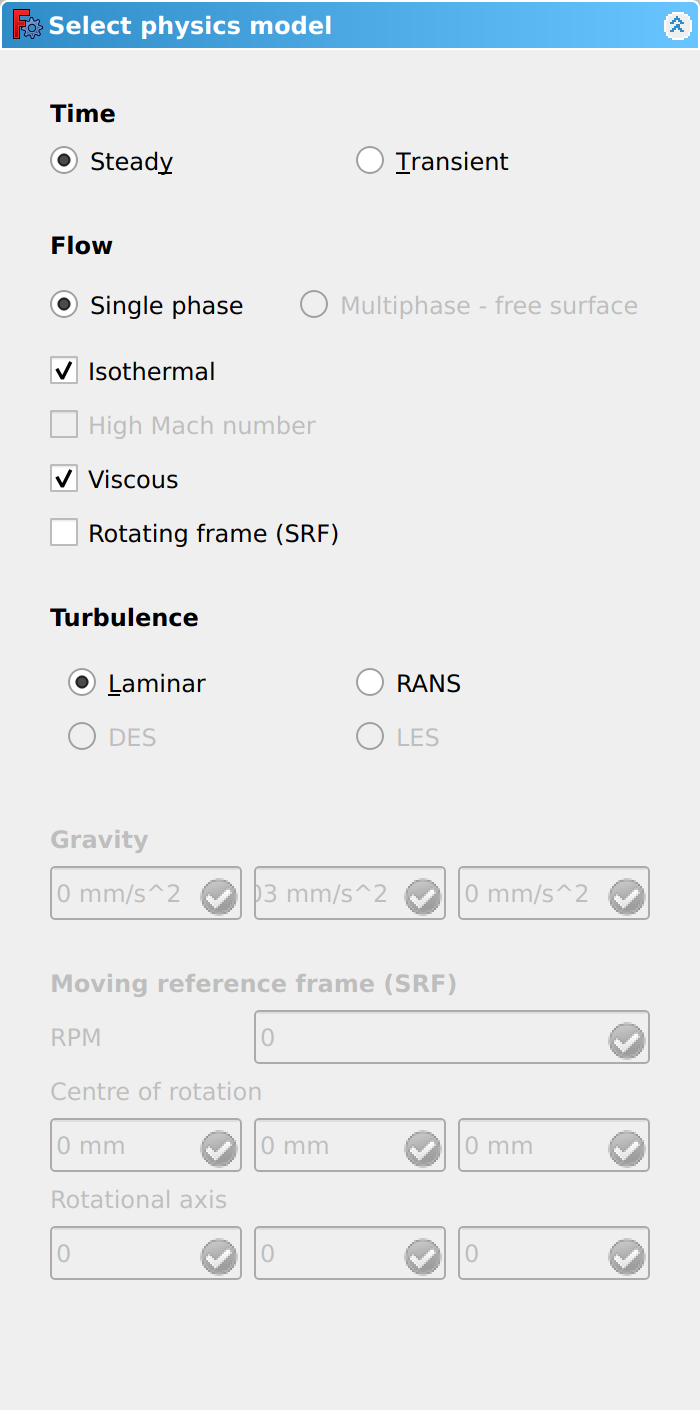
Time
- Select either Steady State or Transient.
: Steady State refers to a simulation where the fluid conditions such as temperature, pressure and velocity do not change over time. A fluid flowing down a smooth pipe could be expected to reach a state of equilibrium, where the temperature, pressure and velocity now, are the same as they were earlier, and will be the same in the future.
: If the pipe included a control valve, with varying position of open/closed over time, this would result in a change in the pressure and velocity, with the simulation being classed as Transient.
: Simulations to watch out for, are those where the expected results are Steady State, but are actually Transient due to unexpected effects such as vortexes.
Flow
- Select either Single Phase or Multiphase - free surface.
: Single Phase refers to a fluid in either the gas or liquid state. Multiphase can simulate cases with two or more phase. The Multiphase can also accept a free surface case, which is the interface between two fluids, such as liquid water and air.
- Optionally select Isothermal.
: An isothermal simulation is where the system temperature remains constant, with heat transfer not considered, and the fluid is incompressible.
- Optionally select High Mach number.
: High Mach number refers to fluids at velocities with a Mach number of above 1.0 (speed of sound). This option is for computing compressible supersonic and transonic flow.
- Optionally select Viscous.
: When selected, the viscosity is considered and the turbulence options are presented below. If Viscous is not selected, viscosity is ignored, the viscous terms are dropped from the Navier-Stokes equations and the resulting \'Euler\' equations are solved instead. This effectively ignores boundary layers, which can be acceptable in some flow regimes for some purposes. Potential flow is a further simplification on top of that, where irrotational flow is assumed.
- Optionally select Rotating Frame (SRF).
: The Single Rotating Frame (SRF) model is used to simulate a rotating object with no stationary parts, such as a propeller. The whole of the reference frame, the fluid, is rotated around the object\'s axis, while the object, e.g. a propeller, remains stationary. The rotation of the reference frame is at the same speed as the object would be rotating, and expressed in revolutions-per-minute [rpm].
Turbulence
- Select either Laminar, RANS, DES, LES, depending on the what is available.
: When either RANS, DES or LES are selected, Models can be selected, using the dropdown. : Please visit the Solver page for more information on the Models.
Gravity
The Gravity input boxes are only available when the non-isothermal option has been selected above.
- Input box for gravity value(s) in x,y,z direction.
Moving Reference Frame (SRF)
The following inputs are only available when the Moving Reference Frame (SRF) option has been selected above.
- Input box for RPM.
: Rotational speed of the reference frame
- Input box for the position of Centre of Rotation in x,y,z.
:
- Input box for the Rotational Axis in x,y,z.
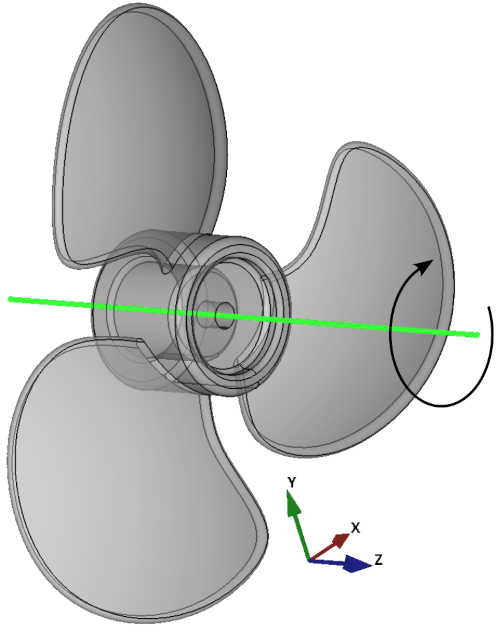
: Rotation of the object is +ve for clockwise and -ve for anti-clockwise. Remember, the Moving Reference Frame will rotate in the opposite direction to the object\'s rotation.
: The example propeller below has it\'s Centre of Rotation on the origin (0, 0, 0). The blades are on the x-y plane, with a Rotational Axis around the z axis (0, 0, -1). The object rotates clockwise, so the reference frame rotational axis is -ve.
Notes
-
You will see from the image of the dialogue panel that some of the options, or input boxes, are greyed out. This is because not all of combination of the options are possible together e.g. Steady State can not handle Multiphase - free surface. To better understand the selections that are possible, and how they relate to different solvers, please visit the Solver page.
-
The selections you make here, have an effect on the options and input boxes in other dialogue panels . To assist with workflow, we recommend you complete this dialogue box first, after you have created your
 Analysis Container.
{{CfdOF Tools navi}}
⏵ documentation index > CfdOF > CfdOF Physics Model
This page is retrieved from https://github.com/FreeCAD/FreeCAD-documentation/blob/main/wiki/CfdOF_Physics_Model.md