Add Workbench to Addon Manager
Introduction
These are step-by-step instructions on how to add a Python workbench to the Addon Manager.
Requirements:
- A local git repository.
- A remote git repository. Supported git hosts are GitHub, GitLab, Framagit and Debian Salsa.
- Git must be installed.
Enable developer mode
- Open the Preferences Editor: select the Edit →
 Preferences... option from the menu.
 - Select the
 Addon Manager option in the left bar.
 - On the Addon manager options tab check the Addon developer mode checkbox. This will enable the Developer tools... button in the Addon Manager.
- Press the OK button to close the Preferences Editor.
Create the package.xml file
-
Open the Addon Manager: select the Tools →
Addon manager option from the menu. -
Press the Developer tools... button.
-
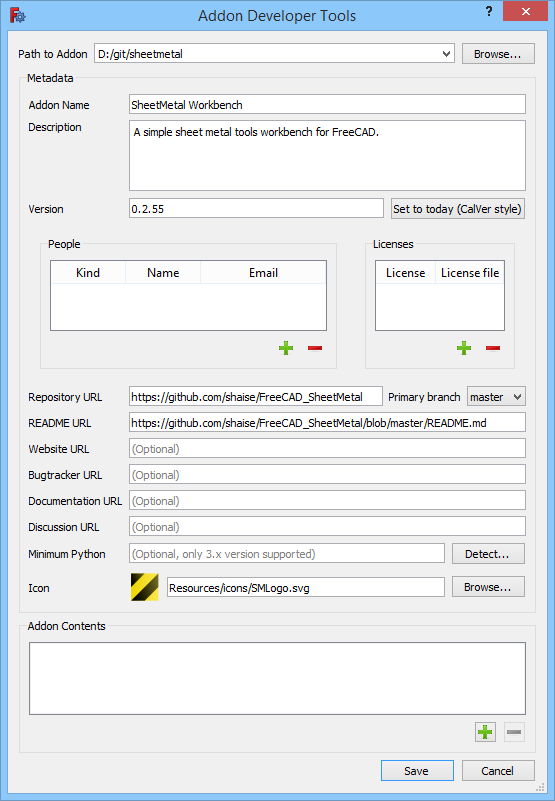
The Addon Developer Tools dialog opens.
-
Enter the following:
**Path to Addon** : The path to the local git repository.-
Addon Name
: This will appear in the listings of the Addon Manager.
-
Description
: Idem.
-
Version
: Idem.
-
Repository URL
-
Primary branch
-
README URL
: Recommended.
-
Icon
: The icon must be part of the repository.
-
-
Press the
 button at the bottom of the dialog.
 -
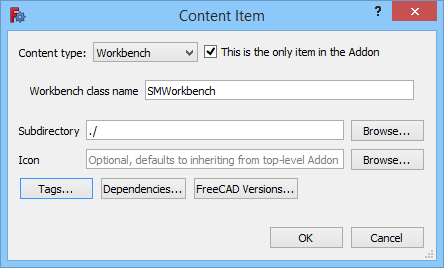
The Content Item dialog opens.
-
The Content type should be set to {{Value|Workbench}}.
-
Check the This is the only item in the Addon checkbox.
-
Enter the Workbench class name. This is the class name specified in the InitGui.py file.
-
For the Subdirectory enter {{Value|./}}.
-
Press the OK button to close the dialog.
-
Press the Save button to close the Addon Developer Tools dialog and save the package.xml file.
-
Press the
 Close button to close the Addon Manager.
 -
Push the created file to your remote repository.
Add the workbench to the .gitmodules file
- Fork https://github.com/FreeCAD/FreeCAD-addons.
- Create a new branch.
- Edit the .gitmodules file to include your new Addon, in alphabetical order.
- Push the new branch to GitHub.
- Submit a Pull Request to the FreeCAD-Addons repository with the new .gitmodules file.
See also
- Workbench creation
- Package Metadata: Detailed information about the package.xml file.
⏵ documentation index > Addons > Developer Documentation > Add Workbench to Addon Manager
This page is retrieved from https://github.com/FreeCAD/FreeCAD-documentation/blob/main/wiki/Add_Workbench_to_Addon_Manager.md