FreeCAD Logo FreeCAD 1.0
  • Inglés Africano Árabe Bielorruso Catalán Checo Alemán Griego Español Español Euskera Finlandés Filipino Francés Gallego Croata Húngaro Indonesio Italiano Japonés Cabilio Coreano Lituano Neerlandés bokmal de Noruega Polaco Portugués Portugués Rumano Ruso Eslovaco Esloveno Serbio Sueco Turco Ucraniano Valenciano Vietnamita Chino Chino
  • Características
  • Descarga
  • Blog
  • Documentación
    Índice de documentación Primeros pasos Documentacion para el usuario El manual de FreeCAD Documentación de entornos de trabajo Documentación sobre FreeCAD + Python Documentación de codificación de C++ Tutoriales Preguntas frecuentes Política de privacidad Acerca de FreeCAD
  • Contribuir
    ¿Cómo puedo ayudar? Sponsor Informar de un error Hacer un pull request Trabajos y financiación Pautas de contribución Manual de desarrolladores Traducciones
  • Comunidad
    Código de conducta Foro The FPA GitHub GitLab Codeberg Mastodon Matrix IRC IRC via Webchat Gitter Discord Reddit Twitter Facebook LinkedIn Calendario
  • ♥ Donate

Donate

$
Información de SEPA
Configure su transferencia bancaria SEPA a:
Beneficiary: The FreeCAD project association
IBAN: BE04 0019 2896 4531
BIC/SWIFT: GEBABEBBXXX
Agencia bancaria: BNP Paribas Fortis
Dirección: Rue de la Station 64, 1360 Perwez, Belgium

While Stripe doesn't support monthly donations, you can still become a sponsor! Simply make a one-time donation equivalent to 12 months of support, and you'll gain access to the corresponding sponsoring tier. It's an easy and flexible way to contribute.

If you are not sure or not able to commit to a regular donation, but still want to help the project, you can do a one-time donation, of any amount.

Choose freely the amount you wish to donate one time only.

You can support FreeCAD by sponsoring it as an individual or organization through various platforms. Sponsorship provides a steady income for developers, allowing the FPA to plan ahead and enabling greater investment in FreeCAD. To encourage sponsorship, we offer different tiers, and unless you choose to remain anonymous, your name or company logo will be featured on our website accordingly.

from 1 USD / 1 EUR per month. You will not have your name displayed here, but you will have helped the project a lot anyway. Together, normal sponsors maintain the project on its feet as much as the bigger sponsors.

from 25 USD / 25 EUR per month. Your name or company name is displayed on this page.

from 100 USD / 100 EUR per month. Your name or company name is displayed on this page, with a link to your website, and a one-line description text.

from 200 USD / 200 EUR per month. Your name or company name and logo displayed on this page, with a link to your website and a custom description text. Companies that have helped FreeCAD early on also appear under Gold sponsors.

Instead of donating each month, you might find it more comfortable to make a one-time donation that, when divided by twelve, would give you right to enter a sponsoring tier. Don't hesitate to do so!

Choose freely the amount you wish to donate each month.

Please inform your forum name or twitter handle as a notein your transfer, or reach to us, so we can give you proper credits!

Load an example ship geometry
Areas curve
Ship

Ship CreateShip

Menu location
Ship design → Create a new ship
Workbenches
Ship
Default shortcut
None
Introduced in version
-
See also
None

Descripción

Create a New Ship or new Ship Instance.

Ship works over Ship entities, that must be created on top of provided geometry. Geometry must be a solid, or set of solids.The following criteria must be taken into account:

  • All hull geometry must be provided (including symmetric bodies).
  • Starboard geometry must be included at negatives y domain.
  • Origin (0,0,0) point is the Midship section (Midpoint between after and forward perpendicular) and base line intersection.
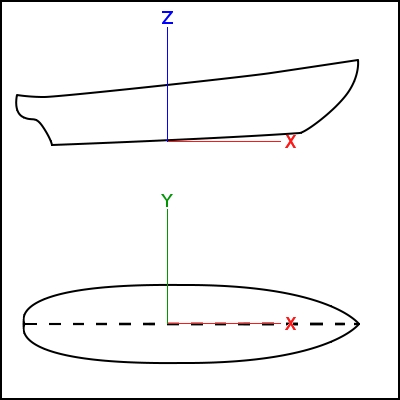
Ship sign criteria

Uso

In order to create a Ship instance (in other words, a New Ship), select the hull solid geometry and invoke Ship design → Create a new ship.

The task panel and a free-surface annotation in the 3D view are shown. The annotation is temporary and will be removed when you close the tool, so don't worry about that.

Most relevant ship data must be introduced (Ship uses a progressive data introduction system, so basic operations can be performed knowing only basic ship data, more information is needed as the operations become more complex).

Ship data

Main dimensions must be introduced here:

  • Length: Length between perpendiculars.
  • Beam: Total ship beam.
  • Draft: Design draft.

Length annotations

Usually the Length between perpendiculars depends on design draft, so if you don't know what is the length of your ship you can set draft, and fit length in order to get bow and draft intersection.
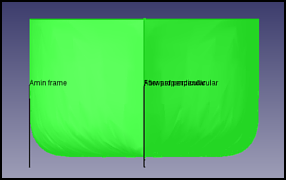
Beam annotations

Same process is valid for Beam fit. Note that the requested value is the total beam, but just the annotation on starboard side is shown.

When you press Accept button, a new Ship instance named Ship is created at Tags & Attributes dialog. The geometry is not needed anymore, so feel free to hide or remove it.

Tutoriales

  • FreeCAD-Ship s60 tutorial
  • FreeCAD-Ship s60 tutorial (II)


Load an example ship geometry
Areas curve
Ship

Esta página ha sido recuperada de https://wiki.freecad.org/Ship_CreateShip

¡Contáctanos!
Forum GitHub Mastodon Matrix IRC Gitter.im Discord Reddit Twitter Facebook LinkedIn

© El equipo de FreeCAD. Créditos de imagen de la página principal (de arriba a abajo): ppemawm, r-frank, epileftric, regis, rider_mortagnais, bejant.

Este proyecto es apoyado por: , KiCad Services Corp. y otros patrocinadores

GitHubMejora esta página en GitHub
