FreeCAD Logo FreeCAD 1.0
  • 英文 南非荷蘭語 阿拉伯語 白俄羅斯語 加泰隆尼亞語 捷克語 德文 希臘語 西班牙文 西班牙文 巴斯克語 芬蘭語 菲律賓語 法文 加利西亞語 克羅埃西亞語 匈牙利語 印尼語 義大利文 日文 卡拜爾語 韓語 立陶宛語 荷蘭文 挪威語 (博克馬爾語) 波蘭文 葡萄牙文 葡萄牙文 羅馬尼亞語 俄文 斯洛伐克語 斯洛維尼亞語 塞爾維亞語 瑞典語 土耳其語 烏克蘭語 瓦倫西亞語 越南語 中文 中文
  • 功能
  • 下載
  • Blog
  • 文件
    Documentation index 開始 使用者文件 The FreeCAD manual 工作台文件 Python coding documentation C++ coding documentation 教學 常見問題 Privacy policy 關於 FreeCAD
  • 貢獻
    How to help Sponsor 回報錯誤 Make a pull request Jobs and funding Contribution guidelines Developers handbook Translations
  • 社群
    Code of conduct Forum The FPA GitHub GitLab Codeberg Mastodon Matrix IRC IRC via Webchat Gitter Discord Reddit Twitter Facebook LinkedIn Calendar
  • ♥ Donate

Donate

$
SEPA Information
Please set up your SEPA bank transfer to:
Beneficiary: The FreeCAD project association
IBAN: BE04 0019 2896 4531
BIC/SWIFT: GEBABEBBXXX
銀行代理: BNP Paribas Fortis
位址: Rue de la Station 64, 1360 Perwez, Belgium

While Stripe doesn't support monthly donations, you can still become a sponsor! Simply make a one-time donation equivalent to 12 months of support, and you'll gain access to the corresponding sponsoring tier. It's an easy and flexible way to contribute.

If you are not sure or not able to commit to a regular donation, but still want to help the project, you can do a one-time donation, of any amount.

Choose freely the amount you wish to donate one time only.

You can support FreeCAD by sponsoring it as an individual or organization through various platforms. Sponsorship provides a steady income for developers, allowing the FPA to plan ahead and enabling greater investment in FreeCAD. To encourage sponsorship, we offer different tiers, and unless you choose to remain anonymous, your name or company logo will be featured on our website accordingly.

from 1 USD / 1 EUR per month. You will not have your name displayed here, but you will have helped the project a lot anyway. Together, normal sponsors maintain the project on its feet as much as the bigger sponsors.

from 25 USD / 25 EUR per month. Your name or company name is displayed on this page.

from 100 USD / 100 EUR per month. Your name or company name is displayed on this page, with a link to your website, and a one-line description text.

from 200 USD / 200 EUR per month. Your name or company name and logo displayed on this page, with a link to your website and a custom description text. Companies that have helped FreeCAD early on also appear under Gold sponsors.

Instead of donating each month, you might find it more comfortable to make a one-time donation that, when divided by twelve, would give you right to enter a sponsoring tier. Don't hesitate to do so!

Choose freely the amount you wish to donate each month.

Please inform your forum name or twitter handle as a notein your transfer, or reach to us, so we can give you proper credits!

Installing on Linux
Installing additional components
Index

FreeCAD can be installed on macOS from a .dmg package which you can drag and drop into your Applications folder, see the Download page.

If you would like to download a development version, which may be unstable, see the weekly builds.

You can also use a package manager such as HomeBrew to keep your software updated. Instructions to install HomeBrew can be seen here. When HomeBrew installed you can simply install FreeCAD through your bash terminal with

brew install --cask freecad

and to use the latest version available on HomeBrew you may run

brew install freecad

If there are any issues with the HomeBrew Cask or Formula you may report them to here.

This page describes the usage and features of the FreeCAD installer. It also includes uninstallation instructions. Head to Getting started once installation is complete.

Simple installation

The FreeCAD installer is provided as a app package (.app) enclosed in a disk image file.

You can download the latest installer from the Download page. After downloading the file, just mount the disk image, then drag it to the Application folder or a folder of your choice.
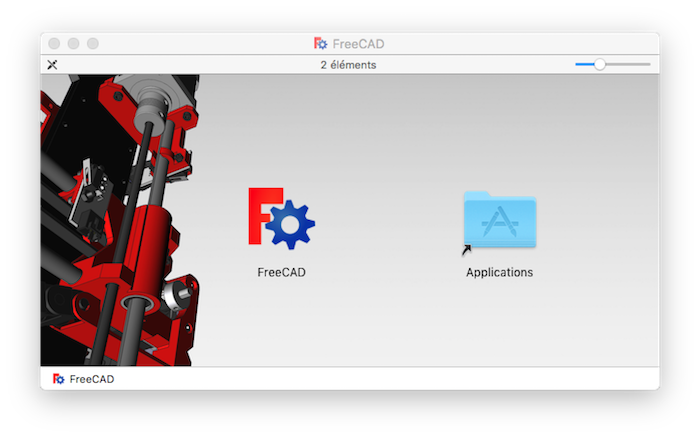
That's it.Just click on the app to launch FreeCAD. If you have this message "FreeCAD can't be open as it is from unidentified developer." Open the folder (Application) and right click on the app then click open and accept to open the application.

Uninstallation

There currently isn't an uninstaller for FreeCAD installed with dmg package. To completely remove FreeCAD and all installed components, drag the following files and folders to the Trash:

  • In the Applications directory:
    • /Applications/FreeCAD.app
  • In the Users Home Library directory
    • $HOME/Library/Application Support/FreeCAD
    • $HOME/Library/Preferences/FreeCAD
    • $HOME/Library/Preferences/com.freecad.FreeCAD.plist
    • $HOME/Library/Preferences/freecad.plist
    • $HOME/Library/Caches/FreeCAD

If you installed FreeCAD with homebrew, then use the brew uninstall freecad command to uninstall /Applications/FreeCAD.app. The related files and directories in the user home Library will still need to be removed manually.


Installing on Linux
Installing additional components
Index

此頁面取自 https://wiki.freecad.org/Installing_on_Mac

Get in touch!
Forum GitHub Mastodon Matrix IRC Gitter.im Discord Reddit Twitter Facebook LinkedIn

© The FreeCAD Team. Homepage image credits (top to bottom): ppemawm, r-frank, epileftric, regis, rider_mortagnais, bejant.

This project is supported by: , KiCad Services Corp. and other sponsors

GitHubImprove this page on GitHub