FreeCAD Logo FreeCAD 1.0
  • Engelska Afrikaans Arabiska Belarusian Katalanska Tjeckiska Tyska Grekiska Spanska Spanska Baskisk Finska Filippinska Franska Galiciska Kroatiska Ungerska Indonesiska Italienska Japanska Kabyliska Koreansk Litauiska Nederländska Norwegian Bokmal Polska Portugisiska Portugisiska Rumänska Ryska Slovakiska Slovenska Serbiska Svenska Turkiska Ukrainska Valencianska Vietnamesiska Kinesiska Kinesiska
  • Funktioner
  • Hämta
  • Blogg
  • Dokumentation
    Documentation index Kom igång Användardokumentation FreeCAD-manualen Dokumentation för arbetsytor Python coding documentation C++ coding documentation Övningar Frequently asked questions Privacy policy Om FreeCAD
  • Bidra
    Hur hjälper du till Sponsor Report a bug Make a pull request Jobs and funding Contribution guidelines Developers handbook Översättningar
  • Gemenskap
    Code of conduct Forum The FPA GitHub GitLab Codeberg Mastodon Matrix IRC IRC via Webchat Gitter Discord Reddit Twitter Facebook LinkedIn Calendar
  • ♥ Donate

Donate

$
SEPA Information
Ställ in din SEPA-banköverföring till:
Beneficiary: The FreeCAD project association
IBAN: BE04 0019 2896 4531
BIC/SWIFT: GEBABEBBXXX
Bankombud: BNP Paribas Fortis
Adress: Rue de la Station 64, 1360 Perwez, Belgium

While Stripe doesn't support monthly donations, you can still become a sponsor! Simply make a one-time donation equivalent to 12 months of support, and you'll gain access to the corresponding sponsoring tier. It's an easy and flexible way to contribute.

If you are not sure or not able to commit to a regular donation, but still want to help the project, you can do a one-time donation, of any amount.

Choose freely the amount you wish to donate one time only.

You can support FreeCAD by sponsoring it as an individual or organization through various platforms. Sponsorship provides a steady income for developers, allowing the FPA to plan ahead and enabling greater investment in FreeCAD. To encourage sponsorship, we offer different tiers, and unless you choose to remain anonymous, your name or company logo will be featured on our website accordingly.

from 1 USD / 1 EUR per month. You will not have your name displayed here, but you will have helped the project a lot anyway. Together, normal sponsors maintain the project on its feet as much as the bigger sponsors.

from 25 USD / 25 EUR per month. Your name or company name is displayed on this page.

from 100 USD / 100 EUR per month. Your name or company name is displayed on this page, with a link to your website, and a one-line description text.

from 200 USD / 200 EUR per month. Your name or company name and logo displayed on this page, with a link to your website and a custom description text. Companies that have helped FreeCAD early on also appear under Gold sponsors.

Instead of donating each month, you might find it more comfortable to make a one-time donation that, when divided by twelve, would give you right to enter a sponsoring tier. Don't hesitate to do so!

Choose freely the amount you wish to donate each month.

Please inform your forum name or twitter handle as a notein your transfer, or reach to us, so we can give you proper credits!

Installing on Linux
Installing additional components
Index

FreeCAD kan installeras på Mac OS X i ett steg genom att använda Installeraren. Denna sida beskriver användandet och funktionerna i FreeCAD installeraren. Den inkluderar också avinstallations instruktioner.

If you would like to download a development version, which may be unstable, see the weekly builds.

You can also use a package manager such as HomeBrew to keep your software updated. Instructions to install HomeBrew can be seen here. When HomeBrew installed you can simply install FreeCAD through your bash terminal with

brew install --cask freecad

and to use the latest version available on HomeBrew you may run

brew install freecad

If there are any issues with the HomeBrew Cask or Formula you may report them to here.

This page describes the usage and features of the FreeCAD installer. It also includes uninstallation instructions. Head to Getting started once installation is complete.

Enkel Installation

FreeCAD installeraren erbjuds som ett Installationspaket(.mpkg) bifogad i en diskavbildningsfil.

The FreeCAD installer is provided as a app package (.app) enclosed in a disk image file.

Du kan ladda ned den senaste installeraren från Nedladdningssidan. Efter att du laddat ned filen, montera diskavbildningen, kör sedan Install FreeCAD paketet.
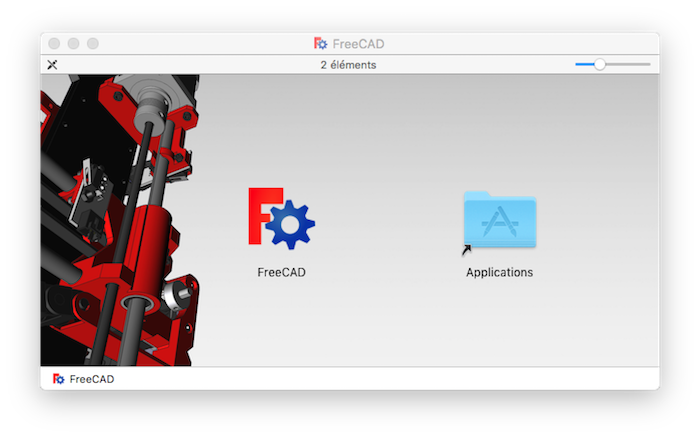
Installeraren kommer att presentera en Customize Installation skärm som listar de paket som kommer att installeras. Om du vet att du redan har något av dessa paket, så kan du välja bort dem genom att använda kryssrutorna. Om du inte är säker, lämna alla rutor markerade.

Avinstallation

Det finns för närvarande ingen avinstallerare för FreeCAD. För att helt ta bort FreeCAD och alla installerade komponenter, dra följande filer och mappar till papperskorgen:

  • I /Applications:
    • FreeCAD

Det är allt. Eventuellt så kommer FreeCAD att finnas tillgängligt som ett applikationspaket så att allt detta trubbel kommer att försvinna.


Install on Unix/sv
Getting started/sv
Index

Denna sida hämtas från https://wiki.freecad.org/Installing_on_Mac

Kontakta oss!
Forum GitHub Mastodon Matrix IRC Gitter.im Discord Reddit Twitter Facebook LinkedIn

© The FreeCAD Team. Homepage image credits (top to bottom): ppemawm, r-frank, epileftric, regis, rider_mortagnais, bejant.

This project is supported by: , KiCad Services Corp. och andra sponsorer

GitHubImprove this page on GitHub