FreeCAD Logo FreeCAD 1.0
  • Inglés Africano Árabe Bielorruso Catalán Checo Alemán Griego Español Español Euskera Finlandés Filipino Francés Gallego Croata Húngaro Indonesio Italiano Japonés Cabilio Coreano Lituano Neerlandés bokmal de Noruega Polaco Portugués Portugués Rumano Ruso Eslovaco Esloveno Serbio Sueco Turco Ucraniano Valenciano Vietnamita Chino Chino
  • Características
  • Descarga
  • Blog
  • Documentación
    Índice de documentación Primeros pasos Documentacion para el usuario El manual de FreeCAD Documentación de entornos de trabajo Documentación sobre FreeCAD + Python Documentación de codificación de C++ Tutoriales Preguntas frecuentes Política de privacidad Acerca de FreeCAD
  • Contribuir
    ¿Cómo puedo ayudar? Sponsor Informar de un error Hacer un pull request Trabajos y financiación Pautas de contribución Manual de desarrolladores Traducciones
  • Comunidad
    Código de conducta Foro The FPA GitHub GitLab Codeberg Mastodon Matrix IRC IRC via Webchat Gitter Discord Reddit Twitter Facebook LinkedIn Calendario
  • ♥ Donate

Donate

$
Información de SEPA
Configure su transferencia bancaria SEPA a:
Beneficiary: The FreeCAD project association
IBAN: BE04 0019 2896 4531
BIC/SWIFT: GEBABEBBXXX
Agencia bancaria: BNP Paribas Fortis
Dirección: Rue de la Station 64, 1360 Perwez, Belgium

While Stripe doesn't support monthly donations, you can still become a sponsor! Simply make a one-time donation equivalent to 12 months of support, and you'll gain access to the corresponding sponsoring tier. It's an easy and flexible way to contribute.

If you are not sure or not able to commit to a regular donation, but still want to help the project, you can do a one-time donation, of any amount.

Choose freely the amount you wish to donate one time only.

You can support FreeCAD by sponsoring it as an individual or organization through various platforms. Sponsorship provides a steady income for developers, allowing the FPA to plan ahead and enabling greater investment in FreeCAD. To encourage sponsorship, we offer different tiers, and unless you choose to remain anonymous, your name or company logo will be featured on our website accordingly.

from 1 USD / 1 EUR per month. You will not have your name displayed here, but you will have helped the project a lot anyway. Together, normal sponsors maintain the project on its feet as much as the bigger sponsors.

from 25 USD / 25 EUR per month. Your name or company name is displayed on this page.

from 100 USD / 100 EUR per month. Your name or company name is displayed on this page, with a link to your website, and a one-line description text.

from 200 USD / 200 EUR per month. Your name or company name and logo displayed on this page, with a link to your website and a custom description text. Companies that have helped FreeCAD early on also appear under Gold sponsors.

Instead of donating each month, you might find it more comfortable to make a one-time donation that, when divided by twelve, would give you right to enter a sponsoring tier. Don't hesitate to do so!

Choose freely the amount you wish to donate each month.

Please inform your forum name or twitter handle as a notein your transfer, or reach to us, so we can give you proper credits!

New Analysis
Fluid Material
FEM

FEM MaterialSolid

Menu location
Model → FEM material for solid
Workbenches
FEM
Default shortcut
M,M
Introduced in version
-
See also
FEM tutorial

Descripción

Agrega propiedades de material a una parte.
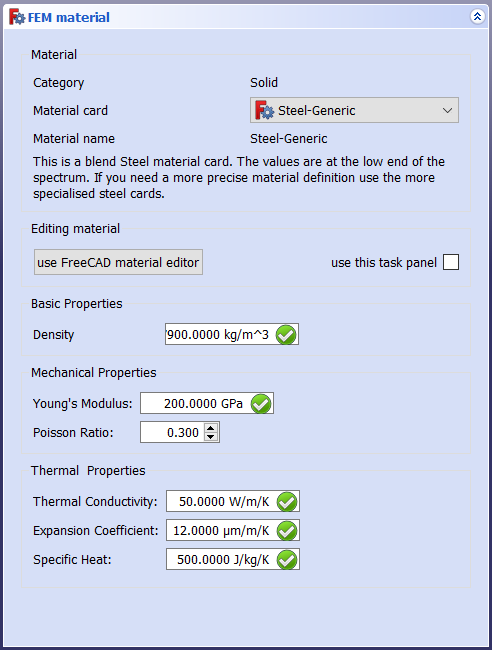
The FEM material task panel

Utilización

  • Haga clic en o seleccione Model → Material de FEM para sólidos desde el menú superior.
  • Haga doble clic en el objeto SolidMaterial creado

    • Seleccione un material. Para el análisis mecánico de ingeniería, CalculiX-Steel es una opción típica.
    • Siempre que esté aplicando material a todo el objeto, no seleccione ninguna entidad geométrica (deje la lista de referencias vacía). El material se aplicará a todo el modelo. De lo contrario, asigne material a partes del modelo en particular manualmente seleccionando algunas de ellas para cada material insertado, pero no deje ninguna parte del modelo sin el material asignado.
    • Puedes ajustar las propiedades del material, como la densidad, el módulo de Young, el Coeficiente de Poisson, etc., sin embargo, la mayoría de los materiales comunes ya están disponibles en los ajustes preestablecidos y no necesitan ningún ajuste.
    • Si realiza modificaciones, puede guardar su material personalizado.
  • Haga clic en Close para cerrar el cuadro de diálogo y crear SolidMaterial objeto

Notas

  1. El material mecánico utiliza la tarjeta * MATERIAL en CalculiX. Los detalles sobre el material mecánico se explican enhttp://web.mit.edu/calculix_v2.7/CalculiX/ccx_2.7/doc/ccx/node216.html


New Analysis
Fluid Material
FEM

Esta página ha sido recuperada de https://wiki.freecad.org/FEM_MaterialSolid

¡Contáctanos!
Forum GitHub Mastodon Matrix IRC Gitter.im Discord Reddit Twitter Facebook LinkedIn

© El equipo de FreeCAD. Créditos de imagen de la página principal (de arriba a abajo): ppemawm, r-frank, epileftric, regis, rider_mortagnais, bejant.

Este proyecto es apoyado por: , KiCad Services Corp. y otros patrocinadores

GitHubMejora esta página en GitHub